


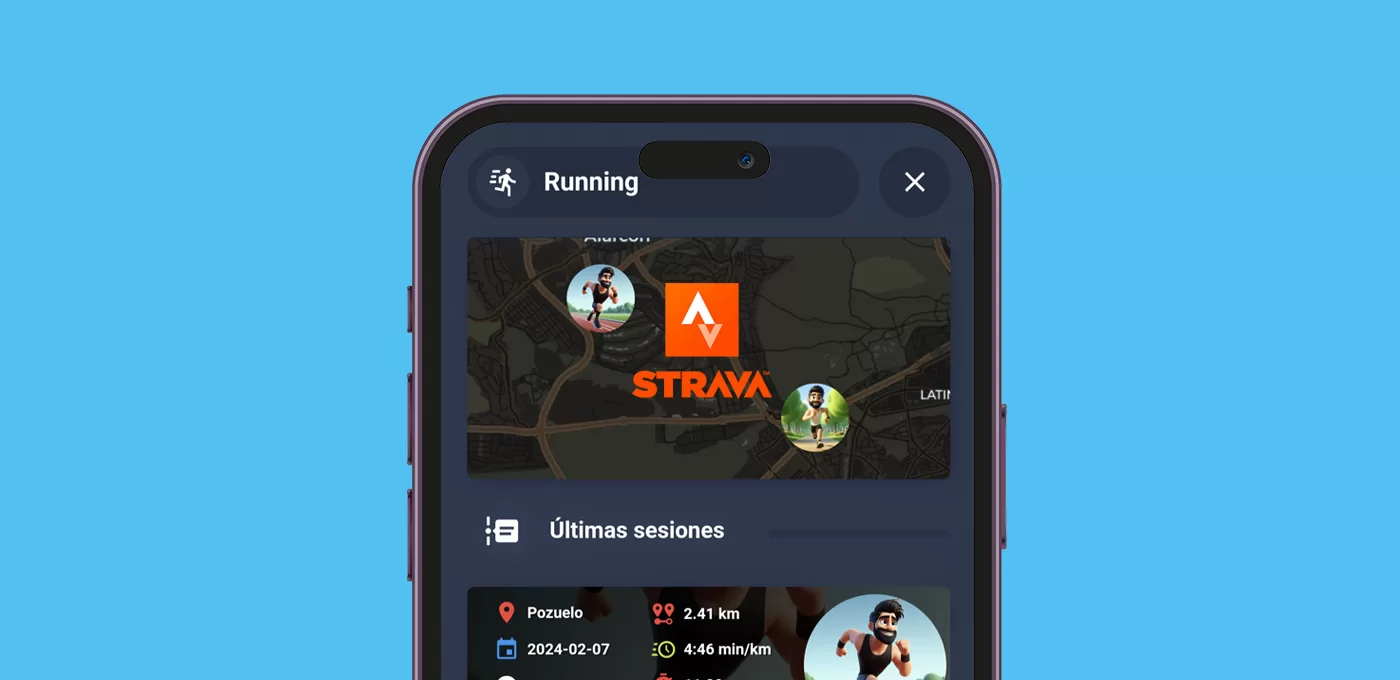
En esta entrada realizamos una tarjeta de sesiones Strava para consultar los detalles de nuestra actividad deportiva y seguir nuestra evolución.
Requisitos previos
Para poder crear la tarjeta de sesiones Strava previamente necesitas:
- Lógicamente, haber integrado Strava en Home Assistant.
- Instalar a través de HACS las tarjetas de Card Mod, Bubble Card, Stack in Card y Mushroom Cards.
Descripción de la tarjeta
Esta es una tarjeta muy sencilla de entender y construir. Si ya estás familiarizado con la integración de Strava, sabrás que para cada sesión deportiva registrada crea una serie de entidades con distintos valores. Compruébalo desde Herramientas para desarrolladores > Estados buscando «Strava».
Verás un montón de entidades con un nombre muy similar, del tipo ‘sensor.strava_x_y’. En estas entidades la ‘x’ identifica a la sesión deportiva (por ejemplo, haber salido a correr ayer). Por otro lado la ‘y’ indica un tipo de métrica en relación a la sesión ‘x’ (por ejemplo, el tiempo que has estado corriendo ayer).
Entendido esto, y teniendo en cuenta que con Strava puedes registrar una cantidad enorme de disciplinas deportivas, la utilidad de cada entidad dependerá de tu caso personal. Por tanto tendrás que revisar cuáles te interesan, pero de cualquier forma vas a tener un montón de información a tu disposición.
Además, en mi caso he metido la tarjeta en un popup que lanzo desde mi widget de actividad física. No obstante tú puedes incluirla donde quieras, y crear tarjetas para tantas sesiones como quieras (usando las entidades correspondientes ‘sensor.strava_0_y’, ‘sensor.strava_1_y’, …)
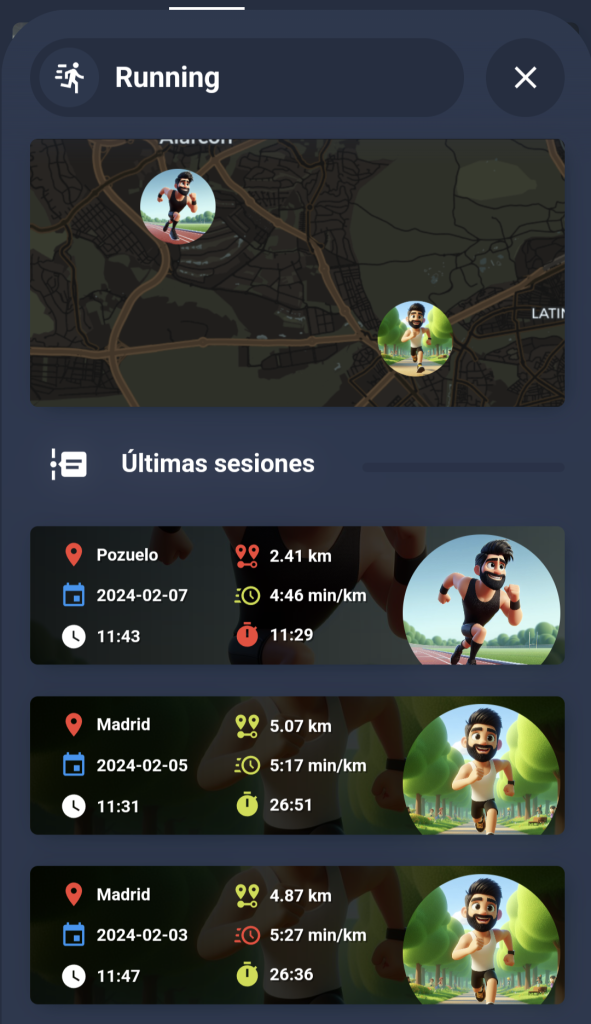
Mi tarjeta de sesiones Strava tiene las siguientes características:
- Primero muestra un mapa donde sitúa la localización de mis últimas sesiones.
- Después registra la información de las últimas 3 sesiones.
- Los iconos de la segunda columna de datos toman el color verde o rojo, en función de si he mejorado o no la marca de la sesión previa. Esto requiere que si, por ejemplo, quieres crear la tarjeta para las 3 últimas sesiones, debes configurar Strava para que te de al menos la información de las últimas 4 sesiones (el número de tarjetas, más una sesión adicional).
- Tanto el sensor de localización como la imagen de la tarjeta varía en función de si he entrenado en pista o en terreno abierto, y para ello utilizo la ubicación proporcionada por Strava (también puedes usar siempre la misma imagen o cambiarla en función del deporte registrado, por ejemplo).
Construcción de la tarjeta
Aunque la propia integración nos da toda la información que necesitamos para crear la tarjeta de una sesión Strava, vamos a crear un pequeño ‘device tracker’ por cada sesión a registrar para poder mostrar las coordenadas en un mapa. Para ello sólo tienes que incluir el siguiente código en tu fichero ‘sensors.yaml’. Recuerda adaptarlo al tipo de deporte que practicas y configurar como quieras la imagen de referencia.
- platform: template
  sensors:
    running_device_tracker_0:
      friendly_name: "Localización de la sesión (0)"
      value_template: "{{ state_attr('sensor.strava_0_0','location') }}"
      entity_picture_template: >
        {% set location = state_attr('sensor.strava_0_0','location') %}
        {% if "PISTA-ATLETISMO" in location %}local/person/tito/pista.jpg
        {% else %}local/person/tito/running.jpg
        {% endif %}
      attribute_templates:
        latitude: "{{ state_attr('sensor.strava_0_0','latitude') }}"
        longitude: "{{ state_attr('sensor.strava_0_0','longitude') }}"

- platform: template
  sensors:
    running_device_tracker_1:
      friendly_name: "Localización de la sesión (1)"
      value_template: "{{ state_attr('sensor.strava_1_0','location') }}"
      entity_picture_template: >
        {% set location = state_attr('sensor.strava_1_0','location') %}
        {% if "PISTA-ATLETISMO" in location %}local/person/tito/pista.jpg
        {% else %}local/person/tito/running.jpg
        {% endif %}
      attribute_templates:
        latitude: "{{ state_attr('sensor.strava_1_0','latitude') }}"
        longitude: "{{ state_attr('sensor.strava_1_0','longitude') }}"
Ya sólo queda crear una nueva tarjeta y pegar el código correspondiente. Ten en cuenta lo siguiente:
- El código corresponde a la tarjeta del pop-up que debe lanzarse desde otro elemento del panel de control con el ‘hash’ correspondiente (si no sabes de qué te estoy hablando revisa antes esta entrada).
- Adapta el nombre de las entidades a las que hayas creado, así como la ruta de las imágenes.
- Revisa la información disponible e incluye las entidades que más te interesen. También puedes modificar los iconos y los colores como más te guste.
type: vertical-stack
cards:
- type: custom:bubble-card
card_type: pop-up
hash: '#running_USUARIO'
name: Running
icon: mdi:run-fast
- type: map
entities:
- entity: sensor.running_device_tracker_0
- entity: sensor.running_device_tracker_1
- entity: sensor.running_device_tracker_2
default_zoom: 15
aspect_ratio: 50%
dark_mode: true
card_mod:
style:
ha-map $ ha-entity-marker $: |
.marker {
border: 0px!important;
}
ha-map$: |
.leaflet-control-attribution {
visibility: hidden;
}
.leaflet-control-zoom {
visibility: hidden;
}
ha-icon-button$: |
mwc-icon-button {
display:none !important
}
- type: custom:bubble-card
card_type: separator
icon: mdi:timeline-text
name: Últimas sesiones
card_mod:
style: |
ha-card {
margin-top: -5px;
margin-left: 4px;
}
- type: custom:stack-in-card
card_mod:
style: |
ha-card {
background: linear-gradient(to left, rgba(0,0,0,0.7), rgba(0,0,0,0.9)), url('/local/person/USUARIO/pista.jpg');
background-position: center;
background-size: cover;
}
cards:
- type: custom:mushroom-chips-card
card_mod:
style: |
ha-card {
margin-left: 10px;
--primary-text-color: white;
}
chips:
- type: template
tap_action:
action: none
icon: mdi:map-marker
content: '{{ states(''sensor.running_device_tracker_0'') }}'
card_mod:
style: |
ha-card {
background: transparent!important;
box-shadow: none!important;
border: 0px;
height: 30px;
text-shadow: 1px 1px #0005;
}
- type: custom:mushroom-chips-card
card_mod:
style: |
ha-card {
margin-left: 10px;
margin-top: -10px;
--primary-text-color: white;
}
chips:
- type: template
tap_action:
action: none
icon: mdi:calendar
content: |
{{ states('sensor.strava_0_0')[:10] }}
card_mod:
style: |
ha-card {
background: transparent!important;
box-shadow: none!important;
border: 0px;
height: 30px;
text-shadow: 1px 1px #0005;
}
- type: custom:mushroom-chips-card
card_mod:
style: |
ha-card {
margin-left: 10px;
margin-top: -10px;
--primary-text-color: white;
}
chips:
- type: template
tap_action:
action: none
icon: mdi:clock
content: |
{{ states('sensor.strava_0_0')[-8:][:5] }}
card_mod:
style: |
ha-card {
background: transparent!important;
box-shadow: none!important;
border: 0px;
height: 30px;
text-shadow: 1px 1px #0005;
}
- type: custom:mushroom-chips-card
card_mod:
style: |
ha-card {
margin-top: -87px;
margin-left: 120px;
--primary-text-color: white;
}
chips:
- type: entity
entity: sensor.strava_0_3
tap_action:
action: none
card_mod:
style: |
ha-card {
background: transparent!important;
box-shadow: none!important;
border: 0px;
height: 30px;
text-shadow: 1px 1px #0005;
}
- type: custom:mushroom-chips-card
card_mod:
style: |
ha-card {
margin-top: -62px;
margin-left: 120px;
--primary-text-color: white;
}
chips:
- type: entity
entity: sensor.strava_0_2
tap_action:
action: none
card_mod:
style: |
ha-card {
background: transparent!important;
box-shadow: none!important;
border: 0px;
height: 30px;
text-shadow: 1px 1px #0005;
}
- type: custom:mushroom-chips-card
card_mod:
style: |
ha-card {
margin-top: -37px;
margin-left: 120px;
--primary-text-color: white;
}
chips:
- type: entity
entity: sensor.strava_0_1
icon_color: >
{% if states('sensor.strava_0_1') > states('sensor.strava_1_1')
%}lime {% elif states('sensor.strava_0_1') <
states('sensor.strava_1_1') %}red {% endif %}
tap_action:
action: none
card_mod:
style: |
ha-card {
background: transparent!important;
box-shadow: none!important;
border: 0px;
height: 30px;
text-shadow: 1px 1px #0005;
}
- type: custom:mushroom-template-card
primary: ''
secondary: ''
icon: mdi:run-fast
icon_color: orange
picture: local/person/USUARIO/pista.jpg
tap_action:
action: none
card_mod:
style: |
ha-card {
border: 0px;
--icon-size: 100px;
margin-left: 225px;
margin-bottom: -35px;
margin-top: -95px;
}
- type: custom:stack-in-card
card_mod:
style: |
ha-card {
background: linear-gradient(to left, rgba(0,0,0,0.7), rgba(0,0,0,0.9)), url('/local/person/USUARIO/running.jpg');
background-position: center;
background-size: cover;
}
cards:
- type: custom:mushroom-chips-card
card_mod:
style: |
ha-card {
margin-left: 10px;
--primary-text-color: white;
}
chips:
- type: template
tap_action:
action: none
icon: mdi:map-marker
content: '{{ states(''sensor.running_device_tracker_1'') }}'
card_mod:
style: |
ha-card {
background: transparent!important;
box-shadow: none!important;
border: 0px;
height: 30px;
text-shadow: 1px 1px #0005;
}
- type: custom:mushroom-chips-card
card_mod:
style: |
ha-card {
margin-left: 10px;
margin-top: -10px;
--primary-text-color: white;
}
chips:
- type: template
tap_action:
action: none
icon: mdi:calendar
content: |
{{ states('sensor.strava_1_0')[:10] }}
card_mod:
style: |
ha-card {
background: transparent!important;
box-shadow: none!important;
border: 0px;
height: 30px;
text-shadow: 1px 1px #0005;
}
- type: custom:mushroom-chips-card
card_mod:
style: |
ha-card {
margin-left: 10px;
margin-top: -10px;
--primary-text-color: white;
}
chips:
- type: template
tap_action:
action: none
icon: mdi:clock
content: |
{{ states('sensor.strava_1_0')[-8:][:5] }}
card_mod:
style: |
ha-card {
background: transparent!important;
box-shadow: none!important;
border: 0px;
height: 30px;
text-shadow: 1px 1px #0005;
}
- type: custom:mushroom-chips-card
card_mod:
style: |
ha-card {
margin-top: -87px;
margin-left: 120px;
--primary-text-color: white;
}
chips:
- type: entity
entity: sensor.strava_1_3
tap_action:
action: none
card_mod:
style: |
ha-card {
background: transparent!important;
box-shadow: none!important;
border: 0px;
height: 30px;
text-shadow: 1px 1px #0005;
}
- type: custom:mushroom-chips-card
card_mod:
style: |
ha-card {
margin-top: -62px;
margin-left: 120px;
--primary-text-color: white;
}
chips:
- type: entity
entity: sensor.strava_1_2
tap_action:
action: none
card_mod:
style: |
ha-card {
background: transparent!important;
box-shadow: none!important;
border: 0px;
height: 30px;
text-shadow: 1px 1px #0005;
}
- type: custom:mushroom-chips-card
card_mod:
style: |
ha-card {
margin-top: -37px;
margin-left: 120px;
--primary-text-color: white;
}
chips:
- type: entity
entity: sensor.strava_1_1
tap_action:
action: none
card_mod:
style: |
ha-card {
background: transparent!important;
box-shadow: none!important;
border: 0px;
height: 30px;
text-shadow: 1px 1px #0005;
}
- type: custom:mushroom-template-card
primary: ''
secondary: ''
icon: mdi:run-fast
icon_color: orange
picture: local/person/USUARIO/running.jpg
tap_action:
action: none
card_mod:
style: |
ha-card {
border: 0px;
--icon-size: 100px;
margin-left: 225px;
margin-bottom: -35px;
margin-top: -95px;
}
- type: custom:stack-in-card
card_mod:
style: |
ha-card {
background: linear-gradient(to left, rgba(0,0,0,0.7), rgba(0,0,0,0.9)), url('/local/person/USUARIO/running.jpg');
background-position: center;
background-size: cover;
}
cards:
- type: custom:mushroom-chips-card
card_mod:
style: |
ha-card {
margin-left: 10px;
--primary-text-color: white;
}
chips:
- type: template
tap_action:
action: none
icon: mdi:map-marker
content: '{{ states(''sensor.running_device_tracker_2'') }}'
card_mod:
style: |
ha-card {
background: transparent!important;
box-shadow: none!important;
border: 0px;
height: 30px;
text-shadow: 1px 1px #0005;
}
- type: custom:mushroom-chips-card
card_mod:
style: |
ha-card {
margin-left: 10px;
margin-top: -10px;
--primary-text-color: white;
}
chips:
- type: template
tap_action:
action: none
icon: mdi:calendar
content: |
{{ states('sensor.strava_2_0')[:10] }}
card_mod:
style: |
ha-card {
background: transparent!important;
box-shadow: none!important;
border: 0px;
height: 30px;
text-shadow: 1px 1px #0005;
}
- type: custom:mushroom-chips-card
card_mod:
style: |
ha-card {
margin-left: 10px;
margin-top: -10px;
--primary-text-color: white;
}
chips:
- type: template
tap_action:
action: none
icon: mdi:clock
content: |
{{ states('sensor.strava_2_0')[-8:][:5] }}
card_mod:
style: |
ha-card {
background: transparent!important;
box-shadow: none!important;
border: 0px;
height: 30px;
text-shadow: 1px 1px #0005;
}
- type: custom:mushroom-chips-card
card_mod:
style: |
ha-card {
margin-top: -87px;
margin-left: 120px;
--primary-text-color: white;
}
chips:
- type: entity
entity: sensor.strava_2_3
tap_action:
action: none
card_mod:
style: |
ha-card {
background: transparent!important;
box-shadow: none!important;
border: 0px;
height: 30px;
text-shadow: 1px 1px #0005;
}
- type: custom:mushroom-chips-card
card_mod:
style: |
ha-card {
margin-top: -62px;
margin-left: 120px;
--primary-text-color: white;
}
chips:
- type: entity
entity: sensor.strava_2_2
tap_action:
action: none
card_mod:
style: |
ha-card {
background: transparent!important;
box-shadow: none!important;
border: 0px;
height: 30px;
text-shadow: 1px 1px #0005;
}
- type: custom:mushroom-chips-card
card_mod:
style: |
ha-card {
margin-top: -37px;
margin-left: 120px;
--primary-text-color: white;
}
chips:
- type: entity
entity: sensor.strava_2_1
tap_action:
action: none
card_mod:
style: |
ha-card {
background: transparent!important;
box-shadow: none!important;
border: 0px;
height: 30px;
text-shadow: 1px 1px #0005;
}
- type: custom:mushroom-template-card
primary: ''
secondary: ''
icon: mdi:run-fast
icon_color: orange
picture: local/person/USUARIO/running.jpg
tap_action:
action: none
card_mod:
style: |
ha-card {
border: 0px;
--icon-size: 100px;
margin-left: 225px;
margin-bottom: -35px;
margin-top: -95px;
}