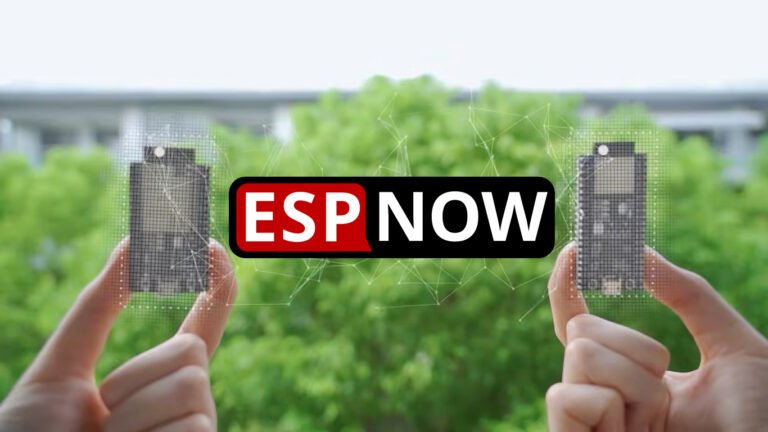



Hoy te enseño a integrar Lilygo T-Display S3 Long en HA, un dispositivo con el que he dado vida al «Habbit Desk».
Índice
T-Display S3 Long y el Habbit Desk
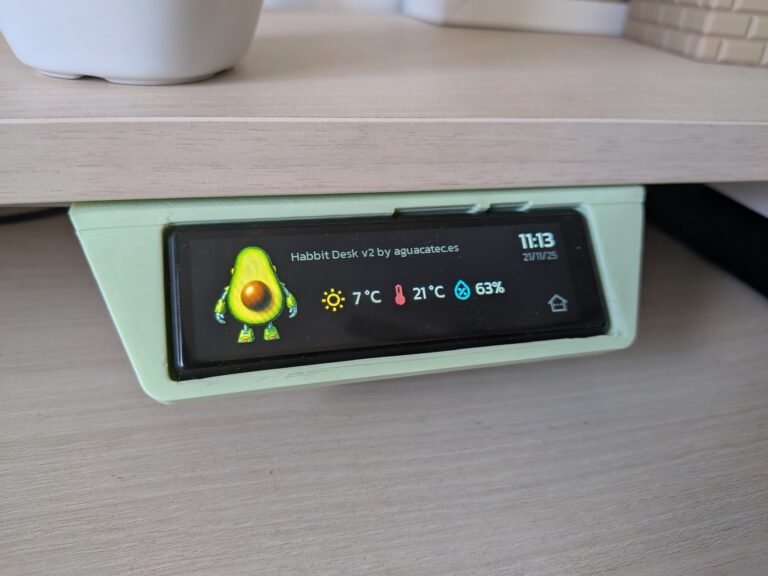
Puesto que hace tiempo ya te presenté este dispositivo, no voy a volver a hablarte de sus características técnicas. Lo que si quiero hacer es recordarte que con este dispositivo di vida a uno de mis dispositivos favoritos, el «Habbit Desk».
Este controlador está inspirado en las pantallas que suelen incorporar los escritorios elevables para regular su altura. La diferencia es que el nuestro hace mucho más (todo lo que quieras!) y queda perfecto con el soporte que diseñamos.
No obstante, ya sabéis que ESPHome está en evolución constante, por lo que nuestro código quedó obsoleto con el tiempo. Esta es, por tanto, una oportunidad fantástica para crear una versión actualizada aplicando todo lo que hemos aprendido desde entonces.
- Código totalmente funcional a fecha de hoy sin necesidad de componentes externos, gracias a que el amigo kim-rass compartió su código con nosotros en la comunidad de Home Assistant!
- Interfaz gráfica avanzada, programada con LVGL. Esto aporta mucha más precisión a la hora de navegar por la pantalla, y controlar el apagado automático por inactividad.
Requisitos previos
Para integrar Lilygo T-Display S3 Long en HA y montar el Habbit Desk necesitas:
- Haber instalado ESPHome en Home Assistant y tener conocimientos mínimos sobre cómo funciona.
- El Lilygo T-Display S3 Long. Ojo, lo venden con y sin carcasa exterior, aunque no hay mucha diferencia en el precio (yo tengo el modelo con carcasa, y es el que he utilizado para crear el soporte de escritorio).
- Un cable USB-C para alimentar la placa de DATOS (con un cable de carga no vas a poder instalar el software).
- Nuestro soporte de escritorio.


Configuración de ESPHome
Para integrar Lilygo T-Display S3 Long en HA y flashearlo con el código del Habbit Desk sigue estos pasos:
- Conecta la pantalla a tu ordenador a través del puerto USB-C.
- En Home Assistant, accede al complemento de ESPHome desde el menú lateral y pulsa en “New device”. Pulsa en “Continue” y dale un nombre (por ejemplo, “Habbit Desk”).
- Pulsa en «Next» y a continuación selecciona la opción «ESP32-S3» como tipo de dispositivo. Verás que en el fondo se ha creado un nuevo dispositivo.
- Pulsa en «Skip» y haz clic en el enlace «Edit» del bloque correspondiente al dispositivo que acabas de crear. Copia este código y consérvalo, ya que utilizaremos algún fragmento.
- Reemplázalo por este código, haciendo las siguientes adaptaciones:
- Ajusta el ‘name’ y ‘friendly-name’ como el nombre que le quieras dar a tu asistente.
- Añade la información que te había generado el complemento en el apartado ‘api’ (‘encryption key’). Haz lo mismo para el campo ‘password’ bajo el apartado ‘ota’, y para los campos ‘ssid’ y ‘password’ bajo el apartado ‘wifi’ y ‘ap’.
- De momento es suficiente, ya que prefiero que empieces a personalizarlo tras explicarte cómo funciona.
substitutions:
# Device customization
# Personalización del dispositivo
name: habbit_desk
friendly_name: Habbit Desk
logo: https://aguacatec.es/wp-content/uploads/2025/11/habbit_aguacatec-1.png
background_color: 0x000000
text_color: 0xFFFFFF
text_color_secondary: 0x626262
iddle_time: 10s
greeting: "Habbit Desk v2 by aguacatec.es"
# Entities
# Entidades
weather_temperature: sensor.openweathermap_temperature
home_temperature: sensor.home_temperatura
home_humidity: sensor.home_humedad
climate: climate.salon
cover: cover.estudio
dehumidifier: humidifier.deshumidificador
fan_ceiling: fan.ventilador_estudio
light_ceiling: light.ventilador_estudio
light_desk: light.tira_led_escritorio
printer_3d: switch.impresora_3d
printer_3d_octoprint_status: switch.orange_pi
printer_3d_octoprint_operation: sensor.octoprint_current_state
printer_3d_octoprint_progress: sensor.octoprint_job_percentage
printer_3d_pause_button: button.octoprint_pause_job
printer_3d_stop_button: button.octoprint_stop_job
printer_3d_spotlight: switch.foco_impresora_3d
vacuum: vacuum.roborock_qr_598
# Other settings
# Otros ajustes
allowed_characters: " ¿?¡!#%'()+,-./:µ³°0123456789ABCDEFGHIJKLMNOPQRSTUVWYZabcdefghijklmnopqrstuvwxyzáéíóú"
################################################################################################################
esphome:
name: ${name}
friendly_name: ${friendly_name}
psram:
mode: octal
esp32:
board: esp32-s3-devkitc-1
flash_size: 16MB
framework:
type: esp-idf
# Enable logging
logger:
# Enable Home Assistant API
api:
encryption:
key: "asdfdssdKGHsh3Ovw+sWMTg213df23rr"
ota:
- platform: esphome
password: "dsffsda233282bf5dsf23"
wifi:
ssid: !secret wifi_ssid
password: !secret wifi_password
# Enable fallback hotspot (captive portal) in case wifi connection fails
ap:
ssid: "Habbit-Desk-V2 Fallback Hotspot"
password: "2ddsfd0123"
captive_portal:
font:
- file: "gfonts://Kanit"
id: font_clock
size: 40
glyphs: ${allowed_characters}
- file: "gfonts://Kanit"
id: font_date
size: 20
glyphs: ${allowed_characters}
- file: "gfonts://Kanit"
id: font_greeting
size: 20
glyphs: ${allowed_characters}
- file: "gfonts://Material+Symbols+Outlined"
id: font_home_icons
size: 40
glyphs: [
"\U0000e430", # sun
"\U0000e1ff", # thermometer
"\U0000f87e", # water-percent
"\U0000e58c", # house-dots
"\U0000e879", # exit
"\U0000e548", # more
"\U0000ec12", # roller-shade
"\U0000ec11", # roller-shade-close
"\U0000e145", # plus
"\U0000f88a", # minus
" ",
]
- file: "gfonts://Kanit"
id: font_home_info
size: 28
glyphs: ${allowed_characters}
- file: "gfonts://Material+Symbols+Outlined"
id: font_device_icons
size: 100
glyphs: [
"\U0000f02a", # ceiling-light
"\U0000f168", # fan
"\U0000ec12", # roller-shade
"\U0000ec11", # roller-shade-close
"\U0000ed38", # 3d
"\U0000ef55", # fire
"\U0000efc5", # vacuum
"\U0000f7ed", # led-strip
"\U0000e97e", # dehumidifier
"\U0000e1c4", # play
"\U0000e1a2", # pause
"\U0000eaaa", # base
"\U0000eee1", # locate
"\U0000f418", # power
"\U0000ef71", # stop
"\U0000ebfe", # spotlight
" ",
]
- file: "gfonts://Kanit"
id: font_slider_value
size: 100
glyphs: ${allowed_characters}
- file: "gfonts://Kanit"
id: font_device_status
size: 20
glyphs: ${allowed_characters}
i2c:
sda: 15
scl: 10
id: touchscreen_bus
image:
- file: ${logo}
id: logo
resize: 180x180
type: RGB565
transparency: alpha_channel
- file: mdi:robot-vacuum
id: icon_vacuum
resize: 100x100
type: BINARY
transparency: chroma_key
- file: mdi:printer-3d-nozzle
id: icon_3dprinter
resize: 100x100
type: BINARY
transparency: chroma_key
- file: mdi:led-strip-variant
id: icon_ledstrip
resize: 100x100
type: BINARY
transparency: chroma_key
interval:
- interval: 60s
then:
- lvgl.label.update:
id: lbl_date
text: !lambda 'return id(esptime).now().strftime("%d/%m/%y");'
- lvgl.label.update:
id: lbl_clock
text: !lambda 'return id(esptime).now().strftime("%H:%M");'
light:
- platform: monochromatic
output: backlight_pwm
id: backlight
name: "Display"
icon: mdi:tablet
restore_mode: ALWAYS_ON
output:
- platform: ledc
pin: GPIO1
id: backlight_pwm
sensor:
# Home Assistant sensors
# Sensores de Home Assistant
- platform: homeassistant
id: home_icon_weather_temperature
entity_id: ${weather_temperature}
internal: true
on_value:
then:
- lvgl.label.update:
id: lbl_weather_temperature
text:
format: "%.0f °C"
args:
- id(home_icon_weather_temperature).state
- platform: homeassistant
id: home_icon_home_temperature
entity_id: ${home_temperature}
internal: true
on_value:
then:
- lvgl.label.update:
id: lbl_home_temperature
text:
format: "%.0f °C"
args:
- id(home_icon_home_temperature).state
- platform: homeassistant
id: home_icon_home_humidity
entity_id: ${home_humidity}
internal: true
on_value:
then:
- lvgl.label.update:
id: lbl_home_humidity
text:
format: "%.0f%%"
args:
- id(home_icon_home_humidity).state
- platform: homeassistant
id: cover_position_value
entity_id: ${cover}
attribute: current_position
internal: true
filters:
- lambda: |-
if (isnan(x)) { return 0; }
else { return x; }
on_value:
then:
- lvgl.slider.update:
id: slider_cover
value: !lambda 'return (int)x;'
- lambda: |-
int position = (int) id(cover_position_value).state;
char buf[8];
snprintf(buf, sizeof(buf), "%d %%", position);
// Actualizar texto del label LVGL
lv_label_set_text(id(slider_cover_value), buf);
- platform: homeassistant
id: printer_3d_octoprint_progress_value
entity_id: ${printer_3d_octoprint_progress}
internal: true
filters:
- lambda: |-
if (isnan(x)) { return 0; }
else { return x; }
on_value:
then:
- if:
condition:
lambda: 'return id(device_printer_3d_octoprint_operation).state == "Printing";'
then:
- lvgl.label.update:
id: lbl_device_printer_3d_octoprint_progress
text:
format: "Impresión al %.0f %%"
args:
- id(printer_3d_octoprint_progress_value).state
spi:
- id: display_qspi
type: quad
clk_pin: 17
data_pins:
- 13
- 18
- 21
- 14
text_sensor:
- platform: homeassistant
id: device_light_ceiling
entity_id: ${light_ceiling}
internal: true
on_value:
then:
- lvgl.label.update:
id: lbl_device_light_ceiling
text_color: !lambda |-
if (x == "on") {
return lv_color_hex(0xe6d754);
} else {
return lv_color_hex(0x626262);
}
- platform: homeassistant
id: device_fan_ceiling
entity_id: ${fan_ceiling}
internal: true
on_value:
then:
- lvgl.label.update:
id: lbl_device_fan_ceiling
text_color: !lambda |-
if (x == "on") {
return lv_color_hex(0x54c9e6);
} else {
return lv_color_hex(0x626262);
}
- platform: homeassistant
id: device_cover
entity_id: ${cover}
internal: true
on_value:
then:
- lvgl.label.update:
id: lbl_device_cover
text: !lambda |-
if (x == "open") {
return "\U0000ec12";
} else {
return "\U0000ec11";
}
text_color: !lambda |-
if (x == "open") {
return lv_color_hex(0xffffff);
} else {
return lv_color_hex(0x626262);
}
- platform: homeassistant
id: device_printer_3d
entity_id: ${printer_3d}
internal: true
on_value:
then:
- lvgl.image.update:
id: lbl_device_printer_3d
image_recolor: !lambda |-
if (x == "on") {
return lv_color_hex(0xe65476);
} else {
return lv_color_hex(0x626262);
}
- lvgl.label.update:
id: lbl_device_printer_3d_state
text_color: !lambda |-
if (x == "on") {
return lv_color_hex(0xe65476);
} else {
return lv_color_hex(0x626262);
}
- lvgl.label.update:
id: lbl_device_printer_3d_octoprint_progress
text: !lambda |-
if (x == "off") {
return " ";
}
- lvgl.widget.redraw:
- platform: homeassistant
id: device_printer_3d_spotlight
entity_id: ${printer_3d_spotlight}
internal: true
on_value:
then:
- lvgl.label.update:
id: lbl_device_printer_3d_spotlight
text_color: !lambda |-
if (x == "on") {
return lv_color_hex(0xe6d754);
} else {
return lv_color_hex(0x626262);
}
- platform: homeassistant
id: device_printer_3d_octoprint
entity_id: ${printer_3d_octoprint_status}
internal: true
on_value:
then:
- lvgl.label.update:
id: lbl_device_printer_3d_octoprint_status
text: !lambda |-
if (x == "on") {
return "Octoprint (Online)";
} else {
return "Octoprint (Offline)";
}
text_color: !lambda |-
if (x == "on") {
return lv_color_hex(0x9def0d);
} else {
return lv_color_hex(0x626262);
}
- lvgl.label.update:
id: lbl_device_printer_3d_octoprint_progress
text: !lambda |-
if (x == "off") {
return " ";
}
- platform: homeassistant
id: device_printer_3d_octoprint_operation
entity_id: ${printer_3d_octoprint_operation}
internal: true
- platform: homeassistant
id: device_climate
entity_id: ${climate}
internal: true
on_value:
then:
- lvgl.label.update:
id: lbl_device_climate
text_color: !lambda |-
if (x == "heat") {
return lv_color_hex(0xffae00);
} else {
return lv_color_hex(0x626262);
}
- platform: homeassistant
id: device_vacuum
entity_id: ${vacuum}
internal: true
on_value:
then:
- lvgl.image.update:
id: lbl_device_vacuum
image_recolor: !lambda |-
if (x == "docked") {
return lv_color_hex(0x626262);
} else {
return lv_color_hex(0xffffff);
}
- platform: homeassistant
id: device_light_desk
entity_id: ${light_desk}
internal: true
on_value:
then:
- lvgl.image.update:
id: lbl_device_light_desk
image_recolor: !lambda |-
if (x == "on") {
return lv_color_hex(0xe6d754);
} else {
return lv_color_hex(0x626262);
}
- platform: homeassistant
id: device_dehumidifier
entity_id: ${dehumidifier}
internal: true
on_value:
then:
- lvgl.label.update:
id: lbl_device_dehumidifier
text_color: !lambda |-
if (x == "on") {
return lv_color_hex(0xe6d754);
} else {
return lv_color_hex(0x626262);
}
time:
- platform: homeassistant
id: esptime
touchscreen:
- platform: axs15231
id: main_touch
display: main_display
i2c_id: touchscreen_bus
transform:
mirror_x: true
mirror_y: true
swap_xy: false
calibration:
x_min: 0
x_max: 640
y_min: 0
y_max: 180
on_touch:
- logger.log:
format: Touch at (%d, %d)
args: [touch.x, touch.y]
on_release:
then:
- if:
condition: lvgl.is_paused
then:
- lvgl.page.show: page_home
- light.turn_on: backlight
- lvgl.resume:
- lvgl.widget.redraw:
display:
- platform: mipi_spi
id: main_display
spi_id: display_qspi
model: AXS15231
dimensions:
height: 640
width: 180
cs_pin: 12
reset_pin: 16
rotation: 90
auto_clear_enabled: false
lvgl:
displays:
- main_display
touchscreens:
- main_touch
buffer_size: 100%
on_idle:
- timeout: ${iddle_time}
then:
- lvgl.pause:
- light.turn_off:
id: backlight
style_definitions:
- id: button_menu
width: 60
height: 60
pad_all: 0
bg_color: 0x000000
border_color: 0x000000
align: BOTTOM_RIGHT
- id: button_more
width: 60
height: 60
pad_all: 0
bg_color: 0x000000
border_color: 0x000000
align: TOP_RIGHT
- id: button_device_1
width: 130
height: 130
pad_all: 0
translate_x: 30
bg_color: 0x000000
border_color: 0x000000
align: LEFT_MID
- id: button_device_2
width: 130
height: 130
pad_all: 0
translate_x: 160
bg_color: 0x000000
border_color: 0x000000
align: LEFT_MID
- id: button_device_3
width: 130
height: 130
pad_all: 0
translate_x: 290
bg_color: 0x000000
border_color: 0x000000
align: LEFT_MID
- id: button_device_4
width: 130
height: 130
pad_all: 0
translate_x: 420
bg_color: 0x000000
border_color: 0x000000
align: LEFT_MID
- id: slider_front_cover
width: 530
height: 160
translate_x: -25
bg_color: 0x9c9c79
radius: 10
align: CENTER
- id: slider_back_cover
width: 530
height: 160
translate_x: -25
bg_color: 0xb4b4a9
radius: 10
align: CENTER
- id: slider_label_values_cover
align: CENTER
translate_x: -10
text_font: font_slider_value
text_color: 0xffffff
- id: device_status_top
align: TOP_LEFT
pad_left: 20
text_font: font_device_status
text_color: ${text_color_secondary}
- id: device_status_bottom
align: BOTTOM_LEFT
pad_left: 20
text_font: font_device_status
text_color: 0xffffff
pages:
- id: page_home
bg_color: ${background_color}
widgets:
- image:
align: LEFT_MID
src: logo
- label:
align: TOP_LEFT
id: lbl_greeting
text: "${greeting}"
text_color: ${text_color_secondary}
text_font: font_greeting
pad_top: 20
pad_left: 150
- label:
align: TOP_RIGHT
id: lbl_clock
text: "00:00"
text_color: ${text_color}
text_font: font_clock
pad_right: 20
- label:
align: TOP_RIGHT
id: lbl_date
text: "00/00/00"
text_color: ${text_color_secondary}
text_font: font_date
pad_top: 45
pad_right: 20
- label:
align: CENTER
text_font: font_home_icons
text_color: 0xe6d754
text: "\U0000e430"
pad_top: 40
pad_right: 220
- label:
id: lbl_weather_temperature
align: CENTER
text_font: font_home_info
text_color: ${text_color}
text: "20 °C"
pad_top: 40
pad_right: 110
- label:
align: CENTER
text_font: font_home_icons
text_color: 0xe65476
text: "\U0000e1ff"
pad_top: 40
- label:
id: lbl_home_temperature
align: CENTER
text_font: font_home_info
text_color: ${text_color}
text: "20 °C"
pad_top: 40
pad_left: 100
- label:
align: CENTER
text_font: font_home_icons
text_color: 0x54c9e6
text: "\U0000f87e"
pad_top: 40
pad_left: 220
- label:
id: lbl_home_humidity
align: CENTER
text_font: font_home_info
text_color: ${text_color}
text: "50%"
pad_top: 40
pad_left: 320
- obj:
styles: button_menu
on_press:
then:
lvgl.page.show: page_devices
widgets:
- label:
text_font: font_home_icons
text_color: ${text_color_secondary}
text: "\U0000e58c"
- id: page_devices
bg_color: ${background_color}
widgets:
- obj:
styles: button_device_1
widgets:
- label:
id: lbl_device_light_ceiling
text_font: font_device_icons
text_color: ${text_color_secondary}
text: "\U0000f02a"
on_press:
then:
- homeassistant.action:
service: light.toggle
data:
entity_id: ${light_ceiling}
- obj:
styles: button_device_2
widgets:
- label:
id: lbl_device_cover
text_font: font_device_icons
text_color: ${text_color_secondary}
text: "\U0000ec12"
on_press:
then:
lvgl.page.show: page_cover
- obj:
styles: button_device_3
widgets:
- label:
id: lbl_device_climate
text_font: font_device_icons
text_color: ${text_color_secondary}
text: "\U0000ef55"
on_press:
then:
- homeassistant.action:
service: climate.toggle
data:
entity_id: ${climate}
- obj:
styles: button_device_4
widgets:
- image:
id: lbl_device_vacuum
src: icon_vacuum
image_recolor: ${text_color_secondary}
image_recolor_opa: COVER
pad_top: 12
on_press:
then:
lvgl.page.show: page_vacuum
- obj:
styles: button_more
on_press:
then:
lvgl.page.show: page_devices_2
widgets:
- label:
text_font: font_home_icons
text_color: ${text_color_secondary}
text: "\U0000e548"
- obj:
styles: button_menu
on_press:
then:
lvgl.page.show: page_home
widgets:
- label:
text_font: font_home_icons
text_color: ${text_color_secondary}
text: "\U0000e879"
- id: page_devices_2
bg_color: ${background_color}
widgets:
- obj:
styles: button_device_1
widgets:
- image:
id: lbl_device_printer_3d
src: icon_3dprinter
image_recolor: ${text_color_secondary}
image_recolor_opa: COVER
pad_top: 12
on_press:
then:
lvgl.page.show: page_3dprinter
- obj:
styles: button_device_2
widgets:
- label:
id: lbl_device_fan_ceiling
text_font: font_device_icons
text_color: ${text_color_secondary}
text: "\U0000f168"
on_press:
then:
- homeassistant.action:
service: fan.toggle
data:
entity_id: ${fan_ceiling}
- obj:
styles: button_device_3
widgets:
- image:
id: lbl_device_light_desk
src: icon_ledstrip
image_recolor: ${text_color_secondary}
image_recolor_opa: COVER
pad_top: 12
on_press:
then:
- homeassistant.action:
service: light.toggle
data:
entity_id: ${light_desk}
- obj:
styles: button_device_4
widgets:
- label:
id: lbl_device_dehumidifier
text_font: font_device_icons
text_color: ${text_color_secondary}
text: "\U0000e97e"
on_press:
then:
- homeassistant.action:
service: humidifier.toggle
data:
entity_id: ${dehumidifier}
- obj:
styles: button_more
on_press:
then:
lvgl.page.show: page_devices
widgets:
- label:
text_font: font_home_icons
text_color: ${text_color_secondary}
text: "\U0000e548"
- obj:
styles: button_menu
on_press:
then:
lvgl.page.show: page_home
widgets:
- label:
text_font: font_home_icons
text_color: ${text_color_secondary}
text: "\U0000e879"
- id: page_cover
bg_color: ${background_color}
widgets:
- slider:
styles: slider_back_cover
id: slider_cover
indicator:
styles: slider_front_cover
knob:
opa: 0
min_value: 0
max_value: 100
on_release:
- homeassistant.action:
action: cover.set_cover_position
data:
entity_id: ${cover}
position: !lambda return int(x);
- label:
styles: slider_label_values_cover
id: slider_cover_value
text: "0 %"
- label:
text_font: font_home_icons
text_color: 0xFFFFFF
text: "\U0000ec11"
align: LEFT_MID
pad_left: 50
- label:
text_font: font_home_icons
text_color: 0xFFFFFF
text: "\U0000ec12"
align: RIGHT_MID
pad_right: 110
- obj:
styles: button_more
on_press:
then:
lvgl.page.show: page_devices
widgets:
- label:
text_font: font_home_icons
text_color: ${text_color_secondary}
text: "\U0000e548"
- obj:
styles: button_menu
on_press:
then:
lvgl.page.show: page_home
widgets:
- label:
text_font: font_home_icons
text_color: ${text_color_secondary}
text: "\U0000e879"
- id: page_vacuum
bg_color: ${background_color}
widgets:
- obj:
styles: button_device_1
widgets:
- label:
text_font: font_device_icons
text_color: ${text_color_secondary}
text: "\U0000e1c4" # play
on_press:
then:
- homeassistant.action:
service: vacuum.start
data:
entity_id: ${vacuum}
- obj:
styles: button_device_2
widgets:
- label:
text_font: font_device_icons
text_color: ${text_color_secondary}
text: "\U0000e1a2" # pause
on_press:
then:
- homeassistant.action:
service: vacuum.pause
data:
entity_id: ${vacuum}
- obj:
styles: button_device_3
widgets:
- label:
text_font: font_device_icons
text_color: ${text_color_secondary}
text: "\U0000eaaa" # base
on_press:
then:
- homeassistant.action:
service: vacuum.return_to_base
data:
entity_id: ${vacuum}
- obj:
styles: button_device_4
widgets:
- label:
text_font: font_device_icons
text_color: ${text_color_secondary}
text: "\U0000eee1" # locate
on_press:
then:
- homeassistant.action:
service: vacuum.locate
data:
entity_id: ${vacuum}
- obj:
styles: button_more
on_press:
then:
lvgl.page.show: page_devices
widgets:
- label:
text_font: font_home_icons
text_color: ${text_color_secondary}
text: "\U0000e548"
- obj:
styles: button_menu
on_press:
then:
lvgl.page.show: page_home
widgets:
- label:
text_font: font_home_icons
text_color: ${text_color_secondary}
text: "\U0000e879"
- id: page_3dprinter
bg_color: ${background_color}
widgets:
- obj:
styles: button_device_1
widgets:
- label:
id: lbl_device_printer_3d_state
text_font: font_device_icons
text_color: ${text_color_secondary}
text: "\U0000f418" # power
on_press:
then:
- homeassistant.action:
service: switch.toggle
data:
entity_id: ${printer_3d}
- obj:
styles: button_device_2
widgets:
- label:
text_font: font_device_icons
text_color: ${text_color_secondary}
text: "\U0000e1a2" # pause
on_press:
then:
- homeassistant.action:
action: button.press
data:
entity_id: ${printer_3d_pause_button}
- obj:
styles: button_device_3
widgets:
- label:
text_font: font_device_icons
text_color: ${text_color_secondary}
text: "\U0000ef71" # stop
on_press:
then:
- homeassistant.action:
action: button.press
data:
entity_id: ${printer_3d_stop_button}
- obj:
styles: button_device_4
widgets:
- label:
id: lbl_device_printer_3d_spotlight
text_font: font_device_icons
text_color: ${text_color_secondary}
text: "\U0000ebfe" # spotlight
on_press:
then:
- homeassistant.action:
service: switch.toggle
data:
entity_id: ${printer_3d_spotlight}
- label:
styles: device_status_top
id: lbl_device_printer_3d_octoprint_status
text: "Octoprint (Offline)"
- label:
styles: device_status_bottom
id: lbl_device_printer_3d_octoprint_progress
text: " "
- obj:
styles: button_more
on_press:
then:
lvgl.page.show: page_devices
widgets:
- label:
text_font: font_home_icons
text_color: ${text_color_secondary}
text: "\U0000e548"
- obj:
styles: button_menu
on_press:
then:
lvgl.page.show: page_home
widgets:
- label:
text_font: font_home_icons
text_color: ${text_color_secondary}
text: "\U0000e879"
- Cuando hayas terminado de editar el código pulsa en “Save” e “Install”. Selecciona la opción “Manual download” y espera a que el código se compile.
- Cuando termine, selecciona la opción “Modern format” para descargar el fichero ‘.bin’ correspondiente.
- Ahora ve a la página de ESPHome y pulsa en “Connect”. En la ventana emergente selecciona tu placa y pulsa en “Conectar”.
- Ahora pulsa en “Install” y selecciona el fichero ‘.bin’ obtenido en el paso 7. De nuevo, pulsa en “Install”.
- Vuelve a Home Assistant y ve a Configuración > Dispositivos y servicios. Lo normal es que tu dispositivo haya sido descubierto y aparezca en la parte superior, esperando únicamente a que pulses el botón de “Configurar”. De lo contrario pulsa en el botón de “Añadir integración”, busca “ESPHome” e introduce la IP de tu placa en el campo ‘Host’. Como siempre, te recomiendo que asignes una IP fija en tu router para evitar fallos en el futuro si esta cambia.
- Para terminar ve a Configuración > Dispositivos y servicios > ESPHome. Pulsa sobre el enlace «Configurar» correspondiente a tu dispositivo. En la ventana emergente marca la casilla «Permitir que el dispositivo realice acciones de Home Assistant» y pulsa en «Enviar». Esto va a permitir que podamos controlar nuestros dispositivos desde la pantalla.
Personalización del Habbit Desk
Vale, una vez que has terminado de integrar Lilygo T-Display S3 Long en HA, déjame que te explique en detalle cómo funciona para que puedas personalizarlo a tu gusto.
Personalización rápida del dispositivo
En las primeras líneas del código encontrar distintos parámetros que puedes personalizar fácilmente, reemplazando su valor:
- Name. Este es el nombre que el dispositivo adopta, dentro de ESPHome (no puede contener espacios, mayúsculas, ni caracteres especiales).
- Friendly_name. Nombre «amistoso» del dispositivo, con el que aparecerá en Home Assistant.
- Logo. Ruta (externa o local) a la imagen que quieres que aparezca en la pantalla de inicio, alineada a la izquierda.
- Background_color. Código hexadecimal del color de fondo de la pantalla, precedido de un ‘0x’ (por ejemplo, ‘0x000000’).
- Text_color. Código hexadecimal del texto e iconos principales (reloj, sensores, etc.).
- Text_color_secondary. Código hexadecimal del texto e iconos secundarios (fecha, dispositivos inactivos, etc.).
- Iddle_time. Tiempo de inactividad tras el cual la pantalla se apaga automáticamente.
- Greeting. Texto que aparece en la pantalla de inicio, en la parte superior.

Entidades de Home Assistant
El siguiente apartado del código muestra cómo importamos información desde las entidades de Home Assistant a nuestro dispositivo. Esto sirve para mostrar su estado en la pantalla, o para controlarlos desde la misma.
Si quieres reutilizar la plantilla, sólo tienes que reemplazarar las entidades del ejemplo por las que corresponden a tu instancia. Ahora, si quieres modificar la interfaz te sugiero que eches un vistazo a cómo las utilizo:
- Las entidades con valores numéricos (como la temperatura o la humedad), se encuentran dentro del componente ‘sensor’ del código.
- Las entidades con valores textuales (como «encendido» o «limpiando»), se encuentran dentro del componente ‘text_sensor’ del código.
Control de dispositivos
Si ya conoces cómo utilizar LVGL con ESPHome, no te costará entender como funciona la interfaz mirando el código. Si no, quizás te ayude tener en cuenta cómo la he diseñado:
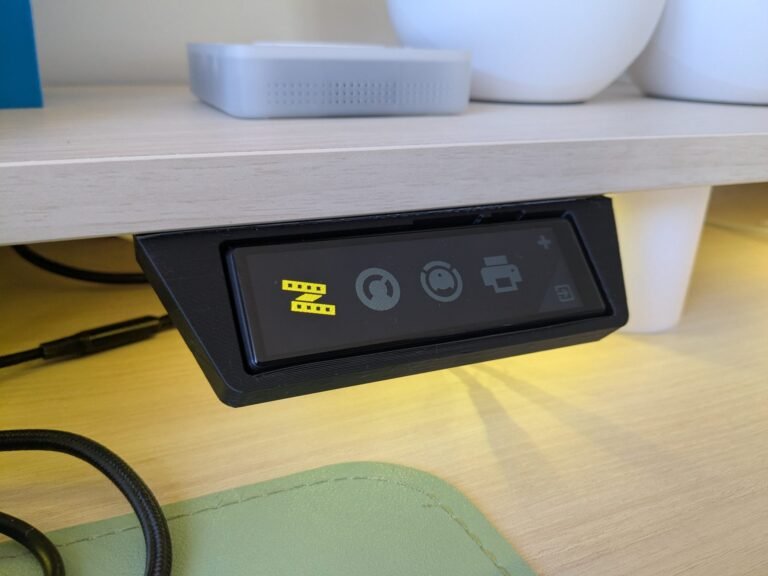
- Pulsando en el icono de la esquina inferior derecha puedes ir del ‘home’ al menú de dispositivos, y viceversa.
- Pulsando en el icono de la esquina superior derecha (‘+’) puedes cambiar entre las distintas páginas de dispositivos. Puedes añadir tantas páginas como necesites.
- Pulsando en el icono de cada uno de los dispositivos, puedes alternar su estado (por ejemplo, encender/apagar una luz). Cuando cambia el estado, también cambia el color del icono para que lo identifiques a simple vista.
- En algunos casos, al pulsar sobre el icono del dispositivo, puedes acceder a otra página con más controles. Por ejemplo, el icono de los estores/persianas lleva a un ‘slider’ para controlar el porcentaje de apertura, y el de la impresora 3D permite controlar la impresión y observar el porcentaje de progreso. Todo es 100% personalizable.