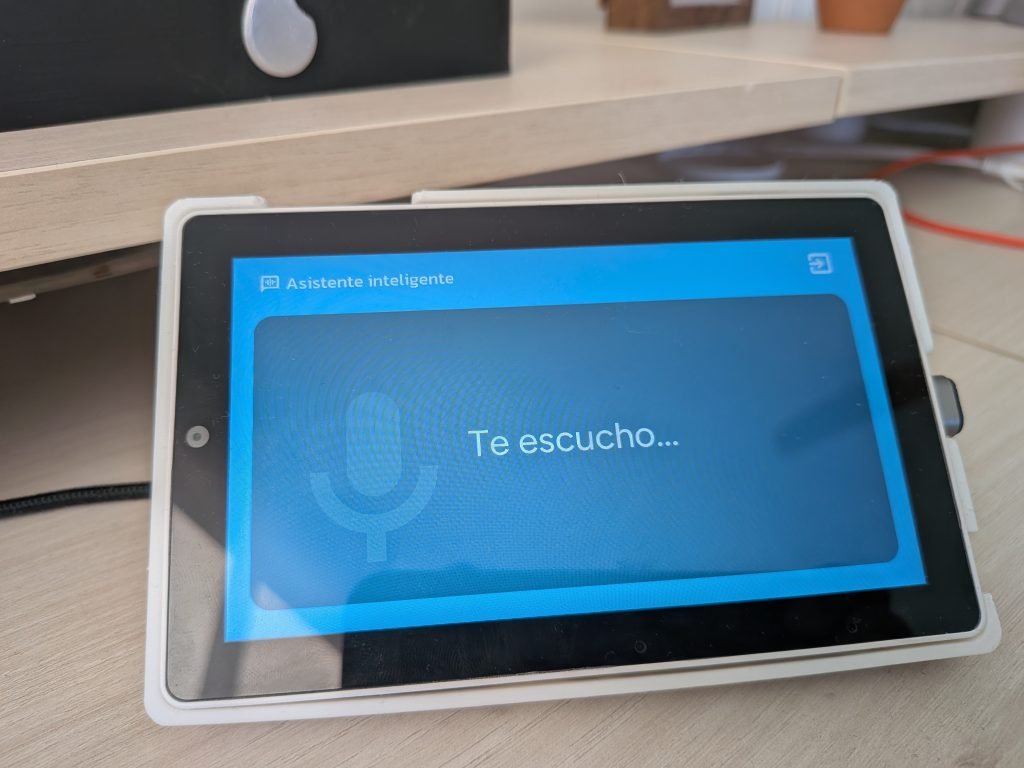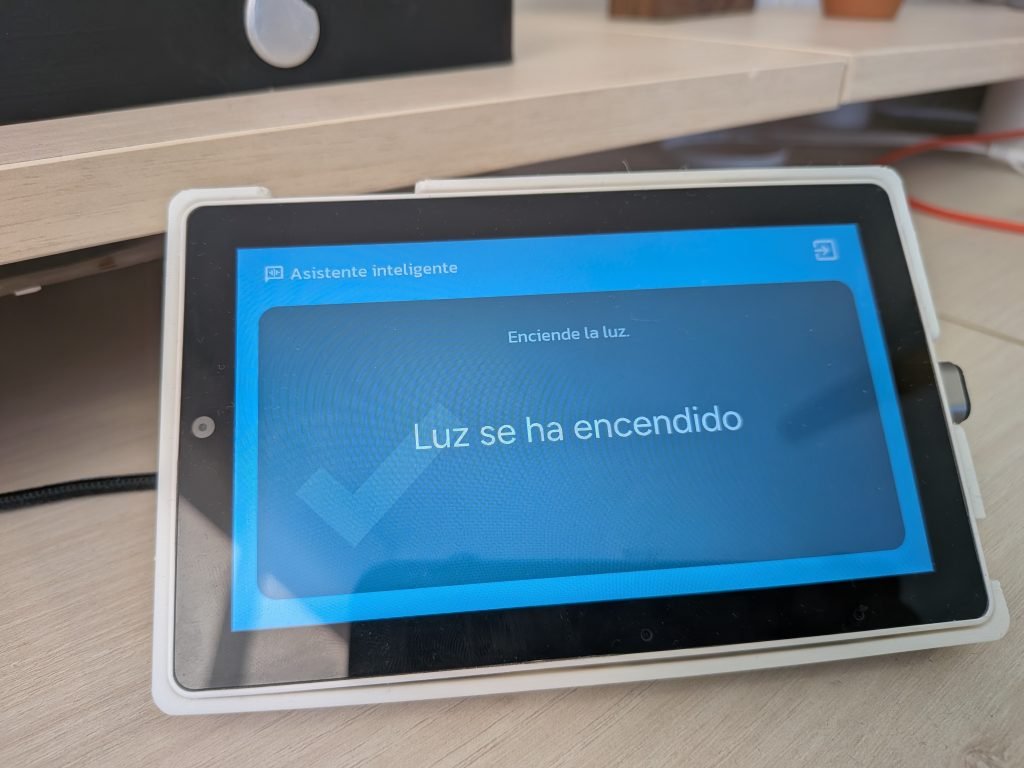



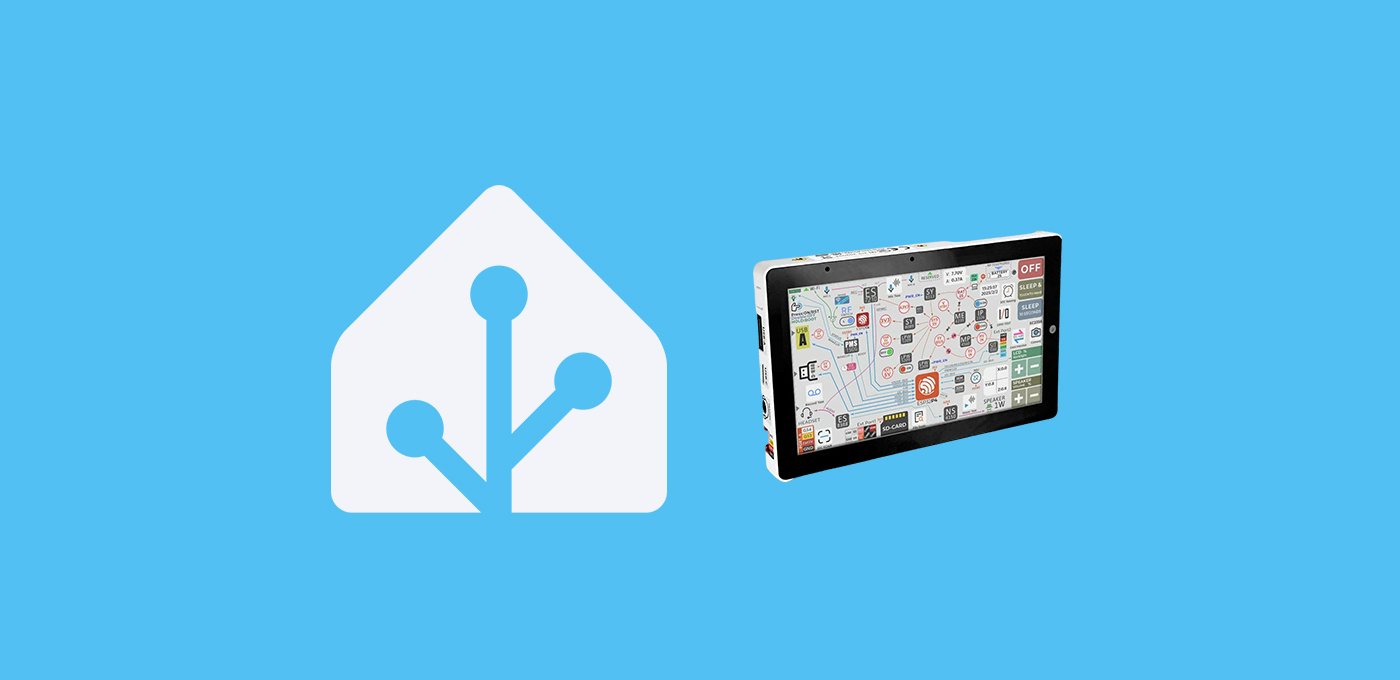
Hoy te enseño a integrar la M5Stack TAB5 en HA, un dispositivo con el que he dado vida al «Habbit Desk PRO».
Índice
M5Stack TAB5 y Habbit Desk PRO
Desde que publiqué el video sobre uno de mis dispositivos favoritos, el Habbit Desk, varios de vosotr@s me pedisteis que hiciera una versión para el M5Stack TAB5.
La verdad es que me pareció muy buena idea, porque hace poco investigué cómo integrar la M5Stack TAB5 en HA y en el proceso me di cuenta de que es el dispositivo más completo que he probado hasta ahora.
Puedes revisar todas las características del dispositivo en la entrada anterior, porque hoy nos vamos a centrar en las características del Habbit Desk PRO, la versión más avanzada del ‘gadget’ que te permite controlar Home Assistant desde el escritorio.
Requisitos previos
Para integrar la M5Stack TAB5 en HA y montar el Habbit Desk PRO necesitas:
- Haber instalado ESPHome en Home Assistant y tener conocimientos mínimos sobre cómo funciona.
- La M5Stack TAB 5. La batería es opcional, aunque en mi caso va a estar permanentemente conectada por USB.
- Un cable USB-C para alimentar la placa de DATOS (con un cable de carga no vas a poder instalar el software).
- Nuestro soporte (si planeas apoyarlo en alguna superficie firme) o nuestra carcasa, junto con este soporte y unos aros magnéticos (si prefieres poder mover la orientación de la pantalla).
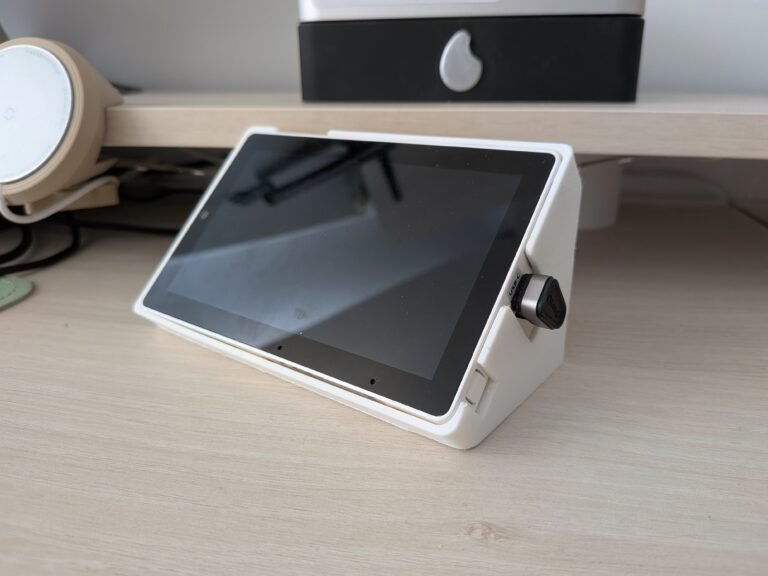
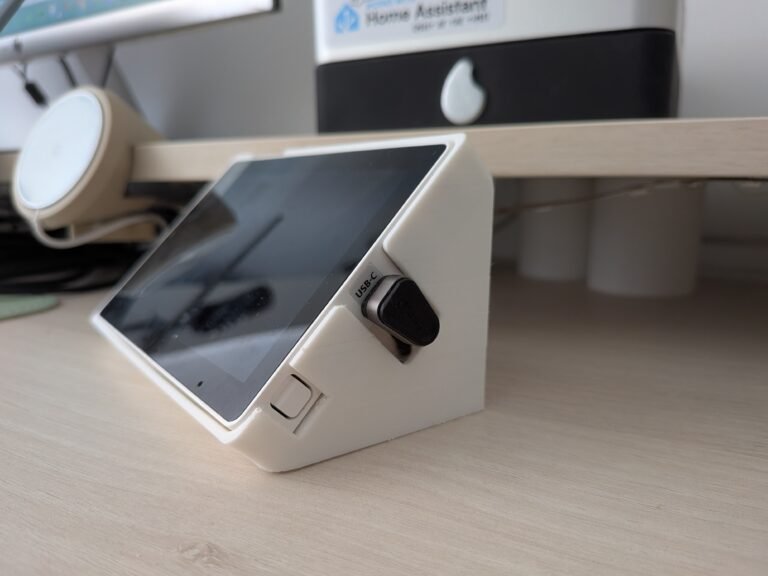

Configuración de ESPHome
Para integrar la M5Stack TAB5 en HA y flashearlo con el código del Habbit Desk PRO sigue estos pasos:
- Conecta la pantalla a tu ordenador a través del puerto USB-C.
- En Home Assistant, accede al complemento de ESPHome desde el menú lateral y pulsa en “New device”. Pulsa en “Continue” y dale un nombre (por ejemplo, “Habbit Desk PRO”).
- Pulsa en «Next» y a continuación selecciona la opción «ESP32-S3» como tipo de dispositivo. Verás que en el fondo se ha creado un nuevo dispositivo.
- Pulsa en «Skip» y haz clic en el enlace «Edit» del bloque correspondiente al dispositivo que acabas de crear. Copia este código y consérvalo, ya que utilizaremos algún fragmento.
- Reemplázalo por este código, haciendo las siguientes adaptaciones:
- Ajusta el ‘name’ y ‘friendly-name’ como el nombre que le quieras dar a tu asistente.
- Añade la información que te había generado el complemento en el apartado ‘api’ (‘encryption key’). Haz lo mismo para el campo ‘password’ bajo el apartado ‘ota’, y para los campos ‘ssid’ y ‘password’ bajo el apartado ‘wifi’ y ‘ap’.
- De momento es suficiente, ya que prefiero que empieces a personalizarlo tras explicarte cómo funciona cada apartado.
substitutions:
# Device customization
# Personalización del dispositivo
name: habbit-desk-pro
friendly_name: Habbit Desk PRO
background_color: 0x000000
text_color: 0xFFFFFF
text_color_secondary: 0x767676
iddle_time: 20s
animation_active: https://aguacatec.es/wp-content/uploads/2026/04/anim_active-1.png
animation_iddle: https://aguacatec.es/wp-content/uploads/2026/04/anim_iddle-1.png
animation_alert: https://aguacatec.es/wp-content/uploads/2026/04/notification-1.png
icon_ha: https://aguacatec.es/wp-content/uploads/2026/04/icon_ha.png
image_3dprinter: https://aguacatec.es/wp-content/uploads/2026/04/3dprinter_enclosed.png
image_vacuum: https://aguacatec.es/wp-content/uploads/2026/04/vacuum.png
# Entities
# Entidades
weather_condition: weather.openweathermap
room_temperature: sensor.sensor_temperatura_estudio_temperature
room_humidity: sensor.sensor_temperatura_estudio_humidity
room_co2: sensor.wifi_smart_switch_calidad_del_aire
notifications: input_text.notificaciones_habbit_desk
calendar: sensor.calendar
media: media_player.laptopchuwi
goal_current: sensor.aguacatec_suscriptores
goal_target: 3000
goal_text: "A por los 3000 subs"
light_ceiling: light.ventilador_estudio
cover1: cover.estor_estudio_1
cover2: cover.estor_estudio_2
climate: climate.salon
dehumidifier: humidifier.deshumidificador_estudio
fan_ceiling: fan.ventilador_estudio
light_bar: switch.regleta_usb_escritorio_l2
printer: switch.impresora
printer_3d: switch.impresora_3d
printer_3d_octoprint_status: switch.regleta_usb_herramientas_center
printer_3d_octoprint_file: sensor.octoprint_current_file
printer_3d_octoprint_temp_bed: sensor.octoprint_actual_bed_temp
printer_3d_octoprint_temp_hotend: sensor.octoprint_actual_tool0_temp
printer_3d_octoprint_operation: sensor.octoprint_current_state
printer_3d_octoprint_progress: sensor.octoprint_job_percentage
printer_3d_octoprint_finish: sensor.octoprint_estimated_finish_time
printer_3d_pause_button: button.octoprint_pause_job
printer_3d_resume_button: button.octoprint_resume_job
printer_3d_stop_button: button.octoprint_stop_job
vacuum: vacuum.roborock_qr_598
vacuum_water: binary_sensor.roborock_qr_598_escasez_de_agua
vacuum_error: sensor.roborock_qr_598_error_de_aspirador
vacuum_current_room: sensor.roborock_qr_598_habitacion_actual
vacuum_cleaning_progress: sensor.roborock_qr_598_progreso_de_la_limpieza
vacuum_cleaning_time: sensor.roborock_qr_598_tiempo_de_limpieza
vacuum_last_clean: sensor.roborock_qr_598_finalizacion_de_la_ultima_limpieza
# Other settings
# Otros ajustes
allowed_characters: " []¿?¡!#%'()+,-—_./:µ³°ªº0123456789ABCDEFGHIJKLMNÑOPQRSTUVWYZabcdefghijklmnñopqrstuvwxyzáéíóúÁÉÍÓÚäëïöü"
################################################################################################################
esphome:
name: ${name}
friendly_name: ${friendly_name}
on_boot:
priority: -100
then:
## Speaker
## Altavoz
- switch.turn_on: speaker_enable
- delay: 500ms
- select.set:
id: dac_output_select
option: LINE1
- delay: 500ms
- media_player.volume_set:
id: speaker_player
volume: 1
## Animation
## Animación
- lambda: |-
lv_obj_t* obj = id(animation_widget);
int32_t base_y = lv_obj_get_y(obj);
static lv_anim_t anim;
lv_anim_init(&anim);
lv_anim_set_var(&anim, obj);
lv_anim_set_exec_cb(&anim, [](void* o, int32_t v) {
lv_obj_set_y((lv_obj_t*)o, v);
});
lv_anim_set_values(&anim, base_y, base_y + 30);
lv_anim_set_duration(&anim, 2200);
lv_anim_set_playback_duration(&anim, 2200);
lv_anim_set_repeat_count(&anim, LV_ANIM_REPEAT_INFINITE);
lv_anim_set_path_cb(&anim, lv_anim_path_ease_in_out);
lv_anim_start(&anim);
- component.update: ina226_sensor
- delay: 500ms
- component.update: battery_percentage
esp32:
board: esp32-p4-evboard
flash_size: 16MB
framework:
type: esp-idf
advanced:
enable_idf_experimental_features: true
esp32_hosted:
variant: esp32c6
active_high: true
clk_pin: GPIO12
cmd_pin: GPIO13
d0_pin: GPIO11
d1_pin: GPIO10
d2_pin: GPIO9
d3_pin: GPIO8
reset_pin: GPIO15
slot: 1
logger:
hardware_uart: USB_SERIAL_JTAG
psram:
mode: hex
speed: 200MHz
api:
encryption:
key: "Fdasdas+OaKt1XvQV9pU6dsaadsads"
ota:
- platform: esphome
password: "2r3d3908b12744trgwds"
wifi:
ssid: !secret wifi_ssid
password: !secret wifi_password
ap:
ssid: "M5Stack-Tab5 Fallback Hotspot"
password: "ewfef3Mt2rd"
audio_dac:
- platform: es8388
id: es8388_dac
audio_adc:
- platform: es7210
id: es7210_adc
bits_per_sample: 16bit
sample_rate: 16000
# Sensors configuration
# Configuración de sensores
binary_sensor:
- platform: gpio
id: charging
name: "Carga"
icon: mdi:battery-charging
pin:
pi4ioe5v6408: pi4ioe2
number: 6
mode: INPUT_PULLDOWN
filters:
- delayed_on: 2s
- delayed_off: 2s
on_state:
then:
- lvgl.label.update:
id: lbl_battery_percentage
text:
format: "%.0f%%"
args:
- id(battery_percentage).state
- lvgl.label.update:
id: battery_icon
text: !lambda |-
if (id(charging).state) return "\U0000f250";
float pct = x;
if (pct >= 70.0) return "\U0000f24f";
if (pct >= 30.0) return "\U0000f255";
return "\U0000f257";
text_color: !lambda |-
float pct = id(battery_percentage).state;
if (id(charging).state) return lv_color_hex(0xe6b854);
if (pct >= 70.0) return lv_color_hex(0xc9e654);
if (pct >= 30.0) return lv_color_hex(0xe65476);
return lv_color_hex(0x767676);
- platform: gpio
id: headphone_detect
name: "Headphone Detect"
internal: true
pin:
pi4ioe5v6408: pi4ioe1
number: 7
# Devices
# Dispositivos
# VACUUM
- platform: homeassistant
id: device_vacuum_water
entity_id: ${vacuum_water}
internal: true
filters:
- delayed_on: 10min
on_press:
then:
- lvgl.label.update:
id: lbl_device_vacuum_water
text_color: 0xe65470
- lvgl.image.update:
id: icon_vacuum_water_state
image_recolor: 0xe65470
on_release:
then:
- lvgl.label.update:
id: lbl_device_vacuum_water
text_color: 0x767676
- lvgl.image.update:
id: icon_vacuum_water_state
image_recolor: 0x767676
esp_ldo:
- voltage: 2.5V
channel: 3
font:
# Interface
# Interfaz
- file: "gfonts://Figtree"
id: font_clock
size: 160
glyphs: ${allowed_characters}
- file: "gfonts://Material+Symbols+Outlined"
id: font_info_icons
size: 40
glyphs: [
"\U0000f24f", # 100%
"\U0000f255", # 50%
"\U0000f257", # 10%
"\U0000f250", # Charging
"\U0000e98e", # Speaker ON
"\U0000e04f", # Speaker OFF
]
- file: "gfonts://Material+Symbols+Outlined"
id: font_info_icons_little
size: 40
glyphs: [
"\U0000f654", # Alert
"\U0000e63e", # Wifi ON
"\U0000e648", # Wifi OFF
"\U0000e1ff", # thermometer
"\U0000f87e", # water-percent
"\U0000e29c", # air
"\U0000e834", # check
"\U0000e62e", # assistant
]
- file: "gfonts://Figtree"
id: font_notification
size: 70
glyphs: ${allowed_characters}
# Weather
# Meteorología
- file: "gfonts://Material+Symbols+Outlined"
id: font_top_icons
size: 70
glyphs: [
"\U0000e81a", # wb_sunny (sol)
"\U0000e818", # cloud (nube)
"\U0000f176", # umbrella (lluvia)
"\U0000e810", # water_drop (gotas)
"\U0000e80b", # ac_unit (nieve)
"\U0000efd8", # air (viento)
"\U0000ea0b", # thunderstorm (tormenta)
"\U0000f159", # nights_stay (noche)
]
- file: "gfonts://Kanit"
id: font_info_text
size: 35
glyphs: ${allowed_characters}
- file: "gfonts://Material+Symbols+Outlined"
id: font_device_icons
size: 120
glyphs: [
"\U0000f02a", # ceiling-light
"\U0000f168", # fan
"\U0000e286", # blinds-shade
"\U0000ec1f", # blinds-shade-close
"\U0000ec12", # roller-shade
"\U0000ec11", # roller-shade-close
"\U0000ed38", # 3d
"\U0000ef55", # fire
"\U0000efc5", # vacuum
"\U0000f7ed", # led-strip
"\U0000e97e", # dehumidifier
"\U0000e1c4", # play
"\U0000e1a2", # pause
"\U0000eaaa", # base
"\U0000eee1", # locate
"\U0000f418", # power
"\U0000ef71", # stop
"\U0000ebfe", # spotlight
" ",
]
- file: "gfonts://Material+Symbols+Outlined"
id: font_device_icons_little
size: 60
glyphs: [
"\U0000e879", # exit
"\U0000e548", # more
"\U0000e834", # check
" ",
]
- file: "gfonts://Material+Symbols+Outlined"
id: font_details_icons
size: 60
glyphs: [
"\U0000e286", # blinds-shade
"\U0000ec1f", # blinds-shade-close
" ",
]
- file: "gfonts://Kanit"
id: font_value
size: 60
glyphs: ${allowed_characters}
- file: "gfonts://Kanit"
id: font_device_status
size: 30
glyphs: ${allowed_characters}
- file: "gfonts://Kanit"
id: font_device_name
size: 35
glyphs: ${allowed_characters}
- file: "gfonts://Kanit"
id: font_values
size: 30
glyphs: ${allowed_characters}
globals:
## Notifications
## Notificaciones
- id: notification
type: bool
restore_value: no
initial_value: 'false'
- id: notification_last_changed
type: time_t
restore_value: yes
initial_value: '0'
- id: notification_last_text
type: std::string
restore_value: yes
max_restore_data_length: 254
initial_value: '""'
i2c:
- id: bsp_bus
sda: GPIO31
scl: GPIO32
frequency: 400kHz
i2s_audio:
- id: mic_bus
i2s_lrclk_pin: GPIO29
i2s_bclk_pin: GPIO27
i2s_mclk_pin: GPIO30
image:
## Customization
## Personalización
- file: ${animation_active}
id: img_animation_active
resize: 400x400
type: RGB565
transparency: alpha_channel
- file: ${animation_iddle}
id: img_animation_iddle
resize: 400x400
type: RGB565
transparency: alpha_channel
- file: ${animation_alert}
id: img_animation_alert
resize: 400x400
type: RGB565
transparency: alpha_channel
## Icons
## Iconos
- file: ${icon_ha}
id: img_icon_ha
resize: 100x100
type: RGB565
transparency: alpha_channel
- file: mdi:calendar
id: icon_calendar_mini
resize: 60x60
type: BINARY
transparency: chroma_key
- file: mdi:check-bold
id: icon_check
resize: 60x60
type: BINARY
transparency: chroma_key
- file: mdi:alert-decagram-outline
id: icon_notification
resize: 400x400
type: BINARY
transparency: chroma_key
- file: mdi:microphone
id: icon_assist_active
resize: 400x400
type: BINARY
transparency: chroma_key
- file: mdi:timer-sand
id: icon_assist_thinking
resize: 400x400
type: BINARY
transparency: chroma_key
- file: mdi:check-bold
id: icon_assist_success
resize: 400x400
type: BINARY
transparency: chroma_key
- file: mdi:music
id: icon_music_mini
resize: 60x60
type: BINARY
transparency: chroma_key
- file: mdi:play-pause
id: icon_music_toggle
resize: 60x60
type: BINARY
transparency: chroma_key
- file: mdi:skip-previous
id: icon_music_previous
resize: 60x60
type: BINARY
transparency: chroma_key
- file: mdi:skip-next
id: icon_music_next
resize: 60x60
type: BINARY
transparency: chroma_key
- file: mdi:youtube
id: icon_youtube_mini
resize: 60x60
type: BINARY
transparency: chroma_key
- file: mdi:robot-vacuum
id: icon_vacuum
resize: 110x110
type: BINARY
transparency: chroma_key
- file: mdi:robot-vacuum
id: icon_vacuum_mini
resize: 60x60
type: BINARY
transparency: chroma_key
- file: mdi:water
id: icon_vacuum_water
resize: 40x40
type: BINARY
transparency: chroma_key
- file: mdi:robot-vacuum-alert
id: icon_vacuum_error
resize: 40x40
type: BINARY
transparency: chroma_key
- file: mdi:printer-3d-nozzle
id: icon_3dprinter
resize: 100x100
type: BINARY
transparency: chroma_key
- file: mdi:printer-3d-nozzle
id: icon_3dprinter_mini
resize: 60x60
type: BINARY
transparency: chroma_key
- file: mdi:printer-3d-nozzle
id: icon_3dprinter_hotend
resize: 40x40
type: BINARY
transparency: chroma_key
- file: mdi:square
id: icon_3dprinter_bed
resize: 40x40
type: BINARY
transparency: chroma_key
## Devices
## Dispositivos
- file: ${image_3dprinter}
id: img_3dprinter
resize: 500x500
type: RGB565
transparency: alpha_channel
- file: ${image_vacuum}
id: img_vacuum
resize: 430x430
type: RGB565
transparency: alpha_channel
interval:
- interval: 60s
then:
- lvgl.label.update:
id: lbl_clock
text: !lambda 'return id(esptime).now().strftime("%H:%M");'
- interval: 10s
then:
- if:
condition:
lambda: 'return !id(notification);'
then:
- lvgl.image.update:
id: animation_widget
src: img_animation_iddle
- delay: 1s
- lvgl.image.update:
id: animation_widget
src: img_animation_active
## Calendar
## Calendario
- interval: 5min
then:
- script.execute: refresh_calendar_widget
- interval: 60s
then:
- lvgl.bar.update:
id: lbl_home_calendar_progress_bar
value: !lambda |-
if (id(calendar_state).state != "on")
return 0;
if (!id(calendar_event_start).has_state() || !id(calendar_event_end).has_state())
return 0;
std::string start = id(calendar_event_start).state;
std::string end_s = id(calendar_event_end).state;
if (start.empty() || end_s.empty())
return 0;
int sy, sm, sd, sh, smin, ss, ey, em, ed, eh, emin, es;
sscanf(start.c_str(), "%d-%d-%d %d:%d:%d", &sy, &sm, &sd, &sh, &smin, &ss);
sscanf(end_s.c_str(), "%d-%d-%d %d:%d:%d", &ey, &em, &ed, &eh, &emin, &es);
auto now = id(esptime).now();
if (!now.is_valid()) return 0;
int now_mins = now.hour * 60 + now.minute;
int start_mins = sh * 60 + smin;
int end_mins = eh * 60 + emin;
if (now_mins < start_mins) return 0;
if (now_mins >= end_mins) return 100;
return (int)(((float)(now_mins - start_mins) / (end_mins - start_mins)) * 100.0f);
light:
- platform: monochromatic
output: backlight_pwm
name: "Pantalla"
id: backlight
icon: mdi:tablet
restore_mode: ALWAYS_ON
media_player:
- platform: speaker
name: "Habbit Desk PRO"
id: speaker_player
announcement_pipeline:
speaker: tab5_speaker
format: FLAC
sample_rate: 48000
num_channels: 1
on_announcement:
# Stop the wake word (mWW or VA) if the mic is capturing
- if:
condition:
- microphone.is_capturing:
then:
- micro_wake_word.stop:
on_idle:
# Since VA isn't running, this is the end of user-intiated media playback. Restart the wake word.
- if:
condition:
not:
voice_assistant.is_running:
then:
- micro_wake_word.start:
microphone:
- platform: i2s_audio
id: tab5_microphone
i2s_din_pin: GPIO28
sample_rate: 16000
bits_per_sample: 16bit
adc_type: external
micro_wake_word:
id: mww
models:
- okay_nabu
# - hey_mycroft
# - hey_jarvis
on_wake_word_detected:
- voice_assistant.start:
wake_word: !lambda return wake_word;
- lvgl.page.show: page_assistant
- light.turn_on: backlight
- lvgl.resume:
- lvgl.widget.redraw:
output:
- platform: ledc
pin: GPIO22
id: backlight_pwm
frequency: 1000Hz
pi4ioe5v6408:
- id: pi4ioe1
address: 0x43
# 0: O - wifi_antenna_int_ext
# 1: O - speaker_enable
# 2: O - external_5v_power
# 3: NC
# 4: O - lcd reset
# 5: O - touch panel reset
# 6: O - camera reset
# 7: I - headphone detect
- id: pi4ioe2
address: 0x44
# 0: O - wifi_power
# 1: NC
# 2: NC
# 3: O - usb_5v_power
# 4: O - poweroff pulse
# 5: O - quick charge enable (inverted)
# 6: I - charging status
# 7: O - charge enable
script:
- id: refresh_calendar_widget
then:
- lvgl.image.update:
id: icon_calendar_mini_id
image_recolor: !lambda |-
if (!id(calendar_event_start).has_state()) return lv_color_hex(0xFFFFFF);
std::string start = id(calendar_event_start).state;
if (start.empty()) return lv_color_hex(0xFFFFFF);
int sy, sm, sd, sh, smin, ss;
if (sscanf(start.c_str(), "%d-%d-%d %d:%d:%d", &sy, &sm, &sd, &sh, &smin, &ss) != 6) {
return lv_color_hex(0xFFFFFF);
}
auto now = id(esptime).now();
if (!now.is_valid()) return lv_color_hex(0xFFFFFF);
bool is_today = (now.year == sy && now.month == sm && now.day_of_month == sd);
bool calendar_off = (id(calendar_state).state == "off");
if (is_today && calendar_off) return lv_color_hex(0x1EBBD7);
return lv_color_hex(0xFFFFFF);
- lvgl.label.update:
id: lbl_home_calendar_event_name
text: !lambda |-
if (!id(calendar_event_name).has_state()) return std::string("Sin eventos");
std::string s = id(calendar_event_name).state;
if (s.length() > 40) return (s.substr(0, 37) + "...").c_str();
return s.c_str();
text_color: !lambda |-
if (!id(calendar_event_start).has_state()) return lv_color_hex(0xFFFFFF);
std::string start = id(calendar_event_start).state;
if (start.empty()) return lv_color_hex(0xFFFFFF);
int sy, sm, sd, sh, smin, ss;
if (sscanf(start.c_str(), "%d-%d-%d %d:%d:%d", &sy, &sm, &sd, &sh, &smin, &ss) != 6) {
return lv_color_hex(0xFFFFFF);
}
auto now = id(esptime).now();
if (!now.is_valid()) return lv_color_hex(0xFFFFFF);
bool is_today = (now.year == sy && now.month == sm && now.day_of_month == sd);
bool calendar_off = (id(calendar_state).state == "off");
if (is_today && calendar_off) return lv_color_hex(0x1EBBD7);
return lv_color_hex(0xFFFFFF);
- lvgl.label.update:
id: lbl_home_calendar_event_details
text: !lambda |-
if (!id(calendar_event_start).has_state() || !id(calendar_event_end).has_state())
return std::string("Sin eventos");
std::string start = id(calendar_event_start).state;
std::string end_s = id(calendar_event_end).state;
if (start.empty() || end_s.empty()) return std::string("Sin eventos");
int sy, sm, sd, sh, smin, ss, ey, em, ed, eh, emin, es;
sscanf(start.c_str(), "%d-%d-%d %d:%d:%d", &sy, &sm, &sd, &sh, &smin, &ss);
sscanf(end_s.c_str(), "%d-%d-%d %d:%d:%d", &ey, &em, &ed, &eh, &emin, &es);
static const int t[] = {0, 3, 2, 5, 0, 3, 5, 1, 4, 6, 2, 4};
int yr = sy; if (sm < 3) yr--;
int dow = (yr + yr/4 - yr/100 + yr/400 + t[sm-1] + sd) % 7;
const char* dias[] = {"Dom", "Lun", "Mar", "Mie", "Jue", "Vie", "Sab"};
char buf[35];
sprintf(buf, "%s %02d/%02d/%02d, %02d:%02d-%02d:%02d",
dias[dow], sd, sm, sy % 100, sh, smin, eh, emin);
return std::string(buf);
text_color: !lambda |-
if (!id(calendar_event_start).has_state()) return lv_color_hex(0xFFFFFF);
std::string start = id(calendar_event_start).state;
if (start.empty()) return lv_color_hex(0xFFFFFF);
int sy, sm, sd, sh, smin, ss;
if (sscanf(start.c_str(), "%d-%d-%d %d:%d:%d", &sy, &sm, &sd, &sh, &smin, &ss) != 6) {
return lv_color_hex(0xFFFFFF);
}
auto now = id(esptime).now();
if (!now.is_valid()) return lv_color_hex(0xFFFFFF);
bool is_today = (now.year == sy && now.month == sm && now.day_of_month == sd);
bool calendar_off = (id(calendar_state).state == "off");
if (is_today && calendar_off) return lv_color_hex(0x1EBBD7);
return lv_color_hex(0xFFFFFF);
select:
- platform: template
id: wifi_antenna_select
name: "WiFi Antenna"
internal: True
options:
- "Internal"
- "External"
optimistic: true
on_value:
- if:
condition:
lambda: return i == 0;
then:
- switch.turn_off: wifi_antenna_int_ext
else:
- switch.turn_on: wifi_antenna_int_ext
## The DAC Output select needs to be manually (or with an automation) changed to `LINE1` for the onboard speaker
- platform: es8388
es8388_id: es8388_dac
dac_output:
name: DAC Output
id: dac_output_select
adc_input_mic:
name: ADC Input Mic
sensor:
# Built-in sensors
# Sensores internos
- platform: wifi_signal
name: "Intensidad WiFi"
update_interval: 300s
on_value:
then:
- lvgl.label.update:
id: wifi_icon
text: !lambda |-
if (std::isnan(x)) return "\U0000e648"; // wifi off - sin conexión
return "\U0000e63e"; // wifi on
text_color: !lambda |-
if (std::isnan(x)) return lv_color_hex(0x767676); // wifi off - sin conexión
return lv_color_hex(0xffffff); // wifi on
- platform: ina226
id: ina226_sensor
address: 0x41
adc_averaging: 16
max_current: 8.192A
shunt_resistance: 0.005ohm
bus_voltage:
name: Battery Voltage
id: battery_voltage
internal: true
current:
name: Battery Current
internal: true
- platform: template
name: "Batería"
id: battery_percentage
unit_of_measurement: "%"
accuracy_decimals: 0
device_class: battery
state_class: measurement
lambda: |-
// Define los voltajes mínimo y máximo de tu batería
float voltage_max = 8.23; // Voltaje máximo (batería llena)
float voltage_min = 6.0; // Voltaje mínimo (batería vacía)
float voltage = id(battery_voltage).state;
// Calcula el porcentaje
float percentage = (voltage - voltage_min) / (voltage_max - voltage_min) * 100.0;
// Limita el porcentaje entre 0 y 100
if (percentage > 100.0) percentage = 100.0;
if (percentage < 0.0) percentage = 0.0;
return percentage;
update_interval: 600s
on_value:
then:
- lvgl.label.update:
id: lbl_battery_percentage
text:
format: "%.0f%%"
args:
- id(battery_percentage).state
- lvgl.label.update:
id: battery_icon
text: !lambda |-
if (id(charging).state) return "\U0000f250";
float pct = x;
if (pct >= 70.0) return "\U0000f24f";
if (pct >= 30.0) return "\U0000f255";
return "\U0000f257";
text_color: !lambda |-
float pct = id(battery_percentage).state;
if (std::isnan(pct)) return lv_color_hex(0x767676);
if (id(charging).state) return lv_color_hex(0xe6b854);
if (pct >= 70.0) return lv_color_hex(0xc9e654);
if (pct >= 30.0) return lv_color_hex(0xe65476);
return lv_color_hex(0x767676);
## Climate
## Climatización
- platform: homeassistant
id: room_temperature_value
entity_id: ${room_temperature}
internal: true
on_value:
then:
- lvgl.label.update:
id: lbl_room_temperature
text:
format: "%.0f°C"
args:
- id(room_temperature_value).state
text_color: !lambda |-
float t = id(room_temperature_value).state;
if (t < 18.0) return lv_color_hex(0x1e9cd7);
if (t > 25.0) return lv_color_hex(0xe65476);
return lv_color_hex(0x626262);
- lvgl.label.update:
id: thermometer_icon
text_color: !lambda |-
float t = id(room_temperature_value).state;
if (t < 18.0) return lv_color_hex(0x1e9cd7);
if (t > 25.0) return lv_color_hex(0xe65476);
return lv_color_hex(0x626262);
- if:
condition:
lambda: 'return id(room_temperature_value).state < 23.0;'
then:
- lvgl.widget.show: btn_climate
- lvgl.widget.hide: btn_fan
else:
- lvgl.widget.hide: btn_climate
- lvgl.widget.show: btn_fan
- platform: homeassistant
id: room_humidity_value
entity_id: ${room_humidity}
internal: true
on_value:
then:
- lvgl.label.update:
id: lbl_room_humidity
text:
format: "%.0f%%"
args:
- id(room_humidity_value).state
text_color: !lambda |-
float t = id(room_humidity_value).state;
if (t < 40.0) return lv_color_hex(0xe0a020);
if (t > 60.0) return lv_color_hex(0x1e9cd7);
return lv_color_hex(0x626262);
- lvgl.label.update:
id: humidity_icon
text_color: !lambda |-
float t = id(room_humidity_value).state;
if (t < 40.0) return lv_color_hex(0xe0a020);
if (t > 60.0) return lv_color_hex(0x1e9cd7);
return lv_color_hex(0x626262);
## Media
## Media
- platform: homeassistant
id: media_duration
entity_id: ${media}
attribute: media_duration
internal: true
- platform: homeassistant
id: media_position
entity_id: ${media}
attribute: media_position
internal: true
on_value:
then:
- lvgl.bar.update:
id: lbl_home_media_progress_bar
value: !lambda |-
float dur = id(media_duration).state;
float pos = id(media_position).state;
if (dur <= 0) return 0;
return (int)((pos / dur) * 100.0f);
# Devices
# Dispositivos
# YOUTUBE
- platform: homeassistant
id: goal_current_value
entity_id: ${goal_current}
internal: true
filters:
- lambda: |-
if (isnan(x)) return 0;
return x;
on_value:
then:
- lvgl.bar.update:
id: lbl_home_goal_progress_bar
value: !lambda return (int)x;
- lvgl.label.update:
id: lbl_home_goal_current
text: !lambda |-
char buf[30];
snprintf(buf, sizeof(buf), "%.0f Suscriptores", x);
return std::string(buf);
- lvgl.label.update:
id: lbl_home_goal_progress_value
text: !lambda |-
int pct = (int)(x / 3000.0f * 100.0f);
char buf[10];
snprintf(buf, sizeof(buf), "%d%%", pct);
return std::string(buf);
# COVER
- platform: homeassistant
id: cover_1_position_value
entity_id: ${cover1}
attribute: current_position
internal: true
filters:
- lambda: |-
if (isnan(x)) { return 0; }
else { return x; }
on_value:
then:
- lvgl.slider.update:
id: slider_cover_1
value: !lambda 'return (int)x;'
- lambda: |-
int position = (int) id(cover_1_position_value).state;
char buf[8];
snprintf(buf, sizeof(buf), "%d%%", position);
// Actualizar texto del label LVGL
lv_label_set_text(id(slider_cover_1_value), buf);
- platform: homeassistant
id: cover_2_position_value
entity_id: ${cover2}
attribute: current_position
internal: true
filters:
- lambda: |-
if (isnan(x)) { return 0; }
else { return x; }
on_value:
then:
- lvgl.slider.update:
id: slider_cover_2
value: !lambda 'return (int)x;'
- lambda: |-
int position = (int) id(cover_2_position_value).state;
char buf[8];
snprintf(buf, sizeof(buf), "%d%%", position);
// Actualizar texto del label LVGL
lv_label_set_text(id(slider_cover_2_value), buf);
# 3D PRINTER
- platform: homeassistant
id: printer_3d_octoprint_temp_bed
entity_id: ${printer_3d_octoprint_temp_bed}
internal: true
filters:
- lambda: |-
if (isnan(x)) { return 0; }
else { return x; }
on_value:
then:
- lvgl.label.update:
id: lbl_device_printer_3d_octoprint_temp_bed
text:
format: "Tª Cama %.0f %ºC"
args:
- id(printer_3d_octoprint_temp_bed).state
- platform: homeassistant
id: printer_3d_octoprint_temp_hotend
entity_id: ${printer_3d_octoprint_temp_hotend}
internal: true
filters:
- lambda: |-
if (isnan(x)) { return 0; }
else { return x; }
on_value:
then:
- lvgl.label.update:
id: lbl_device_printer_3d_octoprint_temp_hotend
text:
format: "Tª Extrusor %.0f %ºC"
args:
- id(printer_3d_octoprint_temp_hotend).state
- platform: homeassistant
id: printer_3d_octoprint_progress_value
entity_id: ${printer_3d_octoprint_progress}
internal: true
filters:
- lambda: |-
if (isnan(x)) { return 0; }
else { return x; }
on_value:
then:
- lvgl.bar.update:
id: lbl_device_printer_3d_progress_bar
value: !lambda return (int)x;
- lvgl.label.update:
id: lbl_device_printer_3d_progress_value
text:
format: "%.0f%%"
args: ['x']
- lvgl.bar.update:
id: lbl_home_printer_3d_progress_bar
value: !lambda return (int)x;
- lvgl.label.update:
id: lbl_home_printer_3d_progress_value
text:
format: "%.0f%%"
args: ['x']
- if:
condition:
lambda: 'return x > 0;'
then:
- lvgl.widget.show: widget_progress_3dprinter
else:
- lvgl.widget.hide: widget_progress_3dprinter
# VACUUM
- platform: homeassistant
id: vacuum_cleaning_progress_value
entity_id: ${vacuum_cleaning_progress}
internal: true
filters:
- lambda: |-
if (isnan(x)) { return 0; }
else { return x; }
on_value:
then:
- lvgl.bar.update:
id: lbl_device_vacuum_progress_bar
value: !lambda return (int)x;
- lvgl.label.update:
id: lbl_device_vacuum_progress_value
text:
format: "%.0f%%"
args: ['x']
- lvgl.bar.update:
id: lbl_home_vacuum_progress_bar
value: !lambda return (int)x;
- lvgl.label.update:
id: lbl_home_vacuum_progress_value
text:
format: "%.0f%%"
args: ['x']
- if:
condition:
lambda: 'return x > 0;'
then:
- lvgl.widget.show: widget_progress_vacuum
else:
- lvgl.widget.hide: widget_progress_vacuum
- platform: homeassistant
id: vacuum_cleaning_time_value
entity_id: ${vacuum_cleaning_time}
internal: true
on_value:
then:
- lvgl.label.update:
id: lbl_device_vacuum_cleaning_time
text: !lambda |-
if (isnan(x) || x <= 0) {
return std::string("Ninguna limpieza en curso");
}
int minutes = (int)x;
int hours = minutes / 60;
int mins = minutes % 60;
char buffer[40];
if (hours > 0) {
snprintf(buffer, sizeof(buffer), "Limpiando %dh %02dm", hours, mins);
} else {
snprintf(buffer, sizeof(buffer), "Limpiando %dm", minutes);
}
return std::string(buffer);
- lvgl.label.update:
id: lbl_home_vacuum_cleaning_time
text: !lambda |-
if (isnan(x) || x <= 0) {
return std::string("Ninguna limpieza en curso");
}
int minutes = (int)x;
int hours = minutes / 60;
int mins = minutes % 60;
char buffer[40];
if (hours > 0) {
snprintf(buffer, sizeof(buffer), "Limpiando %dh %02dm", hours, mins);
} else {
snprintf(buffer, sizeof(buffer), "Limpiando %dm", minutes);
}
return std::string(buffer);
switch:
- platform: gpio
id: wifi_power
name: "WiFi"
internal: true
pin:
pi4ioe5v6408: pi4ioe2
number: 0
restore_mode: ALWAYS_ON
- platform: gpio
id: usb_5v_power
name: "USB Power"
internal: true
pin:
pi4ioe5v6408: pi4ioe2
number: 3
- platform: gpio
id: quick_charge
name: "Quick Charge"
internal: true
pin:
pi4ioe5v6408: pi4ioe2
number: 5
inverted: true
- platform: gpio
id: charge_enable
name: "Carga"
restore_mode: ALWAYS_OFF
internal: False
pin:
pi4ioe5v6408: pi4ioe2
number: 7
- platform: gpio
id: wifi_antenna_int_ext
internal: True
pin:
pi4ioe5v6408: pi4ioe1
number: 0
- platform: gpio
id: speaker_enable
name: "Altavoz"
icon: mdi:volume-high
pin:
pi4ioe5v6408: pi4ioe1
number: 1
on_state:
then:
- lvgl.label.update:
id: speaker_icon
text: !lambda |-
if (id(speaker_enable).state) return "\U0000e98e";
return "\U0000e04f";
text_color: !lambda |-
if (id(speaker_enable).state) return lv_color_hex(0xffffff);
return lv_color_hex(0x767676);
- platform: gpio
id: external_5v_power
name: "External 5V Power"
internal: true
pin:
pi4ioe5v6408: pi4ioe1
number: 2
text_sensor:
## Weather
## Meteorología
- platform: homeassistant
id: weather_condition_value
entity_id: ${weather_condition}
internal: true
on_value:
then:
- lvgl.label.update:
id: weather_icon
text: !lambda |-
if (x == "sunny") return "\U0000e81a"; // wb_sunny
if (x == "partlycloudy") return "\U0000e818"; // wb_cloudy
if (x == "cloudy") return "\U0000e818"; // cloud
if (x == "rainy") return "\U0000f176"; // umbrella
if (x == "pouring") return "\U0000e810"; // water_drop
if (x == "snowy") return "\U0000e80b"; // ac_unit
if (x == "fog") return "\U0000e818"; // cloud (niebla)
if (x == "windy") return "\U0000efd8"; // air
if (x == "lightning" || x == "lightning-rainy") return "\U0000ea0b"; // thunderstorm
if (x == "clear-night") return "\U0000f159"; // nights_stay
return "\U0000e818"; // cloud
text_color: !lambda |-
if (x == "sunny") return lv_color_hex(0xe6b454);
if (x == "partlycloudy") return lv_color_hex(0xFFFFFF);
if (x == "cloudy") return lv_color_hex(0xFFFFFF);
if (x == "rainy") return lv_color_hex(0x8bc1dd);
if (x == "pouring") return lv_color_hex(0x8bc1dd);
if (x == "snowy") return lv_color_hex(0xFFFFFF);
if (x == "fog") return lv_color_hex(0xFFFFFF);
if (x == "windy") return lv_color_hex(0x8bc1dd);
if (x == "lightning" || x == "lightning-rainy") return lv_color_hex(0xe6b454);
if (x == "clear-night") return lv_color_hex(0xf2eb81);
return lv_color_hex(0xFFFFFF);
- platform: homeassistant
id: room_co2_value
entity_id: ${room_co2}
internal: true
on_value:
then:
- lvgl.label.update:
id: lbl_room_co2
text: !lambda |-
if (x == "poor") return "KO";
return "OK";
text_color: !lambda |-
if (x == "poor") return lv_color_hex(0xe65476);
return lv_color_hex(0x626262);
- lvgl.label.update:
id: co2_icon
text_color: !lambda |-
if (x == "poor") return lv_color_hex(0xe65476);
return lv_color_hex(0x626262);
## Notifications
## Notificaciones
- platform: homeassistant
id: notification_text
entity_id: ${notifications}
internal: true
on_value:
then:
- lvgl.label.update:
id: notification_current_text
text: !lambda |-
if (x.empty() || x == "unknown" || x == "unavailable") {
return std::string("");
}
return x;
- lambda: |-
auto s = x;
bool valid = !s.empty() && s != "unknown" && s != "unavailable";
id(notification) = valid;
if (valid) {
if (s != id(notification_last_text)) {
id(notification_last_text) = s;
id(notification_last_changed) = id(esptime).now().timestamp;
}
} else {
id(notification_last_text) = "";
id(notification_last_changed) = 0;
}
- lvgl.label.update:
id: notification_time
text: !lambda |-
if (!id(notification) || id(notification_last_changed) == 0) {
return std::string("");
}
const char* dias[] = {
"domingo", "lunes", "martes", "miercoles",
"jueves", "viernes", "sabado"
};
time_t ts = id(notification_last_changed);
struct tm recv_tm = *localtime(&ts);
auto now = id(esptime).now();
struct tm now_tm = *localtime(&now.timestamp);
char buf[70];
if (recv_tm.tm_year == now_tm.tm_year && recv_tm.tm_yday == now_tm.tm_yday) {
snprintf(buf, sizeof(buf),
"Recibida hoy, a las %02d:%02d",
recv_tm.tm_hour, recv_tm.tm_min);
} else {
time_t yesterday_ts = now.timestamp - 86400;
struct tm yesterday_tm = *localtime(&yesterday_ts);
if (recv_tm.tm_year == yesterday_tm.tm_year && recv_tm.tm_yday == yesterday_tm.tm_yday) {
snprintf(buf, sizeof(buf),
"Recibida ayer, a las %02d:%02d",
recv_tm.tm_hour, recv_tm.tm_min);
} else {
snprintf(buf, sizeof(buf),
"Recibida el %s, a las %02d:%02d",
dias[recv_tm.tm_wday],
recv_tm.tm_hour,
recv_tm.tm_min);
}
}
return std::string(buf);
- if:
condition:
lambda: 'return id(notification);'
then:
- lvgl.image.update:
id: animation_widget
src: img_animation_alert
- lvgl.widget.show: alert_icon
else:
- lvgl.image.update:
id: animation_widget
src: img_animation_active
- lvgl.widget.hide: alert_icon
- delay: 1s
- light.turn_on: backlight
- lvgl.resume:
- lvgl.widget.redraw:
## Calendar
## Calendario
- platform: homeassistant
id: calendar_state
entity_id: ${calendar}
internal: true
on_value:
then:
- script.execute: refresh_calendar_widget
- platform: homeassistant
id: calendar_event_name
entity_id: ${calendar}
attribute: message
internal: true
- platform: homeassistant
id: calendar_event_start
entity_id: ${calendar}
attribute: start_time
internal: true
- platform: homeassistant
id: calendar_event_end
entity_id: ${calendar}
attribute: end_time
internal: true
on_value:
then:
- script.execute: refresh_calendar_widget
## Media
## Media
- platform: homeassistant
id: media_status
entity_id: ${media}
internal: true
- platform: homeassistant
id: media_title
entity_id: ${media}
attribute: media_title
internal: true
on_value:
then:
- lvgl.label.update:
id: lbl_home_media_title
text: !lambda |-
if (x.length() > 18)
return (x.substr(0, 15) + "...").c_str();
return x.c_str();
- platform: homeassistant
id: media_artist
entity_id: ${media}
attribute: media_artist
internal: true
on_value:
then:
- lvgl.label.update:
id: lbl_home_media_artist
text: !lambda |-
if (x.length() > 18)
return (x.substr(0, 15) + "...").c_str();
return x.c_str();
## Devices
## Dispositivos
## LIGHTS
- platform: homeassistant
id: device_light_ceiling
entity_id: ${light_ceiling}
internal: true
on_value:
then:
- lvgl.label.update:
id: lbl_device_light_ceiling
text_color: !lambda |-
if (x == "on") {
return lv_color_hex(0xe6d754);
} else {
return lv_color_hex(0x626262);
}
- lvgl.label.update:
id: lbl_menu_light_ceiling_status
text: !lambda |-
if (x == "on") {
return "Encendida";
} else {
return "Apagada";
}
- if:
condition:
lambda: 'return id(device_light_ceiling).state == "on";'
then:
- lvgl.obj.update:
id: lbl_menu_light_ceiling_button
bg_color: 0xadbd53
else:
- lvgl.obj.update:
id: lbl_menu_light_ceiling_button
bg_color: 0x262626
- platform: homeassistant
id: device_light_bar
entity_id: ${light_bar}
internal: true
on_value:
then:
- lvgl.label.update:
id: lbl_menu_light_bar_status
text: !lambda |-
if (x == "on") {
return "Encendida";
} else {
return "Apagada";
}
- if:
condition:
lambda: 'return id(device_light_bar).state == "on";'
then:
- lvgl.obj.update:
id: lbl_menu_light_bar_button
bg_color: 0xadbd53
else:
- lvgl.obj.update:
id: lbl_menu_light_bar_button
bg_color: 0x262626
## COVERS
- platform: homeassistant
id: device_cover1
entity_id: ${cover1}
internal: true
on_value:
then:
- lvgl.label.update:
id: lbl_menu_cover_status
text: !lambda |-
if (id(device_cover1).state == "closed" && id(device_cover2).state == "closed")
return std::string("Cerrados");
return std::string("Abiertos");
- platform: homeassistant
id: device_cover2
entity_id: ${cover2}
internal: true
on_value:
then:
- lvgl.label.update:
id: lbl_menu_cover_status
text: !lambda |-
if (id(device_cover1).state == "closed" && id(device_cover2).state == "closed")
return std::string("Cerrados");
return std::string("Abiertos");
## FAN
- platform: homeassistant
id: device_fan_ceiling
entity_id: ${fan_ceiling}
internal: true
on_value:
then:
- lvgl.label.update:
id: lbl_device_fan
text_color: !lambda |-
if (x == "on") {
return lv_color_hex(0x1EBBD7);
} else {
return lv_color_hex(0x626262);
}
- lvgl.label.update:
id: lbl_menu_fan_ceiling_status
text: !lambda |-
if (x == "on") {
return "Encendido";
} else {
return "Apagado";
}
- if:
condition:
lambda: 'return id(device_fan_ceiling).state == "on";'
then:
- lvgl.obj.update:
id: lbl_menu_fan_ceiling_button
bg_color: 0xadbd53
else:
- lvgl.obj.update:
id: lbl_menu_fan_ceiling_button
bg_color: 0x262626
## CLIMATE
- platform: homeassistant
id: device_climate
entity_id: ${climate}
internal: true
on_value:
then:
- lvgl.label.update:
id: lbl_device_climate
text_color: !lambda |-
if (x == "on") {
return lv_color_hex(0xe0a020);
} else {
return lv_color_hex(0x626262);
}
- lvgl.label.update:
id: lbl_menu_climate_status
text: !lambda |-
if (x == "off") {
return "Apagada";
} else {
return "Encendida";
}
- if:
condition:
lambda: 'return id(device_climate).state == "off";'
then:
- lvgl.obj.update:
id: lbl_menu_climate_button
bg_color: 0x262626
else:
- lvgl.obj.update:
id: lbl_menu_climate_button
bg_color: 0xadbd53
## DEHUMIDIFIER
- platform: homeassistant
id: device_dehumidifier
entity_id: ${dehumidifier}
internal: true
on_value:
then:
- lvgl.label.update:
id: lbl_menu_dehumidifier_status
text: !lambda |-
if (x == "off") {
return "Apagado";
} else {
return "Encendido";
}
- if:
condition:
lambda: 'return id(device_dehumidifier).state == "off";'
then:
- lvgl.obj.update:
id: lbl_menu_dehumidifier_button
bg_color: 0x262626
else:
- lvgl.obj.update:
id: lbl_menu_dehumidifier_button
bg_color: 0xadbd53
## 3D PRINTER
- platform: homeassistant
id: device_printer_3d
entity_id: ${printer_3d}
internal: true
on_value:
then:
- lvgl.image.update:
id: lbl_device_printer_3d
image_recolor: !lambda |-
if (x == "on") {
return lv_color_hex(0xe65476);
} else {
return lv_color_hex(0x626262);
}
- lvgl.label.update:
id: btn_printer_3d_status
text: !lambda |-
if (x == "on") {
return "Encendida";
} else {
return "Apagada";
}
- if:
condition:
lambda: 'return id(device_printer_3d).state == "on";'
then:
- lvgl.obj.update:
id: btn_3dprinter_toggle
bg_color: 0xadbd53
else:
- lvgl.obj.update:
id: btn_3dprinter_toggle
bg_color: 0x262626
- lvgl.label.update:
id: lbl_menu_printer_3d_status
text: !lambda |-
if (x == "on") {
return "Encendida";
} else {
return "Apagada";
}
- if:
condition:
lambda: 'return id(device_printer_3d).state == "on";'
then:
- lvgl.obj.update:
id: lbl_menu_printer_3d_button
bg_color: 0xadbd53
else:
- lvgl.obj.update:
id: lbl_menu_printer_3d_button
bg_color: 0x262626
- platform: homeassistant
id: device_printer_3d_octoprint
entity_id: ${printer_3d_octoprint_status}
internal: true
on_value:
then:
- lvgl.label.update:
id: lbl_device_printer_3d_octoprint_status
text: !lambda |-
if (x == "on") {
return "Octoprint (Online)";
} else {
return "Octoprint (Offline)";
}
text_color: !lambda |-
if (x == "on") {
return lv_color_hex(0xc9e654);
} else {
return lv_color_hex(0x767676);
}
- platform: homeassistant
id: device_printer_3d_octoprint_finish
entity_id: ${printer_3d_octoprint_finish}
internal: true
on_value:
then:
- lvgl.label.update:
id: lbl_device_printer_3d_estimated_time
text: !lambda |-
std::string raw = id(device_printer_3d_octoprint_finish).state;
if (raw.empty() || raw == "unknown" || raw == "unavailable") { return std::string("Ninguna impresión en curso"); }
int year, month, day, hour, minute, second;
sscanf(raw.c_str(), "%d-%d-%dT%d:%d:%d", &year, &month, &day, &hour, &minute, &second);
int days_in_month[] = {31,28,31,30,31,30,31,31,30,31,30,31};
if ((year % 4 == 0 && year % 100 != 0) || year % 400 == 0)
days_in_month[1] = 29;
long days = 0;
for (int y = 1970; y < year; y++) { days += ((y % 4 == 0 && y % 100 != 0) || y % 400 == 0) ? 366 : 365; }
for (int m = 1; m < month; m++) { days += days_in_month[m - 1]; }
days += day - 1;
time_t finish_ts = days * 86400L + hour * 3600L + minute * 60L + second;
time_t now_ts = id(esptime).now().timestamp;
long remaining = (long)finish_ts - (long)now_ts;
if (remaining <= 0) { return std::string("Finalizando..."); }
int hours = remaining / 3600;
int minutes = (remaining % 3600) / 60;
char buffer[30];
if (hours > 0) { snprintf(buffer, sizeof(buffer), "Termina en %dh %02dm", hours, minutes); }
else { snprintf(buffer, sizeof(buffer), "Termina en %dm", minutes); }
return std::string(buffer);
- lvgl.label.update:
id: lbl_home_printer_3d_estimated_time
text: !lambda |-
std::string raw = id(device_printer_3d_octoprint_finish).state;
if (raw.empty() || raw == "unknown" || raw == "unavailable") { return std::string("Ninguna impresión en curso"); }
int year, month, day, hour, minute, second;
sscanf(raw.c_str(), "%d-%d-%dT%d:%d:%d", &year, &month, &day, &hour, &minute, &second);
int days_in_month[] = {31,28,31,30,31,30,31,31,30,31,30,31};
if ((year % 4 == 0 && year % 100 != 0) || year % 400 == 0)
days_in_month[1] = 29;
long days = 0;
for (int y = 1970; y < year; y++) { days += ((y % 4 == 0 && y % 100 != 0) || y % 400 == 0) ? 366 : 365; }
for (int m = 1; m < month; m++) { days += days_in_month[m - 1]; }
days += day - 1;
time_t finish_ts = days * 86400L + hour * 3600L + minute * 60L + second;
time_t now_ts = id(esptime).now().timestamp;
long remaining = (long)finish_ts - (long)now_ts;
if (remaining <= 0) { return std::string("Finalizando..."); }
int hours = remaining / 3600;
int minutes = (remaining % 3600) / 60;
char buffer[30];
if (hours > 0) { snprintf(buffer, sizeof(buffer), "Termina en %dh %02dm", hours, minutes); }
else { snprintf(buffer, sizeof(buffer), "Termina en %dm", minutes); }
return std::string(buffer);
- platform: homeassistant
id: device_printer_3d_octoprint_file
entity_id: ${printer_3d_octoprint_file}
internal: true
on_value:
then:
- lvgl.label.update:
id: lbl_device_printer_3d_octoprint_file
text: !lambda |-
if (x.empty() || x == "unknown" || x == "unavailable") {
return std::string("");
}
if (x.length() > 60) {
return x.substr(0, 57) + "...";
}
return x;
- lvgl.label.update:
id: lbl_home_printer_3d_octoprint_file
text: !lambda |-
if (x.empty() || x == "unknown" || x == "unavailable") {
return std::string("");
}
if (x.length() > 20) {
return x.substr(0, 17) + "...";
}
return x;
# PRINTER
- platform: homeassistant
id: device_printer
entity_id: ${printer}
internal: true
on_value:
then:
- lvgl.label.update:
id: lbl_menu_printer_status
text: !lambda |-
if (x == "on") {
return "Encendida";
} else {
return "Apagada";
}
- if:
condition:
lambda: 'return id(device_printer).state == "on";'
then:
- lvgl.obj.update:
id: lbl_menu_printer_button
bg_color: 0xadbd53
else:
- lvgl.obj.update:
id: lbl_menu_printer_button
bg_color: 0x262626
# VACUUM
- platform: homeassistant
id: device_vacuum
entity_id: ${vacuum}
internal: true
on_value:
then:
- lvgl.label.update:
id: btn_vacuum_status
text: !lambda |-
if (x == "cleaning") {
return "Limpiando";
} else if (x == "paused") {
return "Esperando";
} else {
return "En la base";
}
- lvgl.widget.update:
id: btn_vacuum_toggle
bg_color: !lambda |-
if (x == "cleaning") {
return lv_color_hex(0xadbd53);
} else if (x == "paused") {
return lv_color_hex(0xe0a020);
} else {
return lv_color_hex(0x262626);
}
- lvgl.bar.update:
id: lbl_device_vacuum_progress_bar
indicator:
bg_color: !lambda |-
if (x == "paused") {
return lv_color_hex(0xe0a020);
} else {
return lv_color_hex(0xadbd53);
}
- lvgl.bar.update:
id: lbl_home_vacuum_progress_bar
indicator:
bg_color: !lambda |-
if (x == "paused") {
return lv_color_hex(0xe0a020);
} else {
return lv_color_hex(0xadbd53);
}
- lvgl.label.update:
id: lbl_home_vacuum_current_room
text_color: !lambda |-
if (x == "paused") {
return lv_color_hex(0xe0a020);
} else {
return lv_color_hex(0xadbd53);
}
- lvgl.label.update:
id: lbl_menu_vacuum_status
text: !lambda |-
if (x == "cleaning") {
return "Limpiando";
} else if (x == "paused") {
return "Esperando";
} else {
return "En la base";
}
- lvgl.widget.update:
id: lbl_menu_vacuum_button
bg_color: !lambda |-
if (x == "cleaning") {
return lv_color_hex(0xadbd53);
} else if (x == "paused") {
return lv_color_hex(0xe0a020);
} else {
return lv_color_hex(0x262626);
}
- platform: homeassistant
id: device_vacuum_error
entity_id: ${vacuum_error}
internal: true
on_value:
then:
- lvgl.label.update:
id: lbl_device_vacuum_error
text_color: !lambda |-
if (x == "none") {
return lv_color_hex(0x767676);
} else {
return lv_color_hex(0xe65470);
}
- lvgl.image.update:
id: icon_vacuum_error_state
image_recolor: !lambda |-
if (x == "none") {
return lv_color_hex(0x767676);
} else {
return lv_color_hex(0xe65470);
}
- platform: homeassistant
id: device_vacuum_current_room
entity_id: ${vacuum_current_room}
internal: true
on_value:
then:
- lvgl.label.update:
id: lbl_device_vacuum_current_room
text: !lambda |-
if (x.empty() || x == "unknown" || x == "unavailable") {
return std::string("Me he perdido");
}
return std::string("Ahora en ") + x;
- lvgl.label.update:
id: lbl_home_vacuum_current_room
text: !lambda |-
if (x.empty() || x == "unknown" || x == "unavailable") {
return std::string("Me he perdido");
}
return std::string("Ahora en ") + x;
- platform: homeassistant
id: device_vacuum_last_clean
entity_id: ${vacuum_last_clean}
internal: true
on_value:
then:
- lvgl.label.update:
id: lbl_device_vacuum_last_clean
text: !lambda |-
std::string raw = x;
if (raw.empty() || raw == "unknown" || raw == "unavailable") {
return std::string("Última limpieza: --");
}
int year, month, day, hour, minute, second;
sscanf(raw.c_str(), "%d-%d-%dT%d:%d:%d", &year, &month, &day, &hour, &minute, &second);
int days_in_month[] = {31,28,31,30,31,30,31,31,30,31,30,31};
if ((year % 4 == 0 && year % 100 != 0) || year % 400 == 0)
days_in_month[1] = 29;
long days = 0;
for (int y = 1970; y < year; y++) {
days += ((y % 4 == 0 && y % 100 != 0) || y % 400 == 0) ? 366 : 365;
}
for (int m = 1; m < month; m++) {
days += days_in_month[m - 1];
}
days += day - 1;
time_t clean_ts = days * 86400L + hour * 3600L + minute * 60L + second;
time_t now_ts = id(esptime).now().timestamp;
long elapsed = (long)now_ts - (long)clean_ts;
if (elapsed < 0) return std::string("Última limpieza: --");
int hours = elapsed / 3600;
int minutes = (elapsed % 3600) / 60;
char buffer[40];
if (hours >= 24) {
int days_ago = hours / 24;
snprintf(buffer, sizeof(buffer), "Última limpieza hace %d día%s", days_ago, days_ago > 1 ? "s" : "");
} else if (hours > 0) {
snprintf(buffer, sizeof(buffer), "Última limpieza hace %dh %02dm", hours, minutes);
} else {
snprintf(buffer, sizeof(buffer), "Última limpieza hace %dm", minutes);
}
return std::string(buffer);
speaker:
- platform: i2s_audio
id: tab5_speaker
i2s_audio_id: mic_bus
i2s_dout_pin: GPIO26
audio_dac: es8388_dac
dac_type: external
channel: mono
buffer_duration: 100ms
bits_per_sample: 16bit
sample_rate: 48000
time:
- platform: homeassistant
id: esptime
on_time:
- seconds: 0
minutes: 0
hours: 0
then:
- lvgl.label.update:
id: lbl_date
text: !lambda |-
auto now = id(esptime).now();
const char* dias[] = {"", "Domingo", "Lunes", "Martes", "Miercoles", "Jueves", "Viernes", "Sabado"};
char buf[30];
snprintf(buf, sizeof(buf), "%s, %02d/%02d/%02d",
dias[now.day_of_week],
now.day_of_month,
now.month,
now.year % 100);
return std::string(buf);
on_time_sync:
then:
- lvgl.label.update:
id: lbl_date
text: !lambda |-
auto now = id(esptime).now();
const char* dias[] = {"", "Domingo", "Lunes", "Martes", "Miercoles", "Jueves", "Viernes", "Sabado"};
char buf[30];
snprintf(buf, sizeof(buf), "%s, %02d/%02d/%02d",
dias[now.day_of_week],
now.day_of_month,
now.month,
now.year % 100);
return std::string(buf);
- lvgl.label.update:
id: lbl_clock
text: !lambda 'return id(esptime).now().strftime("%H:%M");'
touchscreen:
- platform: gt911
interrupt_pin: GPIO23
update_interval: never
reset_pin:
pi4ioe5v6408: pi4ioe1
number: 5
calibration:
x_min: 0
x_max: 720
y_min: 0
y_max: 1280
id: touch
on_release:
then:
- if:
condition: lvgl.is_paused
then:
- lvgl.page.show: page_home
- light.turn_on: backlight
- lvgl.resume:
- lvgl.widget.redraw:
voice_assistant:
id: va
microphone: tab5_microphone
media_player: speaker_player
micro_wake_word: mww
on_stt_end:
- lvgl.image.update:
id: lbl_assist_icon
src: icon_assist_thinking
- lvgl.label.update:
id: lbl_assist_command
text: !lambda 'return x;'
- lvgl.label.update:
id: lbl_assist_awake
text: "..."
on_tts_start:
- lvgl.image.update:
id: lbl_assist_icon
src: icon_assist_success
# - lvgl.label.update:
# id: lbl_assist_awake
# text: !lambda 'return x;'
- lvgl.label.update:
id: lbl_assist_awake
text: !lambda |-
std::string s = x;
if (!s.empty()) {
s[0] = static_cast<char>(std::toupper(static_cast<unsigned char>(s[0])));
}
return s;
on_end:
- light.turn_on: backlight
- lvgl.resume:
- lvgl.widget.redraw:
# Wait a short amount of time to see if an announcement starts
- wait_until:
condition:
- media_player.is_announcing:
timeout: 0.5s
# Announcement is finished and the I2S bus is free
- wait_until:
- and:
- not:
media_player.is_announcing:
- not:
speaker.is_playing:
- delay: 5s
- micro_wake_word.start:
- lvgl.image.update:
id: lbl_assist_icon
src: icon_assist_active
- lvgl.label.update:
id: lbl_assist_command
text: ""
- lvgl.label.update:
id: lbl_assist_awake
text: "Te escucho..."
- lvgl.page.show: page_home
on_client_connected:
- micro_wake_word.start:
on_client_disconnected:
- micro_wake_word.stop:
display:
- platform: mipi_dsi
dimensions:
height: 1280
width: 720
model: M5Stack-Tab5
reset_pin:
pi4ioe5v6408: pi4ioe1
number: 4
color_order: rgb
lvgl:
color_depth: 16
buffer_size: 100%
byte_order: little_endian
rotation: 90
on_idle:
- timeout: ${iddle_time}
then:
- lvgl.pause:
- light.turn_off:
id: backlight
style_definitions:
## Quick Access Devices
## Acceso Rápido Dispositivos
- id: quick_access_device_1
width: 145
height: 145
bg_color: 0x000000
bg_opa: 0%
border_color: 0x000000
border_opa: 0%
border_width: 0
align: BOTTOM_RIGHT
pad_all: 0
translate_x: -595
translate_y: -13
- id: quick_access_device_2
width: 145
height: 145
bg_color: 0x000000
bg_opa: 0%
border_color: 0x000000
border_opa: 0%
border_width: 0
align: BOTTOM_RIGHT
pad_all: 0
translate_x: -445
translate_y: -13
- id: quick_access_device_3
width: 145
height: 145
bg_color: 0x000000
bg_opa: 0%
border_color: 0x000000
border_opa: 0%
border_width: 0
align: BOTTOM_RIGHT
pad_all: 0
translate_x: -285
translate_y: 8
- id: quick_access_device_4
width: 145
height: 145
bg_color: 0x000000
bg_opa: 0%
border_color: 0x000000
border_opa: 0%
border_width: 0
align: BOTTOM_RIGHT
pad_all: 0
translate_x: -160
translate_y: -13
- id: button_menu
width: 145
height: 145
bg_color: 0x000000
bg_opa: 0%
border_color: 0x000000
border_opa: 0%
border_width: 0
align: BOTTOM_RIGHT
pad_all: 0
translate_x: 0
translate_y: -10
- id: button_more
width: 100
height: 100
bg_color: 0x000000
bg_opa: 0%
border_color: 0x000000
border_opa: 0%
border_width: 0
align: TOP_RIGHT
pad_all: 0
translate_x: -10
translate_y: 20
- id: button_back
width: 100
height: 100
bg_color: 0x000000
bg_opa: 0%
border_color: 0x000000
border_opa: 0%
border_width: 0
align: BOTTOM_RIGHT
pad_all: 0
translate_x: -10
translate_y: -10
## Device details
## Detalle de dispositivos
- id: device_status
align: TOP_LEFT
text_font: font_device_status
- id: device_status_bottom
align: BOTTOM_LEFT
text_font: font_device_status
- id: style_button
width: 300
height: 160
bg_color: 0x262626
border_width: 0
- id: style_button_secondary
width: 150
height: 160
bg_color: 0x262626
border_width: 0
pad_all: 0
- id: style_button_text
align: CENTER
text_font: font_device_name
text_color: 0xffffff
- id: style_button_status
align: CENTER
text_font: font_values
text_color: 0x525252
## Cover page
## Página de persianas
- id: slider_front_cover
width: 300
height: 400
bg_color: 0xc0e8ef
radius: 0
align: CENTER
- id: slider_back_cover
width: 300
height: 400
bg_color: 0x85b3bb
bg_opa: COVER
radius: 20
align: CENTER
- id: slider_label_values_cover
align: CENTER
text_font: font_value
text_color: 0x426970
## Progress Bar
## Barra de progreso
- id: style_bar_progress
radius: 10
bg_color: 0x262626
bg_opa: COVER
- id: progress_bar_label_values
align: CENTER
text_font: font_value
text_color: 0xffffff
- id: progress_bar_label_estimated_time
align: RIGHT_MID
text_font: font_values
text_color: 0x525252
## Media Widget
## Widget multimedia
- id: style_home_media_title
align: LEFT_MID
text_font: font_values
text_color: 0xffffff
- id: style_home_media_artist
align: LEFT_MID
text_font: font_values
text_color: 0x525252
- id: style_home_media_track
align: RIGHT_MID
text_font: font_values
text_color: 0x525252
pages:
## Home page
## Página de inicio
- id: page_home
bg_color: ${background_color}
scrollbar_mode: "OFF"
scroll_snap_x: none
scroll_dir: NONE
widgets:
## LEFT SIDE (Date, time and device info)
## LADO IZQUIERDO (Fecha, hora e información del dispositivo)
- label:
id: weather_icon
align: TOP_LEFT
text_font: font_top_icons
text_color: 0xe6b454
text: "\U0000e81a" # SUN
pad_top: 10
pad_left: 70
- label:
align: TOP_LEFT
id: lbl_date
text: "Lunes, 00/00/00"
text_color: ${text_color_secondary}
text_font: font_info_text
pad_top: 25
pad_left: 160
- label:
align: TOP_LEFT
id: lbl_clock
text: "00:00"
text_color: ${text_color}
text_font: font_clock
pad_left: 55
pad_top: 80
- image:
id: animation_widget
align: TOP_LEFT
src: img_animation_active
pad_left: 80
pad_top: 365
on_press:
then:
- if:
condition:
lambda: 'return id(notification);'
then:
- lvgl.page.show: page_notification
- label:
id: thermometer_icon
align: BOTTOM_LEFT
text_font: font_info_icons_little
text_color: ${text_color_secondary}
text: "\U0000e1ff"
y: -60
pad_left: 65
- label:
align: BOTTOM_LEFT
id: lbl_room_temperature
text: "20ºC"
text_color: ${text_color_secondary}
text_font: font_info_text
y: -60
pad_left: 110
- label:
id: humidity_icon
align: BOTTOM_LEFT
text_font: font_info_icons_little
text_color: ${text_color_secondary}
text: "\U0000f87e"
y: -60
pad_left: 200
- label:
align: BOTTOM_LEFT
id: lbl_room_humidity
text: "40%"
text_color: ${text_color_secondary}
text_font: font_info_text
y: -60
pad_left: 255
- label:
id: co2_icon
align: BOTTOM_LEFT
text_font: font_info_icons_little
text_color: ${text_color_secondary}
text: "\U0000e29c"
y: -60
pad_left: 335
- label:
align: BOTTOM_LEFT
id: lbl_room_co2
text: "OK"
text_color: ${text_color_secondary}
text_font: font_info_text
y: -60
pad_left: 380
## TOP BAR (WiFi, speaker and battery)
## BARRA SUPERIOR (WiFi, altavoz y batería)
- label:
id: alert_icon
align: TOP_RIGHT
text_font: font_info_icons_little
text_color: 0xdc424d
text: "\U0000f654"
pad_top: 15
pad_right: 343
hidden: true
on_press:
then:
lvgl.page.show: page_notification
- label:
id: wifi_icon
align: TOP_RIGHT
text_font: font_info_icons_little
text_color: ${text_color_secondary}
text: "\U0000e648"
pad_top: 15
pad_right: 273
- label:
id: speaker_icon
align: TOP_RIGHT
text_font: font_info_icons
text_color: ${text_color_secondary}
text: "\U0000e98e"
pad_top: 17
pad_right: 203
clickable: true
on_click:
then:
- switch.toggle: speaker_enable
- label:
id: battery_icon
align: TOP_RIGHT
text_font: font_info_icons
text_color: ${text_color_secondary}
text: "\U0000f24f"
pad_top: 17
pad_right: 133
- label:
align: TOP_RIGHT
id: lbl_battery_percentage
text: "100%"
text_color: ${text_color_secondary}
text_font: font_info_text
pad_top: 17
pad_right: 35
## CALENDAR
## CALENDARIO
- obj:
id: widget_calendar
x: 555
y: 110
width: 690
height: 150
bg_opa: TRANSP
border_width: 0
pad_all: 0
widgets:
- bar:
id: lbl_home_calendar_progress_bar
styles: style_bar_progress
min_value: 0
max_value: 100
clickable: false
value: 50
width: 690
height: 125
indicator:
bg_color: 0x1ebbd7
bg_opa: COVER
radius: 10
- image:
id: icon_calendar_mini_id
src: icon_calendar_mini
image_recolor: 0xffffff
image_recolor_opa: COVER
align: LEFT_MID
x: 25
y: -10
- label:
styles: style_home_media_title
id: lbl_home_calendar_event_name
x: 110
y: -30
text: "Charla de Aguacatec"
text_color: 0xffffff
- label:
styles: style_home_media_artist
id: lbl_home_calendar_event_details
x: 110
y: 10
text: "26/04/26, de 11:00 a 12:00"
text_color: 0xffffff
text_opa: 50%
## MEDIA CONTROL
## CONTROL MULTIMEDIA
- obj:
id: widget_media
x: 555
y: 255
width: 690
height: 150
bg_opa: TRANSP
border_width: 0
pad_all: 0
widgets:
- bar:
id: lbl_home_media_progress_bar
styles: style_bar_progress
min_value: 0
max_value: 100
clickable: false
value: 0
width: 690
height: 125
indicator:
bg_color: 0x1ed760
bg_opa: COVER
radius: 10
- image:
src: icon_music_mini
image_recolor: 0xffffff
image_recolor_opa: COVER
align: LEFT_MID
x: 25
y: -13
- label:
styles: style_home_media_title
id: lbl_home_media_title
x: 110
y: -30
text: "Héroes del Sábado"
text_color: 0xffffff
- label:
styles: style_home_media_artist
id: lbl_home_media_artist
x: 110
y: 10
text: "La M.O.D.A."
text_color: 0xffffff
text_opa: 50%
- image:
src: icon_music_previous
image_recolor: 0xffffff
image_recolor_opa: COVER
align: RIGHT_MID
x: -220
y: -10
on_press:
then:
- homeassistant.action:
service: media_player.media_previous_track
data:
entity_id: ${media}
- image:
src: icon_music_toggle
image_recolor: 0xffffff
image_recolor_opa: COVER
align: RIGHT_MID
x: -120
y: -10
on_press:
then:
- homeassistant.action:
service: media_player.media_play_pause
data:
entity_id: ${media}
- image:
src: icon_music_next
image_recolor: 0xffffff
image_recolor_opa: COVER
align: RIGHT_MID
x: -20
y: -10
on_press:
then:
- homeassistant.action:
service: media_player.media_next_track
data:
entity_id: ${media}
## PROGRESS BAR
## BARRA DE PROGRESO
## GOAL
- obj:
id: widget_progress_goal
x: 555
y: 400
width: 690
height: 150
bg_opa: TRANSP
border_width: 0
pad_all: 0
widgets:
- bar:
id: lbl_home_goal_progress_bar
styles: style_bar_progress
min_value: 0
max_value: ${goal_target}
clickable: false
value: 0
width: 690
height: 125
indicator:
bg_color: 0xbd535d
bg_opa: COVER
radius: 10
- image:
src: icon_youtube_mini
image_recolor: 0xffffff
image_recolor_opa: COVER
align: LEFT_MID
x: 25
y: -13
- label:
id: lbl_home_goal_progress_value
styles: progress_bar_label_values
align: LEFT_MID
x: 110
y: -15
text: "0%"
- label:
styles: progress_bar_label_estimated_time
id: lbl_home_goal_current
x: -30
y: -30
text: "3000 Suscriptores"
text_color: 0xffffff
- label:
styles: progress_bar_label_estimated_time
x: -30
y: 10
text: ${goal_text}
text_color: 0xffffff
text_opa: 50%
## 3D PRINTING
- obj:
id: widget_progress_3dprinter
x: 555
y: 400
width: 690
height: 150
bg_opa: TRANSP
border_width: 0
pad_all: 0
hidden: true
on_press:
then:
- lvgl.page.show: page_3dprinter
widgets:
- bar:
id: lbl_home_printer_3d_progress_bar
styles: style_bar_progress
min_value: 0
max_value: 100
clickable: false
value: 0
width: 690
height: 125
indicator:
bg_color: 0xadbd53
bg_opa: COVER
radius: 10
- image:
src: icon_3dprinter_mini
image_recolor: 0xffffff
image_recolor_opa: COVER
align: LEFT_MID
x: 25
y: -13
- label:
id: lbl_home_printer_3d_progress_value
styles: progress_bar_label_values
align: LEFT_MID
x: 110
y: -15
text: "0%"
- label:
styles: progress_bar_label_estimated_time
id: lbl_home_printer_3d_octoprint_file
x: -30
y: -30
text: ""
text_color: 0xc9e654
- label:
id: lbl_home_printer_3d_estimated_time
styles: progress_bar_label_estimated_time
x: -30
y: 10
text: "Ninguna impresión en curso"
## VACUUM CLEANING
- obj:
id: widget_progress_vacuum
x: 555
y: 400
width: 690
height: 150
bg_opa: TRANSP
border_width: 0
pad_all: 0
hidden: true
on_press:
then:
- lvgl.page.show: page_vacuum
widgets:
- bar:
id: lbl_home_vacuum_progress_bar
styles: style_bar_progress
min_value: 0
max_value: 100
clickable: false
value: 0
width: 690
height: 125
indicator:
bg_color: 0xadbd53
bg_opa: COVER
radius: 10
- image:
src: icon_vacuum_mini
image_recolor: 0xffffff
image_recolor_opa: COVER
align: LEFT_MID
x: 25
y: -13
- label:
id: lbl_home_vacuum_progress_value
styles: progress_bar_label_values
align: LEFT_MID
x: 110
y: -15
text: "0%"
- label:
id: lbl_home_vacuum_current_room
styles: progress_bar_label_estimated_time
x: -30
y: -30
text: ""
text_color: 0xffffff
- label:
id: lbl_home_vacuum_cleaning_time
styles: progress_bar_label_estimated_time
x: -30
y: 10
text: "Ninguna limpieza en curso"
## BOTTOM BAR (Quick Access Devices)
## BARRA INFERIOR (Acceso Rápido Dispositivos)
- obj:
styles: quick_access_device_1
widgets:
- label:
id: lbl_device_light_ceiling
text_font: font_device_icons
text_color: ${text_color_secondary}
text: "\U0000f02a"
on_press:
then:
- homeassistant.action:
service: light.toggle
data:
entity_id: ${light_ceiling}
- obj:
styles: quick_access_device_2
widgets:
- label:
id: lbl_device_cover
text_font: font_device_icons
text_color: ${text_color_secondary}
text: "\U0000ec12"
on_press:
then:
lvgl.page.show: page_cover
- obj:
styles: quick_access_device_3
widgets:
- image:
id: lbl_device_printer_3d
src: icon_3dprinter
image_recolor: ${text_color_secondary}
image_recolor_opa: COVER
on_press:
then:
lvgl.page.show: page_3dprinter
- obj:
id: btn_climate
styles: quick_access_device_4
hidden: false
widgets:
- label:
id: lbl_device_climate
text_font: font_device_icons
text_color: ${text_color_secondary}
text: "\U0000ef55"
on_press:
then:
- homeassistant.action:
service: climate.toggle
data:
entity_id: ${climate}
- obj:
id: btn_fan
styles: quick_access_device_4
hidden: true
widgets:
- label:
id: lbl_device_fan
text_font: font_device_icons
text_color: ${text_color_secondary}
text: "\U0000f168"
on_press:
then:
- homeassistant.action:
service: fan.toggle
data:
entity_id: ${fan_ceiling}
- image:
id: icon_ha_widget
align: BOTTOM_RIGHT
src: img_icon_ha
pad_right: 85
pad_bottom: 78
on_press:
then:
lvgl.page.show: page_devices_1
## Devices menu page
## Página de menú de dispositivos
- id: page_devices_1
bg_color: ${background_color}
scrollbar_mode: "OFF"
scroll_snap_x: none
scroll_dir: NONE
widgets:
- obj:
layout:
type: GRID
grid_columns: [FR(1), FR(1), FR(1)]
grid_rows: [FR(1), FR(1), FR(1)]
align: CENTER
width: 960
height: 540
bg_opa: TRANSP
border_width: 0
pad_all: 10
widgets:
- obj:
id: lbl_menu_light_ceiling_button
grid_cell_column_pos: 0
grid_cell_row_pos: 0
grid_cell_x_align: CENTER
grid_cell_y_align: CENTER
styles: style_button
widgets:
- label:
styles: style_button_text
text: "Lámpara"
y: -20
- label:
id: lbl_menu_light_ceiling_status
styles: style_button_status
text: "Apagada"
y: 20
on_press:
then:
- homeassistant.action:
service: light.toggle
data:
entity_id: ${light_ceiling}
- obj:
grid_cell_column_pos: 1
grid_cell_row_pos: 0
grid_cell_x_align: CENTER
grid_cell_y_align: CENTER
styles: style_button
widgets:
- label:
styles: style_button_text
text: "Estores"
y: -20
- label:
id: lbl_menu_cover_status
styles: style_button_status
text: "Cerrados"
y: 20
on_press:
then:
lvgl.page.show: page_cover
- obj:
id: lbl_menu_light_bar_button
grid_cell_column_pos: 2
grid_cell_row_pos: 0
grid_cell_x_align: CENTER
grid_cell_y_align: CENTER
styles: style_button
widgets:
- label:
styles: style_button_text
text: "Iluminación"
y: -20
- label:
id: lbl_menu_light_bar_status
styles: style_button_status
text: "Apagada"
y: 20
on_press:
then:
- homeassistant.action:
service: switch.toggle
data:
entity_id: ${light_bar}
- obj:
id: lbl_menu_fan_ceiling_button
grid_cell_column_pos: 0
grid_cell_row_pos: 1
grid_cell_x_align: CENTER
grid_cell_y_align: CENTER
styles: style_button
widgets:
- label:
styles: style_button_text
text: "Ventilador"
y: -20
- label:
id: lbl_menu_fan_ceiling_status
styles: style_button_status
text: "Apagado"
y: 20
on_press:
then:
- homeassistant.action:
service: fan.toggle
data:
entity_id: ${fan_ceiling}
- obj:
id: lbl_menu_climate_button
grid_cell_column_pos: 1
grid_cell_row_pos: 1
grid_cell_x_align: CENTER
grid_cell_y_align: CENTER
styles: style_button
widgets:
- label:
styles: style_button_text
text: "Calefacción"
y: -20
- label:
id: lbl_menu_climate_status
styles: style_button_status
text: "Apagada"
y: 20
on_press:
then:
- homeassistant.action:
service: climate.toggle
data:
entity_id: ${climate}
- obj:
id: lbl_menu_dehumidifier_button
grid_cell_column_pos: 2
grid_cell_row_pos: 1
grid_cell_x_align: CENTER
grid_cell_y_align: CENTER
styles: style_button
widgets:
- label:
styles: style_button_text
text: "Deshumidif."
y: -20
- label:
id: lbl_menu_dehumidifier_status
styles: style_button_status
text: "Apagado"
y: 20
on_press:
then:
- homeassistant.action:
service: humidifier.toggle
data:
entity_id: ${dehumidifier}
- obj:
id: lbl_menu_printer_3d_button
grid_cell_column_pos: 0
grid_cell_row_pos: 2
grid_cell_x_align: CENTER
grid_cell_y_align: CENTER
styles: style_button
widgets:
- label:
styles: style_button_text
text: "Impresora 3D"
y: -20
- label:
id: lbl_menu_printer_3d_status
styles: style_button_status
text: "Apagada"
y: 20
on_press:
then:
lvgl.page.show: page_3dprinter
- obj:
id: lbl_menu_vacuum_button
grid_cell_column_pos: 1
grid_cell_row_pos: 2
grid_cell_x_align: CENTER
grid_cell_y_align: CENTER
styles: style_button
widgets:
- label:
styles: style_button_text
text: "Aspirador"
y: -20
- label:
id: lbl_menu_vacuum_status
styles: style_button_status
text: "En la base"
y: 20
on_press:
then:
lvgl.page.show: page_vacuum
- obj:
id: lbl_menu_printer_button
grid_cell_column_pos: 2
grid_cell_row_pos: 2
grid_cell_x_align: CENTER
grid_cell_y_align: CENTER
styles: style_button
widgets:
- label:
styles: style_button_text
text: "Impresora"
y: -20
- label:
id: lbl_menu_printer_status
styles: style_button_status
text: "Apagada"
y: 20
on_press:
then:
- homeassistant.action:
service: switch.toggle
data:
entity_id: ${printer}
- obj:
styles: button_more
on_press:
then:
lvgl.page.show: page_devices_1
widgets:
- label:
text_font: font_device_icons_little
text_color: ${text_color_secondary}
text: "\U0000e548"
- obj:
styles: button_back
on_press:
then:
lvgl.page.show: page_home
widgets:
- label:
text_font: font_device_icons_little
text_color: ${text_color_secondary}
text: "\U0000e879"
## Cover page
## Página de persianas
- id: page_cover
bg_color: ${background_color}
scrollbar_mode: "OFF"
scroll_snap_x: none
scroll_dir: NONE
widgets:
- slider:
styles: slider_back_cover
id: slider_cover_1
x: -200
indicator:
styles: slider_front_cover
knob:
opa: 0
min_value: 0
max_value: 100
on_release:
- homeassistant.action:
action: cover.set_cover_position
data:
entity_id: ${cover1}
position: !lambda return int(x);
- label:
styles: slider_label_values_cover
id: slider_cover_1_value
x: -200
text: "0%"
- label:
text_font: font_details_icons
text_color: 0xffffff
text: "\U0000e286"
align: TOP_MID
y: 180
x: -200
- label:
text_font: font_details_icons
text_color: 0x608c94
text: "\U0000ec1f"
align: BOTTOM_MID
y: -180
x: -200
- slider:
styles: slider_back_cover
id: slider_cover_2
x: 200
indicator:
styles: slider_front_cover
knob:
opa: 0
min_value: 0
max_value: 100
on_release:
- homeassistant.action:
action: cover.set_cover_position
data:
entity_id: ${cover2}
position: !lambda return int(x);
- label:
styles: slider_label_values_cover
id: slider_cover_2_value
x: 200
text: "0%"
- label:
text_font: font_details_icons
text_color: 0xffffff
text: "\U0000e286"
align: TOP_MID
y: 180
x: 200
- label:
text_font: font_details_icons
text_color: 0x608c94
text: "\U0000ec1f"
align: BOTTOM_MID
y: -180
x: 200
- obj:
styles: button_back
on_press:
then:
lvgl.page.show: page_home
widgets:
- label:
text_font: font_device_icons_little
text_color: ${text_color_secondary}
text: "\U0000e879"
## 3D Printer page
## Página de Impresora 3D
- id: page_3dprinter
bg_color: ${background_color}
scrollbar_mode: "OFF"
scroll_snap_x: none
scroll_dir: NONE
widgets:
- label:
styles: device_status
id: lbl_device_printer_3d_octoprint_status
x: 90
y: 100
text: "Octoprint (Offline)"
text_color: ${text_color_secondary}
- label:
styles: device_status
align: TOP_RIGHT
id: lbl_device_printer_3d_octoprint_temp_bed
x: -120
y: 90
text: "Tª Cama 0ºC"
text_color: ${text_color_secondary}
- image:
src: icon_3dprinter_bed
image_recolor: ${text_color_secondary}
image_recolor_opa: COVER
align: TOP_RIGHT
x: -70
y: 95
- label:
styles: device_status
align: TOP_RIGHT
id: lbl_device_printer_3d_octoprint_temp_hotend
x: -120
y: 140
text: "Tª Extrusor 0ºC"
text_color: ${text_color_secondary}
- image:
src: icon_3dprinter_hotend
image_recolor: ${text_color_secondary}
image_recolor_opa: COVER
align: TOP_RIGHT
x: -70
y: 145
- image:
align: LEFT_MID
src: img_3dprinter
pad_left: -80
- obj:
styles: style_button
id: btn_3dprinter_toggle
x: 410
y: 215
widgets:
- label:
styles: style_button_text
align: center
text: "Impresora 3D"
y: -20
- label:
styles: style_button_status
id: btn_printer_3d_status
align: center
text: "Apagada"
y: 20
on_press:
- homeassistant.action:
action: switch.toggle
data:
entity_id: ${printer_3d}
- obj:
styles: style_button_secondary
x: 730
y: 215
widgets:
- label:
text_font: font_device_icons
text_color: ${text_color_secondary}
align: center
text: "\U0000e1a2" # pause
y: 3
on_press:
then:
- homeassistant.action:
action: button.press
data:
entity_id: ${printer_3d_pause_button}
- obj:
styles: style_button_secondary
x: 900
y: 215
widgets:
- label:
text_font: font_device_icons
text_color: ${text_color_secondary}
align: center
text: "\U0000e1c4" # play
y: 3
on_press:
then:
- homeassistant.action:
action: button.press
data:
entity_id: ${printer_3d_resume_button}
- obj:
styles: style_button_secondary
x: 1070
y: 215
widgets:
- label:
text_font: font_device_icons
text_color: ${text_color_secondary}
align: center
text: "\U0000ef71" # stop
y: 3
on_press:
then:
- homeassistant.action:
action: button.press
data:
entity_id: ${printer_3d_stop_button}
- bar:
id: lbl_device_printer_3d_progress_bar
styles: style_bar_progress
min_value: 0
max_value: 100
value: 0
x: 410
y: 395
width: 810
height: 160
indicator:
bg_color: 0xadbd53
bg_opa: COVER
radius: 10
- label:
id: lbl_device_printer_3d_progress_value
styles: progress_bar_label_values
x: -150
y: 112
text: "0%"
- label:
id: lbl_device_printer_3d_estimated_time
styles: progress_bar_label_estimated_time
x: -100
y: 112
text: "Ninguna impresión en curso"
- label:
styles: device_status_bottom
id: lbl_device_printer_3d_octoprint_file
x: 65
y: -50
text: ""
text_color: 0xc9e654
- obj:
styles: button_back
on_press:
then:
lvgl.page.show: page_home
widgets:
- label:
text_font: font_device_icons_little
text_color: ${text_color_secondary}
text: "\U0000e879"
## Vacuum page
## Página de robot aspirador
- id: page_vacuum
bg_color: ${background_color}
scrollbar_mode: "OFF"
scroll_snap_x: none
scroll_dir: NONE
widgets:
- label:
styles: device_status
id: lbl_device_vacuum_current_room
x: 90
y: 100
text: "Ahora en Salón"
text_color: ${text_color_secondary}
- label:
styles: device_status
align: TOP_RIGHT
id: lbl_device_vacuum_water
x: -120
y: 90
text: "Depósito de agua"
text_color: ${text_color_secondary}
- image:
id: icon_vacuum_water_state
src: icon_vacuum_water
image_recolor: ${text_color_secondary}
image_recolor_opa: COVER
align: TOP_RIGHT
x: -70
y: 95
- label:
styles: device_status
align: TOP_RIGHT
id: lbl_device_vacuum_error
x: -120
y: 140
text: "Error en el robot"
text_color: ${text_color_secondary}
- image:
id: icon_vacuum_error_state
src: icon_vacuum_error
image_recolor: ${text_color_secondary}
image_recolor_opa: COVER
align: TOP_RIGHT
x: -70
y: 145
- image:
align: LEFT_MID
src: img_vacuum
pad_left: -20
- obj:
styles: style_button
id: btn_vacuum_toggle
x: 410
y: 215
widgets:
- label:
styles: style_button_text
align: center
text: "Aspirador"
y: -20
- label:
styles: style_button_status
id: btn_vacuum_status
align: center
text: "En la base"
y: 20
- obj:
styles: style_button_secondary
x: 730
y: 215
widgets:
- label:
text_font: font_device_icons
text_color: ${text_color_secondary}
align: center
text: "\U0000e1a2" # pause
y: 3
on_press:
then:
- homeassistant.action:
service: vacuum.pause
data:
entity_id: ${vacuum}
- obj:
styles: style_button_secondary
x: 900
y: 215
widgets:
- label:
text_font: font_device_icons
text_color: ${text_color_secondary}
align: center
text: "\U0000e1c4" # play
y: 3
on_press:
then:
- homeassistant.action:
service: vacuum.start
data:
entity_id: ${vacuum}
- obj:
styles: style_button_secondary
x: 1070
y: 215
widgets:
- label:
text_font: font_device_icons
text_color: ${text_color_secondary}
align: center
text: "\U0000eaaa" # base
y: 3
on_press:
then:
- homeassistant.action:
service: vacuum.return_to_base
data:
entity_id: ${vacuum}
- bar:
id: lbl_device_vacuum_progress_bar
styles: style_bar_progress
min_value: 0
max_value: 100
value: 0
x: 410
y: 395
width: 810
height: 160
indicator:
bg_color: 0xadbd53
bg_opa: COVER
radius: 10
- label:
id: lbl_device_vacuum_progress_value
styles: progress_bar_label_values
x: -150
y: 112
text: "0%"
- label:
id: lbl_device_vacuum_cleaning_time
styles: progress_bar_label_estimated_time
x: -100
y: 112
text: "Ninguna limpieza en curso"
- label:
styles: device_status_bottom
id: lbl_device_vacuum_last_clean
x: 65
y: -50
text: ""
text_color: ${text_color_secondary}
- obj:
styles: button_back
on_press:
then:
lvgl.page.show: page_home
widgets:
- label:
text_font: font_device_icons_little
text_color: ${text_color_secondary}
text: "\U0000e879"
## Notification page
## Página de notificaciones
- id: page_notification
bg_color: 0xdc424d
scrollbar_mode: "OFF"
scroll_snap_x: none
scroll_dir: NONE
widgets:
- label:
align: TOP_LEFT
text_font: font_info_icons_little
text_color: 0xffffff
text: "\U0000f654"
pad_left: 50
pad_top: 32
- label:
align: TOP_LEFT
text: "Notificación pendiente"
text_font: font_device_name
text_color: 0xffffff
pad_left: 100
pad_top: 30
- obj:
styles: button_more
on_press:
then:
- lvgl.page.show: page_home
widgets:
- label:
text_font: font_device_icons_little
text_color: 0xffffff
text: "\U0000e879"
- obj:
align: CENTER
width: 1200
height: 550
radius: 36
bg_color: 0x1f1f1f
bg_opa: 50%
border_width: 0
y: 40
widgets:
- image:
align: TOP_MID
pad_top: 80
src: icon_notification
image_recolor: 0xffffff
image_recolor_opa: COVER
opa: 10%
- image:
align: BOTTOM_LEFT
src: icon_calendar_mini
image_recolor: 0xffffff
image_recolor_opa: COVER
opa: 50%
pad_left: 30
pad_bottom: 10
- label:
id: notification_time
align: BOTTOM_LEFT
text: "Recibida el 27/04, a las 16:00"
text_font: font_device_name
text_color: 0xffffff
text_opa: 80%
pad_left: 90
pad_bottom: 10
- label:
id: notification_current_text
width: 1000
align: CENTER
text_align: CENTER
long_mode: WRAP
text_font: font_notification
text_color: 0xffffff
text: "Esto es una notificación"
pad_top: -20
- label:
align: BOTTOM_RIGHT
pad_right: 80
pad_bottom: 10
text: "Descartar"
text_font: font_device_name
text_color: 0xffffff
text_opa: 80%
on_press:
then:
- homeassistant.action:
service: input_text.set_value
data:
entity_id: ${notifications}
value: ""
- lvgl.page.show: page_home
- image:
align: BOTTOM_RIGHT
pad_right: 30
pad_bottom: 10
src: icon_check
image_recolor: 0xffffff
image_recolor_opa: COVER
opa: 50%
on_press:
then:
- homeassistant.action:
service: input_text.set_value
data:
entity_id: ${notifications}
value: ""
- lvgl.page.show: page_home
## Assistant page
## Página del asistente
- id: page_assistant
bg_color: 0x52c0f3
scrollbar_mode: "OFF"
scroll_snap_x: none
scroll_dir: NONE
widgets:
- label:
align: TOP_LEFT
text_font: font_info_icons_little
text_color: 0xffffff
text: "\U0000e62e"
pad_left: 50
pad_top: 32
- label:
align: TOP_LEFT
text: "Asistente inteligente"
text_font: font_device_name
text_color: 0xffffff
pad_left: 100
pad_top: 30
- obj:
styles: button_more
on_press:
then:
- lvgl.page.show: page_home
widgets:
- label:
text_font: font_device_icons_little
text_color: 0xffffff
text: "\U0000e879"
- obj:
align: CENTER
width: 1200
height: 550
radius: 36
bg_color: 0x1f1f1f
bg_opa: 50%
border_width: 0
y: 40
widgets:
- image:
id: lbl_assist_icon
align: BOTTOM_LEFT
src: icon_assist_active
image_recolor: 0xffffff
image_recolor_opa: COVER
opa: 10%
- label:
id: lbl_assist_command
width: 960
align: TOP_MID
y: 40
text_align: CENTER
long_mode: WRAP
text_font: font_info_text
text_color: 0xffffff
text_opa: 70%
text: ""
- label:
id: lbl_assist_awake
width: 1000
align: CENTER
text_align: CENTER
long_mode: WRAP
text_font: font_notification
text_color: 0xffffff
text: "Te escucho..."
- Cuando hayas terminado de editar el código pulsa en “Save” e “Install”. Selecciona la opción “Manual download” y espera a que el código se compile.
- Cuando termine, selecciona la opción «Factory format» para descargar el fichero ‘.bin’ correspondiente.
- Ahora ve a la página de ESPHome y pulsa en “Connect”. En la ventana emergente selecciona tu placa y pulsa en “Conectar”.
- Pulsa en “Install” y selecciona el fichero ‘.bin’ obtenido en el paso 7. De nuevo, pulsa en “Install”.
- Vuelve a Home Assistant y ve a Configuración > Dispositivos y servicios. Lo normal es que tu dispositivo haya sido descubierto y aparezca en la parte superior, esperando únicamente a que pulses el botón de “Configurar”. De lo contrario pulsa en el botón de “Añadir integración”, busca “ESPHome” e introduce la IP de tu placa en el campo ‘Host’. Como siempre, te recomiendo que asignes una IP fija en tu router para evitar fallos en el futuro si esta cambia.
- Para terminar ve a Configuración > Dispositivos y servicios > ESPHome. Pulsa sobre el enlace «Configurar» correspondiente a tu dispositivo. En la ventana emergente marca la casilla «Permitir que el dispositivo realice acciones de Home Assistant» y pulsa en «Enviar». Esto va a permitir que podamos controlar nuestros dispositivos desde la pantalla.
Personalización del Habbit Desk PRO
Vale, una vez que has terminado de integrar la M5Stack TAB5 en HA, déjame que te explique en detalle cómo funciona para que puedas personalizarla a tu gusto.
Recorrido por la interfaz
La interfaz de nuestro Habbit Desk PRO es tan sencilla como potente. Gracias a la generosa pantalla del dispositivo, he podido mostrar en su pantalla de inicio mucha información útil.
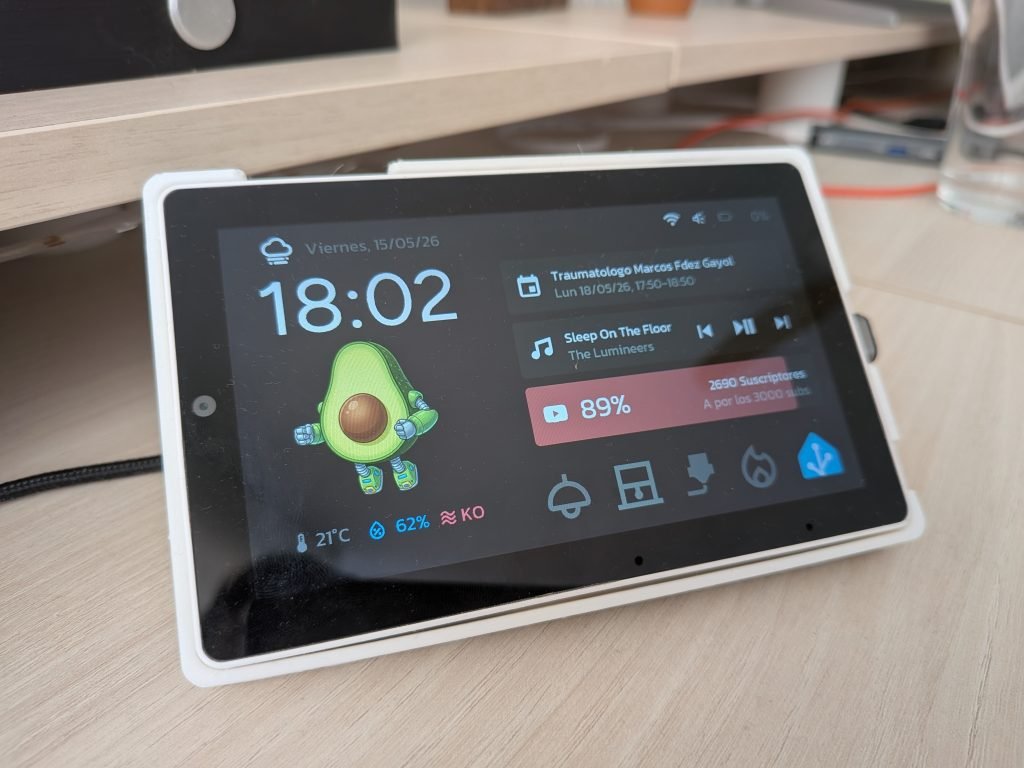
A la izquierda encontrarás la información sobre la fecha y hora actual, así como un icono que representa la condición climatológica del momento. Debajo, una pequeña animación (puedes personalizarla con las imágenes que tú quieras) que no solo realiza una función estética, sino que también te avisa cuando hay una notificación pendiente de leer (luego te explico cómo funciona). Debajo de ella se muestran los datos ambientales relativos a la habitación (temperatura, humedad y nivel de CO2).
A la derecha encontrarás unos iconos que te indican si el dispositivo está conectado, el estado del altavoz y de la batería. Debajo, 3 widgets súper útiles:
- El primero muestra el próximo evento de calendario. En caso de que tengas un evento el mismo día, el texto aparece en azul para llamar tu atención. Además, cuando un evento se encuentra en curso, el widget se convierte en una barra que se va completando en función del evento, para que sepas de un vistazo cuánto te queda.
- El segundo controla una entidad multimedia, mostrando lo que estás escuchando y el grado de avance en la pista, e incorpora controles de reproducción.
- El tercero, en condiciones normales, muestra el porcentaje de progreso respecto a un objetivo que te hayas marcado (en mi caso, suscriptores de nuestro canal de Youtube). No obstante, cuando hay alguna tarea en curso (como una limpieza del robot aspirador o una impresión 3D) muestra el grado de avance de la misma, y el widget se convierte en un acceso rápido al control extendido del dispositivo.
Por último, debajo de estos widgets he incluido un acceso rápido a los dispositivos que más utilizo, así como el icono de Home Assistant, que nos lleva a otra pantalla desde la que puedo controlar todos los dispositivos.
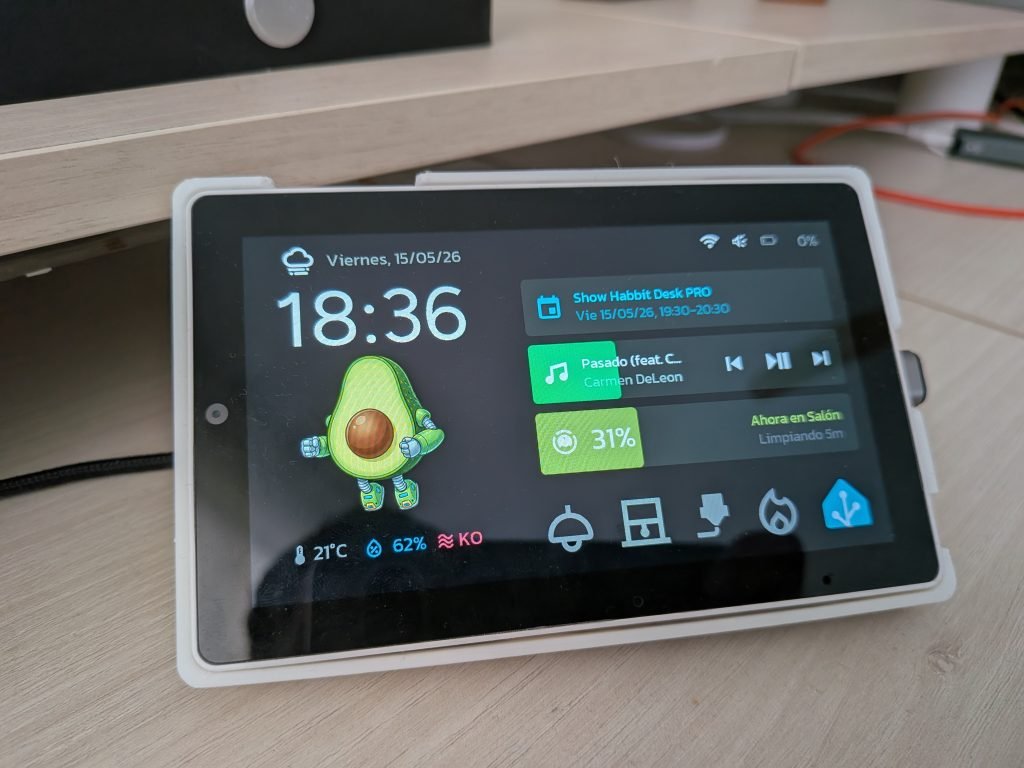
Personalización rápida del dispositivo
En las primeras líneas del código encontrarás distintos parámetros que puedes personalizar fácilmente, reemplazando su valor:
- Name. Este es el nombre que el dispositivo adopta, dentro de ESPHome (no puede contener espacios, mayúsculas, ni caracteres especiales).
- Friendly_name. Nombre «amistoso» del dispositivo, con el que aparecerá en Home Assistant.
- Background_color. Código hexadecimal del color de fondo de la pantalla, precedido de un ‘0x’ (por ejemplo, ‘0x000000’).
- Text_color. Código hexadecimal del texto e iconos principales (reloj, sensores, etc.).
- Text_color_secondary. Código hexadecimal del texto e iconos secundarios (fecha, dispositivos inactivos, etc.).
- Iddle_time. Tiempo de inactividad tras el cual la pantalla se apaga automáticamente.
- Animation_active. URL de la imagen que se muestra cuando el dispositivo está activo.
- Animation_iddle. URL de la imagen que se muestra brevemente cuando pasan unos segundos.
- Animation_alert. URL de la imagen que se muestra cuando hay una notificación pendiente.
- Icon_ha. URL de la imagen que abre el menú de dispositivos.
- Image_3dprinter. URL de la imagen que se muestra en la página de control de la impresora 3D.
- Image_vacuum. URL de la imagen que se muestra en la página de control del robot aspirador.
Entidades de Home Assistant
La siguiente parte del código muestra cómo importamos información desde las entidades de Home Assistant a nuestro dispositivo. Esto sirve para mostrar su estado en la pantalla, o para controlarlos desde la misma.
Si quieres reutilizar la plantilla, sólo tienes que reemplazarar las entidades del ejemplo por las que corresponden a tu instancia. Ahora, si quieres modificar la interfaz te sugiero que eches un vistazo a cómo las utilizo:
- Las entidades con valores numéricos (como la temperatura o la humedad), se encuentran dentro del componente ‘sensor’ del código.
- Las entidades con valores textuales (como «encendido» o «limpiando»), se encuentran dentro del componente ‘text_sensor’ del código.
Control de dispositivos
Como te comentaba antes, si desde la pantalla de inicio pulsas en el icono de Home Assistant, llegarás a una página donde puedes desplegar todos los dispositivos que quieras. De hecho, la he preparado para que puedas crear distintas páginas y moverte desde el icono de la esquina superior derecha.
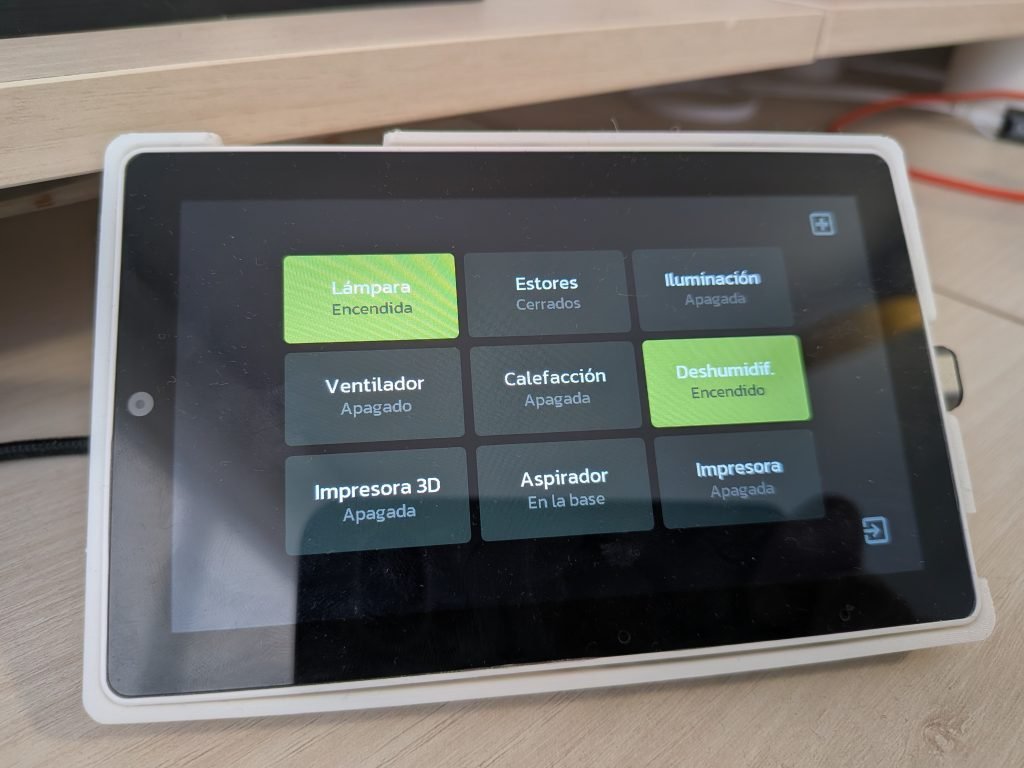
Además, también he creado algunas pantallas ampliadas para dispositivos específicos, como unos ‘sliders’ para los estores de la habitación, o una pantalla para mi impresora 3D.
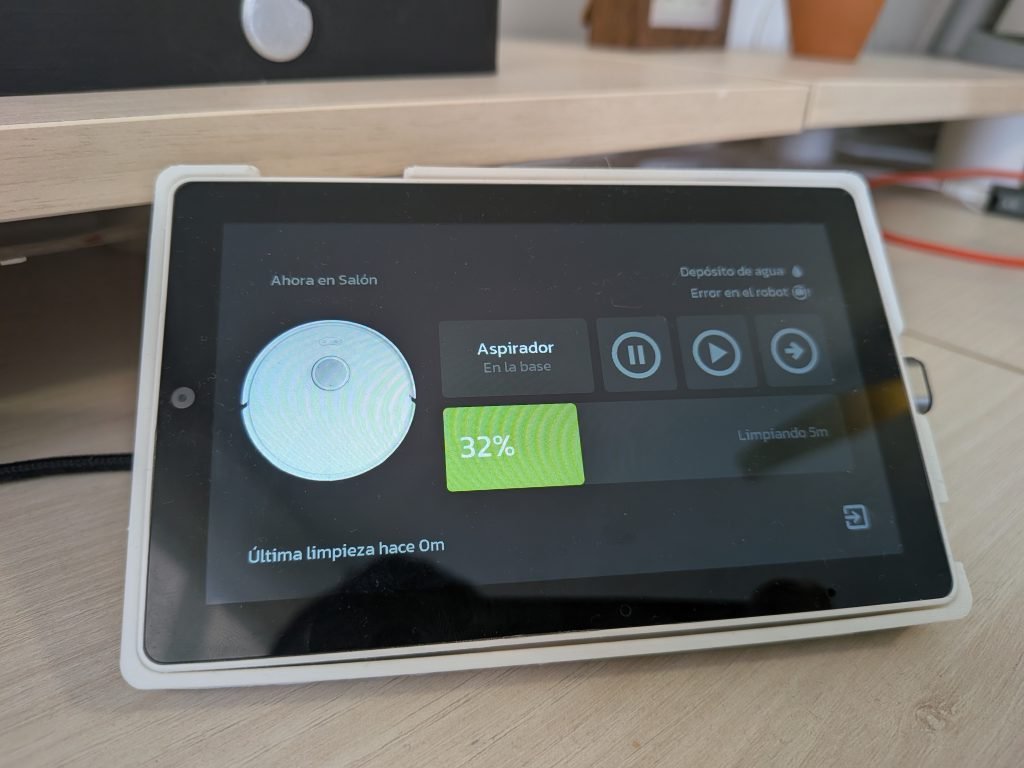
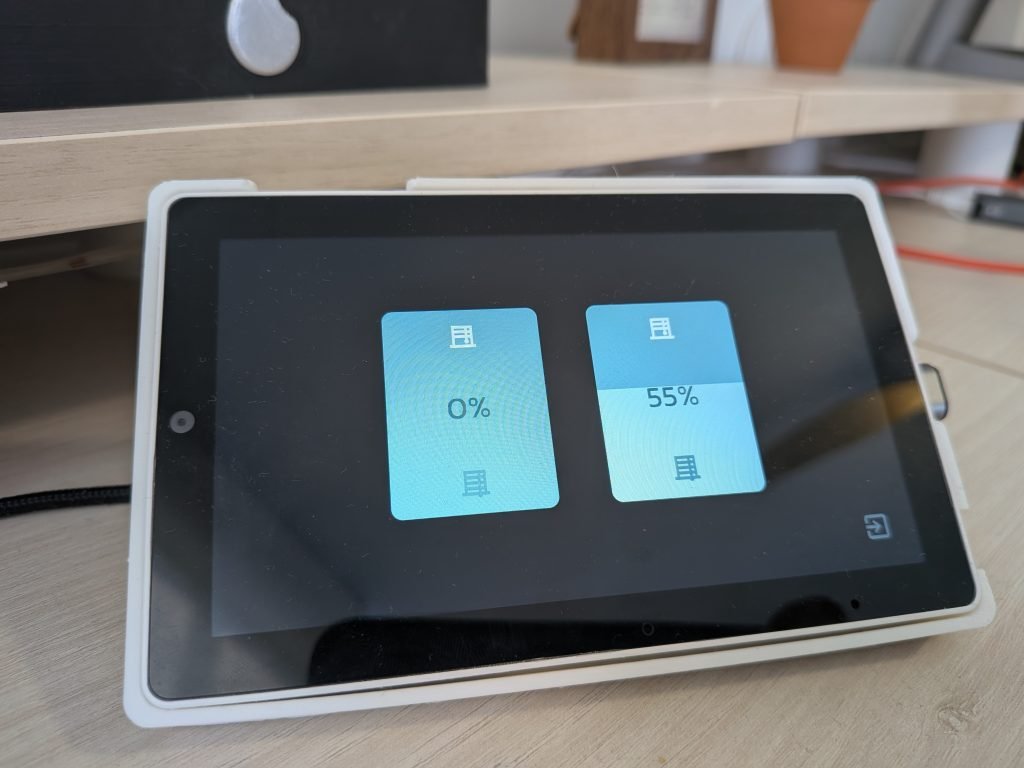
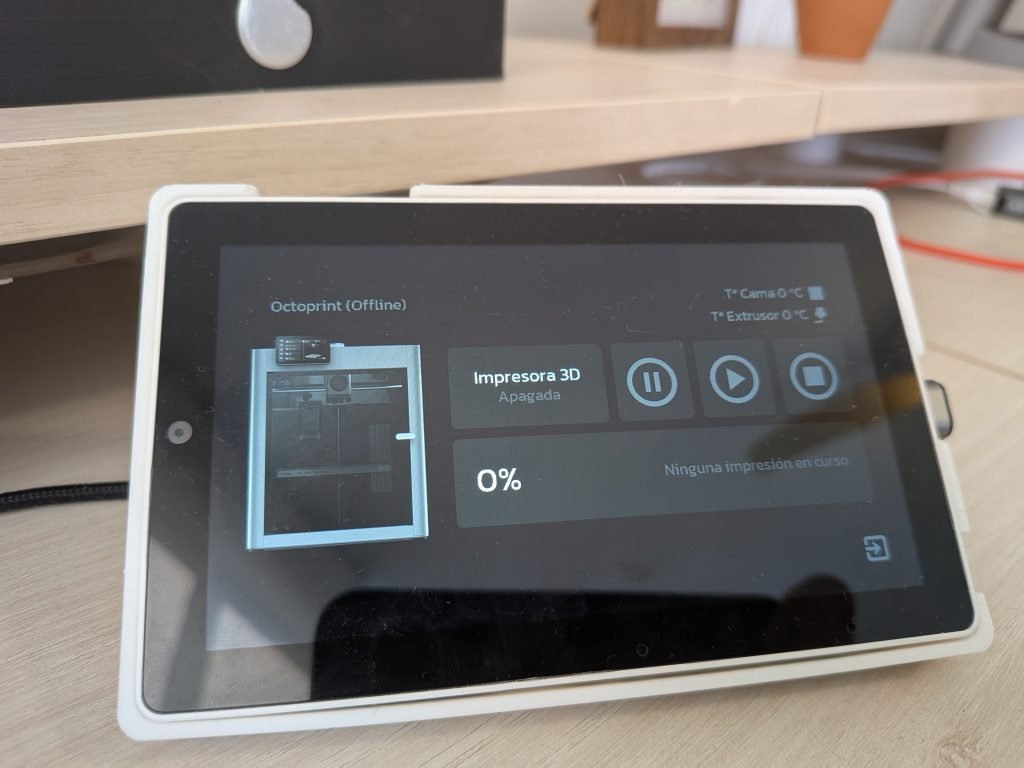
Notificaciones y avisos
Otra de las funciones que me encantan del Habbit Desk PRO es que me muestra notificaciones cuando sucede algo que quiero que me llame la atención. Por ejemplo, cuando llaman a la puerta o acaba la lavadora. Esto lo hace cambiando la animación de la pantalla de inicio y, si pulso sobre ella, me lleva a una pantalla donde me dice lo que ha pasado.
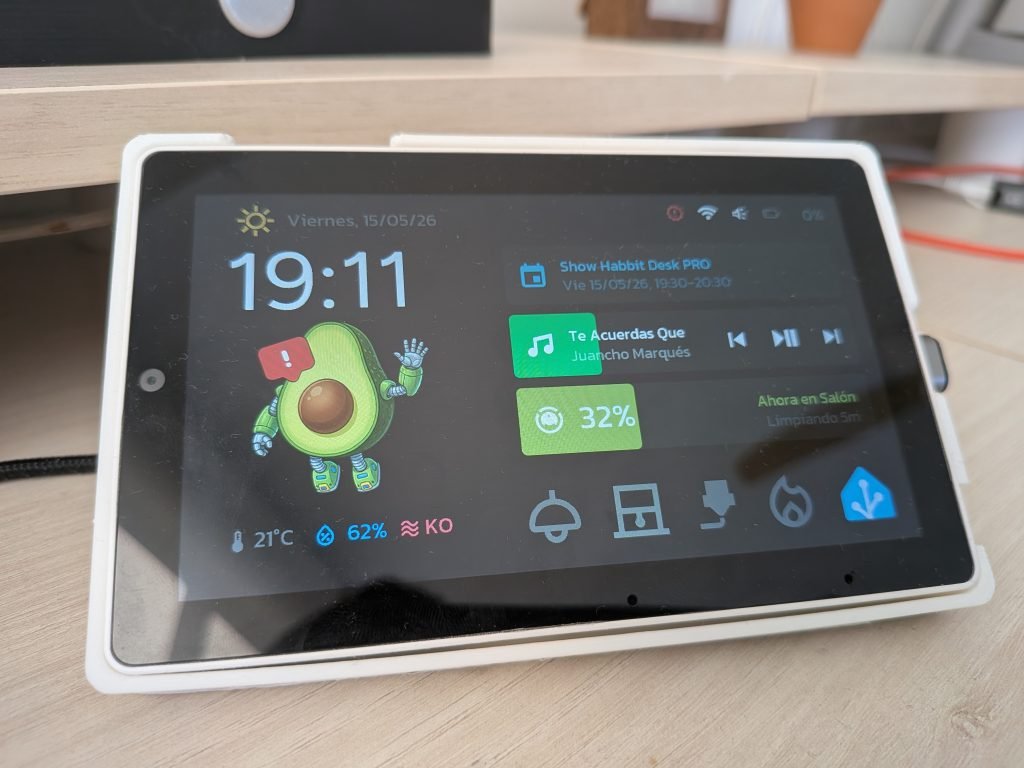
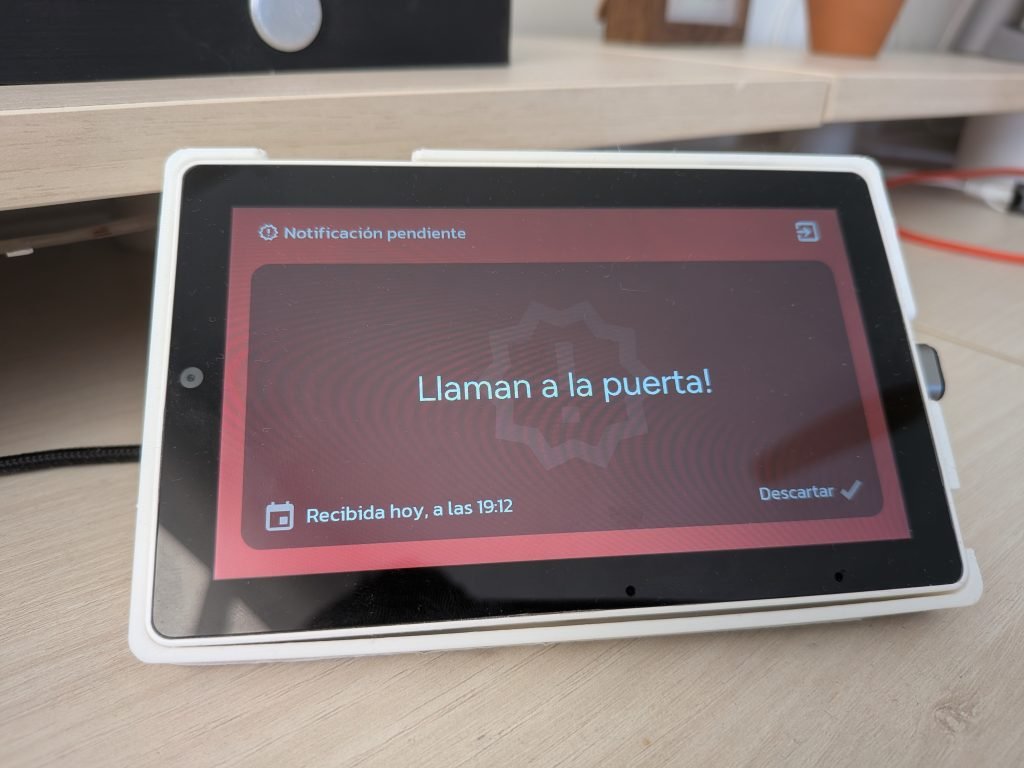
Para ello, simplemente he creado un ayudante de tipo texto (‘input_text.notificaciones_habbit_desk’) que actualizo desde distintas automatizaciones. Cuando este ayudante se actualiza, se desencadena la notificación.
Asistente de voz
Una de las cosas que me sorprendieron de este dispositivo es que cuenta con dos micros y un altavoz que, junto a su pantalla, funcionan de fábula para utilizar el dispositivo como asistente de voz y conseguir un auténtico todo en uno. Además, he podido configurarlo con un tiempo de respuesta inferior a 1 segundo, por lo que estoy muy contento con él.
También lo he configurado para que la pantalla muestre cuándo se activa, y registre los comandos de entrada y la respuesta.