


Si estás buscando una gran pantalla para crear tus dispositivos, en esta entrada vamos a integrar el CrowPanel 5.0″ en HA.
Índice
CrowPanel 5.0″- HMI ESP32 Display
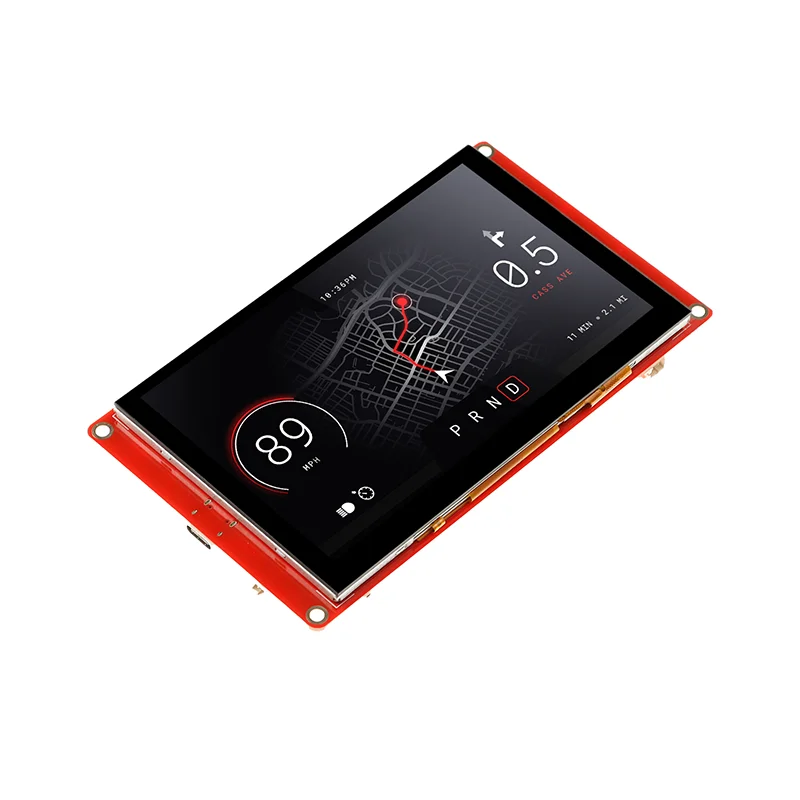
Esta pantalla fabricada por Elecrow es una de las más grandes que he probado hasta ahora. Se trata de una pantalla táctil rectangular de 5.0″ (800×400 pixels) con controlador IC ILI6122 e ILI5960, que funciona sobre una placa ESP32-S3-WROOM-1-N4R8, con WiFi y Bluetooth 5.0, compatible con ESPHome y por tanto integrable en Home Assistant (por lo que, entre otras, podemos usarla como Bluetooth Proxy con Bermuda).
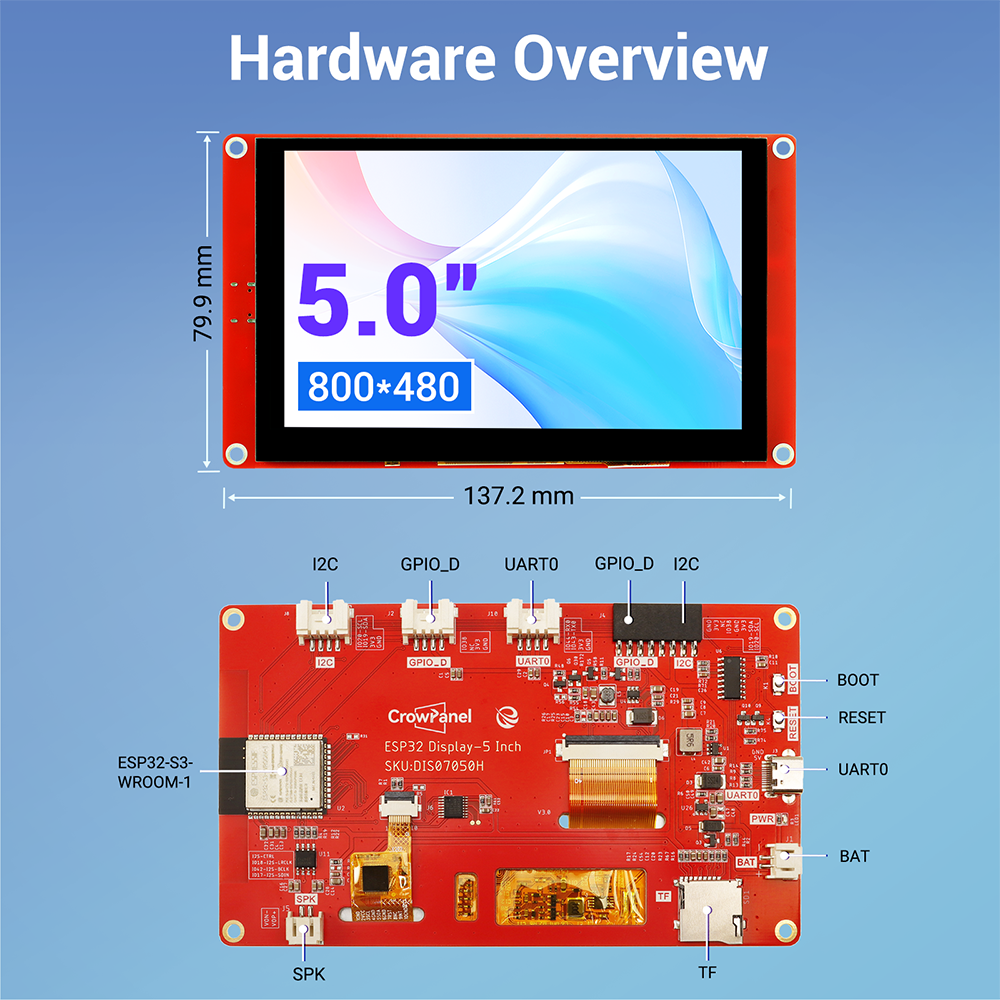
Dispone de una ranura para una tarjeta MicroSD (no incluida), conexión para un altavoz externo y batería (DC5V-2A), además de distintos puertos de conexión 2*I2C, 2*UART0 y 2*GPIO. En resumen, me parece un dispositivo muy completo para tus proyectos, a pesar de que tiene un precio bastante contenido (unos 30€).
Requisitos previos
Para integrar el CrowPanel 5.0″ en HA previamente necesitas:
- Una pantalla CrowPanel 5.0″- HMI ESP32 Display, que trae el cable USB-C de datos incluido.
- Haber instalado ESPHome en Home Assistant.

Configuración en ESPHome
Sigue estos pasos para integrar el CrowPanel 5.0″ en HA:
- En Home Assistant, ve a tu complemento de ESPHome, pulsa en “New device” y “Continue”.
- Dale un nombre a tu dispositivo (por ejemplo, “CrowPanel 5”) y pulsa en “Next”.
- Como tipo de dispositivo selecciona “ESP32-S3”. Observarás de fondo que se ha creado un nuevo bloque para tu dispositivo.
- Pulsa en “Skip” y haz clic en “Edit”, sobre el bloque de tu dispositivo. Copia el código que aparece y consérvalo, ya que vas a necesitar alguna parte del mismo.
- Copia el siguiente código y úsalo para reemplazar el código anterior en ESPHome.
substitutions:
  name: "crowpanel-5"
  friendly_name: "CrowPanel 5"

esphome:
  name: "${name}"
  friendly_name: "${friendly_name}"
  platformio_options:
    board_build.esp-idf.memory_type: qio_opi
    board_build.flash_mode: dio

esp32:
  board: esp32-s3-devkitc-1
  framework:
    type: esp-idf
    sdkconfig_options:
      CONFIG_ESP32S3_DEFAULT_CPU_FREQ_240: y
      CONFIG_ESP32S3_DATA_CACHE_64KB: y
      CONFIG_SPIRAM_FETCH_INSTRUCTIONS: y
      CONFIG_SPIRAM_RODATA: y

psram:
  mode: octal
  speed: 80MHz

logger:

# Enable Home Assistant API
api:
  encryption:
    key: "dsffasdadsYdD2pKHVShOrLNvQn342regrg"

ota:
  - platform: esphome
    password: "dsfsfd342d8128d6b434fd"

wifi:
  ssid: !secret wifi_ssid
  password: !secret wifi_password

  # Enable fallback hotspot (captive portal) in case wifi connection fails
  ap:
    ssid: "Crowpanel-5 Fallback Hotspot"
    password: "a05sJyc6tAul"

captive_portal:

i2c:
  sda: GPIO19
  scl: GPIO20
  scan: true

light:
  - platform: monochromatic
    output: gpio_backlight_pwm
    name: Display Backlight
    id: back_light
    restore_mode: ALWAYS_ON

output:
  - platform: ledc
    pin: 2
    frequency: 1220
    id: gpio_backlight_pwm

touchscreen:
  - platform: gt911
    id: touch

display:
  - platform: rpi_dpi_rgb
    id: main_display
    color_order: RGB
    invert_colors: True
    update_interval: never
    auto_clear_enabled: false # takes 2.8 seconds to clear the display
    dimensions:
      width: 800
      height: 480
    de_pin: 40
    hsync_pin: 39
    vsync_pin: 41
    pclk_pin: 0
    pclk_frequency: 12MHz
    data_pins:
      red:
        - 45        #r1
        - 48        #r2
        - 47        #r3
        - 21        #r4
        - 14        #r5
      green:
        - 5         #g0
        - 6         #g1
        - 7         #g2
        - 15        #g3
        - 16        #g4
        - 4         #g5
      blue:
        - 8         #b1
        - 3         #b2
        - 46        #b3
        - 9         #b4
        - 1         #b5

lvgl:
  displays:
    - main_display
  touchscreens:
    - touch
  buffer_size: 100%
  widgets:
    - label:
        align: CENTER
        id: lbl_title
        text_font: montserrat_28
        text: "Aguacatec"
- Parte importante. En este código no se han incluido las credenciales para que el dispositivo se conecte a tu WiFi y tu instancia de Home Assistant y tienes que incluirlas manualmente. En concreto me refiero a las siguientes líneas del código que has copiado en el paso 4.
# Enable Home Assistant API
api:
  encryption:
    key: "bg6hash6sjdjsdjk02hh0qnQeYVwm123vdfKE8BP5"

ota:
  - platform: esphome
    password: "asddasda27aab65a48484502b332f"

wifi:
  ssid: !secret wifi_ssid
  password: !secret wifi_password

  # Enable fallback hotspot (captive portal) in case wifi connection fails
  ap:
    ssid: "Assist Fallback Hotspot"
    password: "ZsasdasdHGP2234"
- Lo que tienes que hacer es, encontrar las líneas correspondientes en el código (está al principio) y añadir la información correspondiente.
- Ahora sí, pulsa en “Save” e “Install”. Selecciona “Manual download” y espera a que se compile el código.
- Cuando termine, selecciona la opción “Modern format” para descargar el fichero ‘.bin’ correspondiente.
- Conecta el dispositivo con el cable USB-C de datos por el puerto que trae en la parte posterior a tu ordenador.
- Ahora ve a la página de ESPHome y pulsa en “Connect”. En la ventana emergente selecciona tu placa y pulsa en “Conectar”.
- Ahora pulsa en “Install” y selecciona el fichero ‘.bin’ obtenido en el paso 9. De nuevo, pulsa en “Install”.
- Vuelve a Home Assistant y ve a Configuración > Dispositivos y servicios. Lo normal es que tu dispositivo haya sido descubierto y aparezca en la parte superior, esperando únicamente a que pulses el botón de “Configurar”. De lo contrario pulsa en el botón de “Añadir integración”, busca “ESPHome” e introduce la IP de tu placa en el campo ‘Host’. Como siempre, te recomiendo que asignes una IP fija en tu router para evitar fallos en el futuro si esta cambia.
- Para terminar ve a Configuración > Dispositivos y servicios > ESPHome. Pulsa sobre el enlace «Configurar» correspondiente tu dispositivo. En la ventana emergente marca la casilla «Permitir que el dispositivo realice acciones de Home Assistant» y pulsa en «Enviar». Esto va a permitir que podamos controlar nuestros dispositivos desde la pantalla.
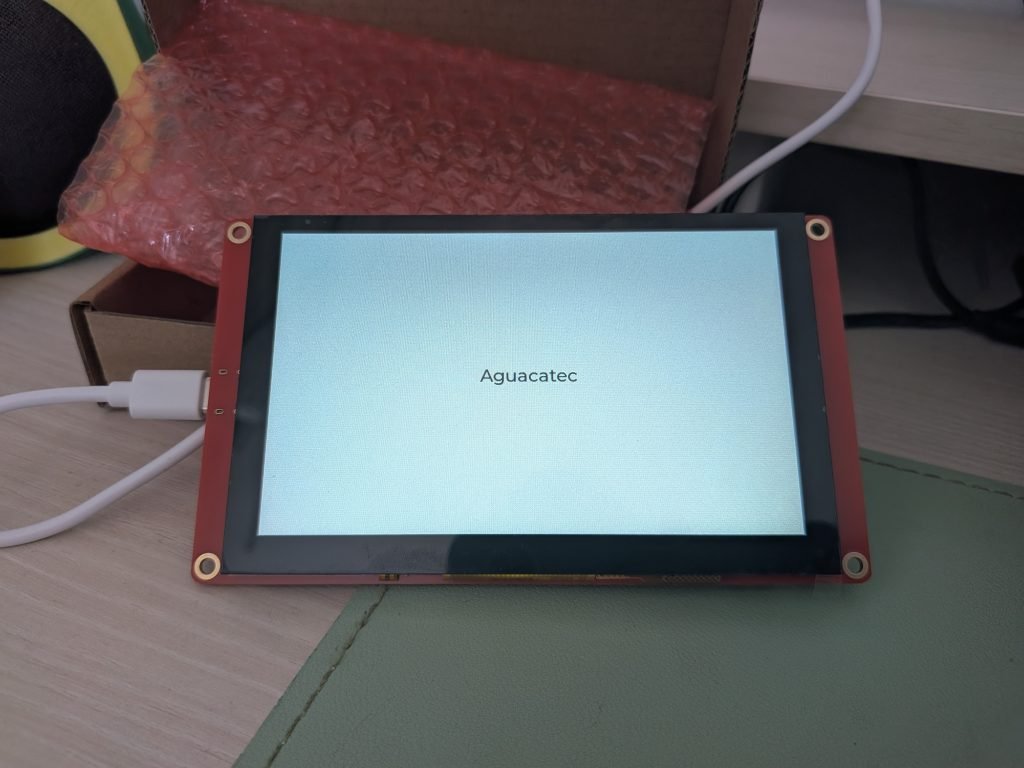
Si todo ha ido bien, deberías estar viendo lo siguiente:
Código de TARS
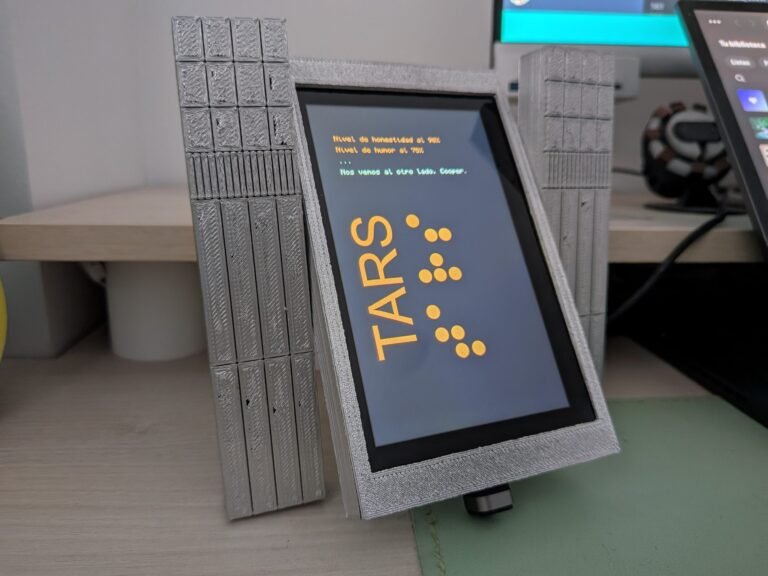
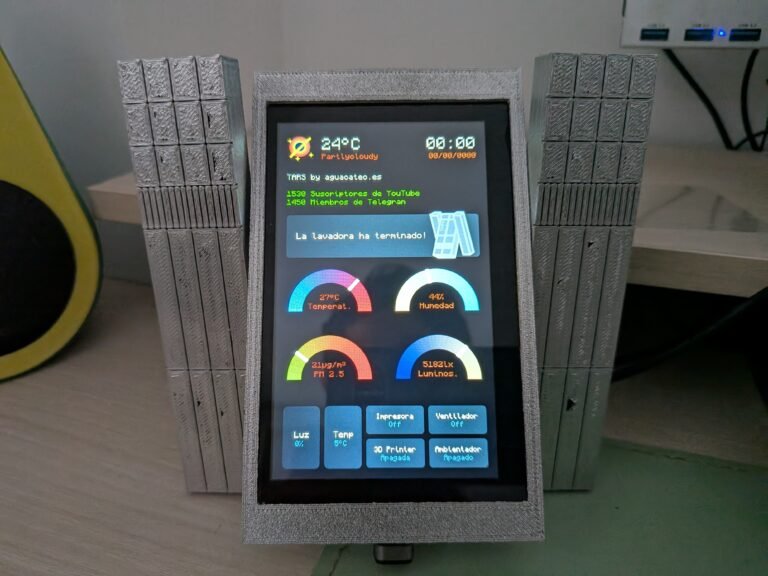
Ya sabes que nunca pierdo la oportunidad de hacer algo interesante con los dispositivos que llegan a nuestras manos. En este caso he querido recrear al robot TARS de «Interstellar», una de mis películas favoritas.
A continuación te dejo el código completo para que lo adaptes como quieras, así como el enlace al soporte que he diseñado.

substitutions:
# Device customization
# Personalización del dispositivo
name: "crowpanel-5"
friendly_name: "CrowPanel 5"
greeting: "TARS by aguacatec.es"
# Example of Sensors
# Ejemplo de Sensores
sensor_temperature: sensor.openweathermap_temperature
sensor_condition: sensor.openweathermap_condition
sensor_1_legend: "Suscriptores de YouTube"
sensor_1_value: sensor.youtube_stats
sensor_2_legend: "Miembros de Telegram"
sensor_2_value: input_number.miembros_telegram
tars_assistant: input_text.tars_assistant
sensor_home_temperature: sensor.home_temperatura
sensor_home_humidity: sensor.home_humedad
sensor_home_pm25: sensor.ikea_vindriktning_v2_part_culas_de_2_5_m
sensor_home_luminance: sensor.sensor_de_lluvia_illuminance
# Example of Devices
# Ejemplo de Dispositivos
slider1: light.tira_led_escritorio
slider1_name: "Luz"
slider2: climate.salon
slider2_name: "Temp"
button1: switch.impresora
button1_name: "Impresora"
button2: switch.ventilador
button2_name: "Ventilador"
button3: switch.impresora_3d
button3_name: "3D Printer"
button4: switch.shelly1g4_a085e3bd5e08_switch_0
button4_name: "Ambientador"
# Other settings
# Otros ajustes
allowed_characters: " ¿?¡!#%'()+,-./:µ³°0123456789ABCDEFGHIJKLMNOPQRSTUVWYZabcdefghijklmnopqrstuvwxyzáéíóú"
################################################################################################################
esphome:
name: "${name}"
friendly_name: "${friendly_name}"
platformio_options:
board_build.esp-idf.memory_type: qio_opi
board_build.flash_mode: dio
esp32:
board: esp32-s3-devkitc-1
framework:
type: esp-idf
sdkconfig_options:
CONFIG_ESP32S3_DEFAULT_CPU_FREQ_240: y
CONFIG_ESP32S3_DATA_CACHE_64KB: y
CONFIG_SPIRAM_FETCH_INSTRUCTIONS: y
CONFIG_SPIRAM_RODATA: y
psram:
mode: octal
speed: 80MHz
http_request:
verify_ssl: false
logger:
# Enable Home Assistant API
api:
encryption:
key: "asdsa345gfdIYdD2pKdsgfgsdgdf45ykakwJk="
ota:
- platform: esphome
password: "0sdf23f822bsdf28d6sdf54645"
wifi:
ssid: !secret wifi_ssid
password: !secret wifi_password
# Enable fallback hotspot (captive portal) in case wifi connection fails
ap:
ssid: "Crowpanel-5 Fallback Hotspot"
password: "dsf654y546ul"
captive_portal:
font:
- file: "fonts/Monocraft.ttf"
id: font_console
size: 16
glyphs: ${allowed_characters}
- file: "fonts/Monocraft.ttf"
id: font_clock
size: 35
glyphs: ${allowed_characters}
- file: "fonts/Monocraft.ttf"
id: font_date
size: 16
glyphs: ${allowed_characters}
- file: "fonts/Monocraft.ttf"
id: font_values
size: 14
glyphs: ${allowed_characters}
- file: "fonts/Monocraft.ttf"
id: font_tars
size: 18
glyphs: ${allowed_characters}
i2c:
sda: GPIO19
scl: GPIO20
scan: true
image:
- file: https://aguacatec.es/wp-content/uploads/2025/06/TARS.png
id: tars_logo
resize: 400x400
type: RGB565
transparency: alpha_channel
- file: https://aguacatec.es/wp-content/uploads/2025/06/gargantua.png
id: icon_weather
resize: 60x60
type: RGB565
transparency: alpha_channel
- file: https://aguacatec.es/wp-content/uploads/2025/06/tars_icon.png
id: icon_tars
resize: 140x140
type: RGB565
transparency: alpha_channel
interval:
- interval: 60s
then:
- lvgl.label.update:
id: lbl_date
text: !lambda 'return id(esptime).now().strftime("%d/%m/%y");'
- lvgl.label.update:
id: lbl_clock
text: !lambda 'return id(esptime).now().strftime("%H:%M");'
light:
- platform: monochromatic
output: gpio_backlight_pwm
name: Display Backlight
id: display_backlight
restore_mode: ALWAYS_ON
output:
- platform: ledc
pin: 2
frequency: 1220
id: gpio_backlight_pwm
sensor:
- platform: homeassistant
id: home_temperature
entity_id: ${sensor_temperature}
internal: true
on_value:
then:
- lvgl.label.update:
id: lbl_temperature
text:
format: "%.0f°C"
args:
- id(home_temperature).state
- platform: homeassistant
id: sensor1
entity_id: ${sensor_1_value}
internal: true
on_value:
then:
- lvgl.label.update:
id: lbl_sensor1
text:
format: "%.0f"
args:
- id(sensor1).state
- platform: homeassistant
id: sensor2
entity_id: ${sensor_2_value}
internal: true
on_value:
then:
- lvgl.label.update:
id: lbl_sensor2
text:
format: "%.0f"
args:
- id(sensor2).state
- platform: homeassistant
id: slider1_value
entity_id: ${slider1}
attribute: brightness
internal: true
filters:
- lambda: |-
if (isnan(x)) { return 0; }
else { return x; }
on_value:
then:
- lvgl.slider.update:
id: dimmer_slider_1
value: !lambda 'return (int)x;'
- lambda: |-
int brightness = (int) id(slider1_value).state;
int percentage = (brightness * 100) / 255;
char buf[8];
snprintf(buf, sizeof(buf), "%d%%", percentage);
// Actualizar texto del label LVGL
lv_label_set_text(id(dimmer_slider_1_value), buf);
- platform: homeassistant
id: slider2_value
entity_id: ${slider2}
attribute: temperature
internal: true
on_value:
then:
- lvgl.slider.update:
id: dimmer_slider_2
value: !lambda 'return (int)x;'
- lambda: |-
float temp = id(slider2_value).state;
char buf[16];
snprintf(buf, sizeof(buf), "%.0f°C", temp);
lv_label_set_text(id(dimmer_slider_2_value), buf);
- platform: homeassistant
id: h_temperature
entity_id: ${sensor_home_temperature}
internal: true
on_value:
then:
- lvgl.indicator.update:
id: temperature_needle
value: !lambda 'return (int)x;'
- lvgl.label.update:
id: h_temperature_value
text:
format: "%.0f°C"
args:
- id(h_temperature).state
- platform: homeassistant
id: h_humidity
entity_id: ${sensor_home_humidity}
internal: true
on_value:
then:
- lvgl.indicator.update:
id: humidity_needle
value: !lambda 'return (int)x;'
- lvgl.label.update:
id: h_humidity_value
text:
format: "%.0f%%"
args:
- id(h_humidity).state
- platform: homeassistant
id: h_pm25
entity_id: ${sensor_home_pm25}
internal: true
on_value:
then:
- lvgl.indicator.update:
id: pm25_needle
value: !lambda 'return (int)x;'
- lvgl.label.update:
id: h_pm25_value
text:
format: "%.0fµg/m³"
args:
- id(h_pm25).state
- platform: homeassistant
id: h_luminance
entity_id: ${sensor_home_luminance}
internal: true
on_value:
then:
- lvgl.indicator.update:
id: luminance_needle
value: !lambda 'return (int)x;'
- lvgl.label.update:
id: h_luminance_value
text:
format: "%.0flx"
args:
- id(h_luminance).state
text_sensor:
- platform: homeassistant
id: home_condition
entity_id: ${sensor_condition}
internal: true
on_value:
then:
- lvgl.label.update:
id: lbl_condition
text: !lambda |-
std::string str = id(home_condition).state;
str[0] = toupper(str[0]);
return str;
- platform: homeassistant
id: tarsassistant
entity_id: ${tars_assistant}
internal: true
on_value:
then:
- lvgl.label.update:
id: tars_message
text: !lambda |-
return to_string(x);
- platform: homeassistant
id: slider_1
entity_id: ${slider1}
internal: true
- platform: homeassistant
id: slider_2
entity_id: ${slider2}
internal: true
- platform: homeassistant
id: button_1
entity_id: ${button1}
internal: true
on_value:
then:
- lvgl.label.update:
id: btn_1_state
text: !lambda |-
if (id(button_1).state == "on") {
return std::string("Encendida");
} else {
return std::string("Apagada");
}
- if:
condition:
lambda: 'return id(button_1).state == "on";'
then:
- lvgl.obj.update:
id: btn_1
bg_color: 0x799c9b
bg_opa: 1
else:
- lvgl.obj.update:
id: btn_1
bg_color: 0xa9b4b4
bg_opa: 0.2
- platform: homeassistant
id: button_2
entity_id: ${button2}
internal: true
on_value:
then:
- lvgl.label.update:
id: btn_2_state
text: !lambda |-
if (id(button_2).state == "on") {
return std::string("Encendido");
} else {
return std::string("Apagado");
}
- if:
condition:
lambda: 'return id(button_2).state == "on";'
then:
- lvgl.obj.update:
id: btn_2
bg_color: 0x799c9b
bg_opa: 1
else:
- lvgl.obj.update:
id: btn_2
bg_color: 0xa9b4b4
bg_opa: 0.2
- platform: homeassistant
id: button_3
entity_id: ${button3}
internal: true
on_value:
then:
- lvgl.label.update:
id: btn_3_state
text: !lambda |-
if (id(button_3).state == "on") {
return std::string("Encendida");
} else {
return std::string("Apagada");
}
- if:
condition:
lambda: 'return id(button_3).state == "on";'
then:
- lvgl.obj.update:
id: btn_3
bg_color: 0x799c9b
bg_opa: 1
else:
- lvgl.obj.update:
id: btn_3
bg_color: 0xa9b4b4
bg_opa: 0.2
- platform: homeassistant
id: button_4
entity_id: ${button4}
internal: true
on_value:
then:
- lvgl.label.update:
id: btn_4_state
text: !lambda |-
if (id(button_4).state == "on") {
return std::string("Encendido");
} else {
return std::string("Apagado");
}
- if:
condition:
lambda: 'return id(button_4).state == "on";'
then:
- lvgl.obj.update:
id: btn_4
bg_color: 0x799c9b
bg_opa: 1
else:
- lvgl.obj.update:
id: btn_4
bg_color: 0xa9b4b4
bg_opa: 0.2
time:
- platform: homeassistant
id: esptime
touchscreen:
platform: gt911
id: touch
transform:
mirror_x: false
mirror_y: true
swap_xy: true
on_touch:
- logger.log:
format: Touch at (%d, %d)
args: [touch.x, touch.y]
on_release:
then:
- if:
condition: lvgl.is_paused
then:
- lvgl.page.show: page_home
- light.turn_on: display_backlight
- lvgl.resume:
- lvgl.widget.redraw:
display:
- platform: rpi_dpi_rgb
id: main_display
color_order: RGB
invert_colors: True
update_interval: never
auto_clear_enabled: false # takes 2.8 seconds to clear the display
rotation: 90
dimensions:
width: 800
height: 480
de_pin: 40
hsync_pin: 39
vsync_pin: 41
pclk_pin: 0
pclk_frequency: 12MHz
data_pins:
red:
- 45 #r1
- 48 #r2
- 47 #r3
- 21 #r4
- 14 #r5
green:
- 5 #g0
- 6 #g1
- 7 #g2
- 15 #g3
- 16 #g4
- 4 #g5
blue:
- 8 #b1
- 3 #b2
- 46 #b3
- 9 #b4
- 1 #b5
lvgl:
displays:
- main_display
touchscreens:
- touch
buffer_size: 100%
style_definitions:
- id: style_title
align: TOP_LEFT
pad_left: 50
text_font: font_console
- id: style_data
text_color: 0x73d82f
text_font: font_date
- id: style_tars_assistant
width: 440
height: 100
bg_color: 0xa9b4b4
bg_opa: 0.2
border_width: 0
- id: style_button
width: 125
height: 59
bg_color: 0xa9b4b4
bg_opa: 0.2
border_width: 0
- id: style_button_text
align: CENTER
text_font: font_values
text_color: 0xffffff
- id: style_slider
width: 80
height: 130
bg_color: 0x799c9b
radius: 10
- id: style_slider_back
width: 80
height: 130
bg_color: 0xa9b4b4
radius: 10
- id: style_slider_label_text
align: CENTER
text_font: font_date
text_color: 0xffffff
- id: style_slider_label_values
align: CENTER
text_font: font_values
text_color: 0x4e7676
on_idle:
- timeout: 5s
then:
- lvgl.pause:
- light.turn_off:
id: display_backlight
pages:
- id: page_boot
bg_color: 0x000000
widgets:
- label:
styles: style_title
id: lbl_title_1
text: "Nivel de honestidad al 90%"
pad_top: 80
text_color: 0xc24d00
- label:
styles: style_title
id: lbl_title_2
text: "Nivel de humor al 75%"
pad_top: 110
text_color: 0xc24d00
- label:
styles: style_title
id: lbl_title_3
text: "..."
pad_top: 140
text_color: 0xffffff
- label:
styles: style_title
id: lbl_title_4
text: "Nos vemos al otro lado, Cooper."
pad_top: 170
text_color: 0xffffff
- image:
align: LEFT_MID
src: tars_logo
id: tars
pad_top: 140
- id: page_home
bg_color: 0x000000
scrollbar_mode: "OFF"
widgets:
## Top Bar / Barra Superior
- image:
align: TOP_LEFT
src: icon_weather
id: weather
pad_top: 30
pad_left: 20
- label:
align: TOP_LEFT
id: lbl_temperature
text: "25ºC"
text_color: 0xffffff
text_font: font_clock
pad_top: 30
pad_left: 100
- label:
align: TOP_LEFT
id: lbl_condition
text: "Sunny"
text_color: 0xc24d00
text_font: font_date
pad_top: 70
pad_left: 100
- label:
align: TOP_RIGHT
id: lbl_clock
text: "00:00"
text_color: 0xffffff
text_font: font_clock
pad_top: 30
pad_right: 20
- label:
align: TOP_RIGHT
id: lbl_date
text: "00/00/0000"
text_color: 0xc24d00
text_font: font_date
pad_top: 70
pad_right: 20
## Info
- label:
styles: style_data
align: TOP_LEFT
id: lbl_greeting
text: "${greeting}"
text_color: 0xffffff
pad_top: 120
pad_left: 20
- label:
styles: style_data
align: TOP_LEFT
id: lbl_sensor1
text: "100000"
pad_top: 160
pad_left: 20
- label:
styles: style_data
align: TOP_LEFT
id: lbl_sensor1_legend
text: "${sensor_1_legend}"
pad_top: 160
pad_left: 75
- label:
styles: style_data
align: TOP_LEFT
id: lbl_sensor2
text: "100000"
pad_top: 180
pad_left: 20
- label:
styles: style_data
align: TOP_LEFT
id: lbl_sensor2_legend
text: "${sensor_2_legend}"
pad_top: 180
pad_left: 75
## TARS ASSISTANT
- obj:
styles: style_tars_assistant
x: 20
y: 220
id: btn_tars
widgets:
- label:
id: tars_message
text_font: font_tars
text_color: 0xffffff
align: LEFT_MID
text: "Hola!"
pad_left: 10
- image:
align: TOP_RIGHT
src: icon_tars
id: tars_assistant
pad_top: 200
pad_right: 20
## Indicators / Indicadores
- obj:
y: 320
height: 240
width: 240
align: TOP_LEFT
bg_color: 0xFFFFFF
bg_opa: 0
border_width: 0
pad_all: 14
widgets:
- meter:
height: 100%
width: 100%
border_width: 0
align: CENTER
bg_opa: TRANSP
scales:
- range_from: 0
range_to: 35
angle_range: 180
ticks:
count: 70
width: 1
length: 31
indicators:
- tick_style:
start_value: 0
end_value: 35
color_start: 0x3399ff
color_end: 0xFF0000
- range_from: 0
range_to: 35
angle_range: 180
ticks:
count: 0
indicators:
- line:
id: temperature_needle
width: 8
r_mod: 2
value: -150
color: 0xFFFFFF
- obj: # to cover the middle part of meter indicator line
height: 123
width: 123
radius: 73
align: CENTER
border_width: 0
pad_all: 0
bg_color: 0x000000
- label:
id: h_temperature_value
text: "--"
align: CENTER
y: -30
text_font: font_date
text_color: 0xc24d00
- label:
text: "Temperat."
align: CENTER
y: -10
text_font: font_date
text_color: 0xc24d00
- obj:
y: 320
height: 240
width: 240
align: TOP_RIGHT
bg_color: 0xFFFFFF
bg_opa: 0
border_width: 0
pad_all: 14
widgets:
- meter:
height: 100%
width: 100%
border_width: 0
align: CENTER
bg_opa: TRANSP
scales:
- range_from: 0
range_to: 100
angle_range: 180
ticks:
count: 70
width: 1
length: 31
indicators:
- tick_style:
start_value: 0
end_value: 100
color_start: 0xffcc66
color_end: 0x3399ff
- range_from: 0
range_to: 100
angle_range: 180
ticks:
count: 0
indicators:
- line:
id: humidity_needle
width: 8
r_mod: 2
value: -150
color: 0xFFFFFF
- obj: # to cover the middle part of meter indicator line
height: 123
width: 123
radius: 73
align: CENTER
border_width: 0
pad_all: 0
bg_color: 0x000000
- label:
id: h_humidity_value
text: "--%"
align: CENTER
y: -30
text_font: font_date
text_color: 0xc24d00
- label:
text: "Humedad"
align: CENTER
y: -10
text_font: font_date
text_color: 0xc24d00
- obj:
y: 470
height: 240
width: 240
align: TOP_LEFT
bg_color: 0xFFFFFF
bg_opa: 0
border_width: 0
pad_all: 14
widgets:
- meter:
height: 100%
width: 100%
border_width: 0
align: CENTER
bg_opa: TRANSP
scales:
- range_from: 0
range_to: 100
angle_range: 180
ticks:
count: 70
width: 1
length: 31
indicators:
- tick_style:
start_value: 0
end_value: 100
color_start: 0x9acd32
color_end: 0xFF0000
- range_from: 0
range_to: 100
angle_range: 180
ticks:
count: 0
indicators:
- line:
id: pm25_needle
width: 8
r_mod: 2
value: -150
color: 0xFFFFFF
- obj: # to cover the middle part of meter indicator line
height: 123
width: 123
radius: 73
align: CENTER
border_width: 0
pad_all: 0
bg_color: 0x000000
- label:
id: h_pm25_value
text: "--"
align: CENTER
y: -30
text_font: font_date
text_color: 0xc24d00
- label:
text: "PM 2.5"
align: CENTER
y: -10
text_font: font_date
text_color: 0xc24d00
- obj:
y: 470
height: 240
width: 240
align: TOP_RIGHT
bg_color: 0xFFFFFF
bg_opa: 0
border_width: 0
pad_all: 14
widgets:
- meter:
height: 100%
width: 100%
border_width: 0
align: CENTER
bg_opa: TRANSP
scales:
- range_from: 0
range_to: 7000
angle_range: 180
ticks:
count: 70
width: 1
length: 31
indicators:
- tick_style:
start_value: 0
end_value: 7000
color_start: 0x000080
color_end: 0xffcc66
- range_from: 0
range_to: 7000
angle_range: 180
ticks:
count: 0
indicators:
- line:
id: luminance_needle
width: 8
r_mod: 2
value: -150
color: 0xFFFFFF
- obj: # to cover the middle part of meter indicator line
height: 123
width: 123
radius: 73
align: CENTER
border_width: 0
pad_all: 0
bg_color: 0x000000
- label:
id: h_luminance_value
text: "--lx"
align: CENTER
y: -30
text_font: font_date
text_color: 0xc24d00
- label:
text: "Luminos."
align: CENTER
y: -10
text_font: font_date
text_color: 0xc24d00
## Controls / Controles
- slider:
styles: style_slider_back
id: dimmer_slider_1
x: 20
y: 650
indicator:
styles: style_slider
knob:
opa: 0
min_value: 0
max_value: 255
on_release:
- homeassistant.action:
action: light.turn_on
data:
entity_id: ${slider1}
brightness: !lambda return int(x);
- label:
styles: style_slider_label_text
id: dimmer_slider_1_label
text: "${slider1_name}"
x: 45
y: 700
align: TOP_LEFT
- label:
styles: style_slider_label_values
id: dimmer_slider_1_value
text: "Off"
x: 47
y: 720
align: TOP_LEFT
- slider:
styles: style_slider_back
id: dimmer_slider_2
x: 110
y: 650
indicator:
styles: style_slider
knob:
opa: 0
min_value: 18
max_value: 25
on_release:
- homeassistant.action:
action: climate.set_temperature
data:
entity_id: ${slider2}
temperature: !lambda return int(x);
- label:
styles: style_slider_label_text
id: dimmer_slider_2_label
text: "${slider2_name}"
x: 130
y: 700
align: TOP_LEFT
- label:
styles: style_slider_label_values
id: dimmer_slider_2_value
text: "Off"
x: 132
y: 720
align: TOP_LEFT
- obj:
styles: style_button
x: 200
y: 650
id: btn_1
widgets:
- label:
styles: style_button_text
align: center
text: "${button1_name}"
pad_bottom: 15
- label:
id: btn_1_state
styles: style_slider_label_values
align: center
text: "Off"
pad_top: 18
on_press:
- homeassistant.action:
action: switch.toggle
data:
entity_id: ${button1}
- obj:
styles: style_button
x: 335
y: 650
id: btn_2
widgets:
- label:
styles: style_button_text
align: center
text: "${button2_name}"
pad_bottom: 15
- label:
id: btn_2_state
styles: style_slider_label_values
align: center
text: "Off"
pad_top: 18
on_press:
- homeassistant.action:
action: switch.toggle
data:
entity_id: ${button2}
- obj:
styles: style_button
x: 200
y: 719
id: btn_3
widgets:
- label:
styles: style_button_text
align: center
text: "${button3_name}"
pad_bottom: 15
- label:
id: btn_3_state
styles: style_slider_label_values
align: center
text: "Off"
pad_top: 18
on_press:
- homeassistant.action:
action: switch.toggle
data:
entity_id: ${button3}
- obj:
styles: style_button
x: 335
y: 719
id: btn_4
widgets:
- label:
styles: style_button_text
align: center
text: "${button4_name}"
pad_bottom: 15
- label:
id: btn_4_state
styles: style_slider_label_values
align: center
text: "Off"
pad_top: 18
on_press:
- homeassistant.action:
action: switch.toggle
data:
entity_id: ${button4}