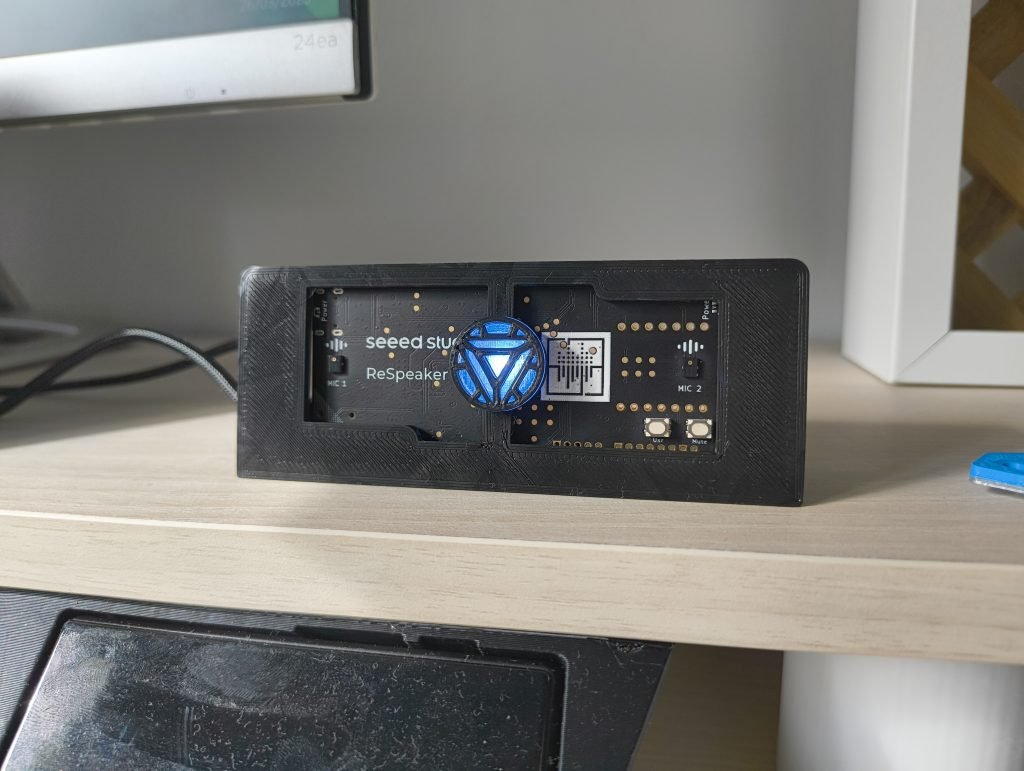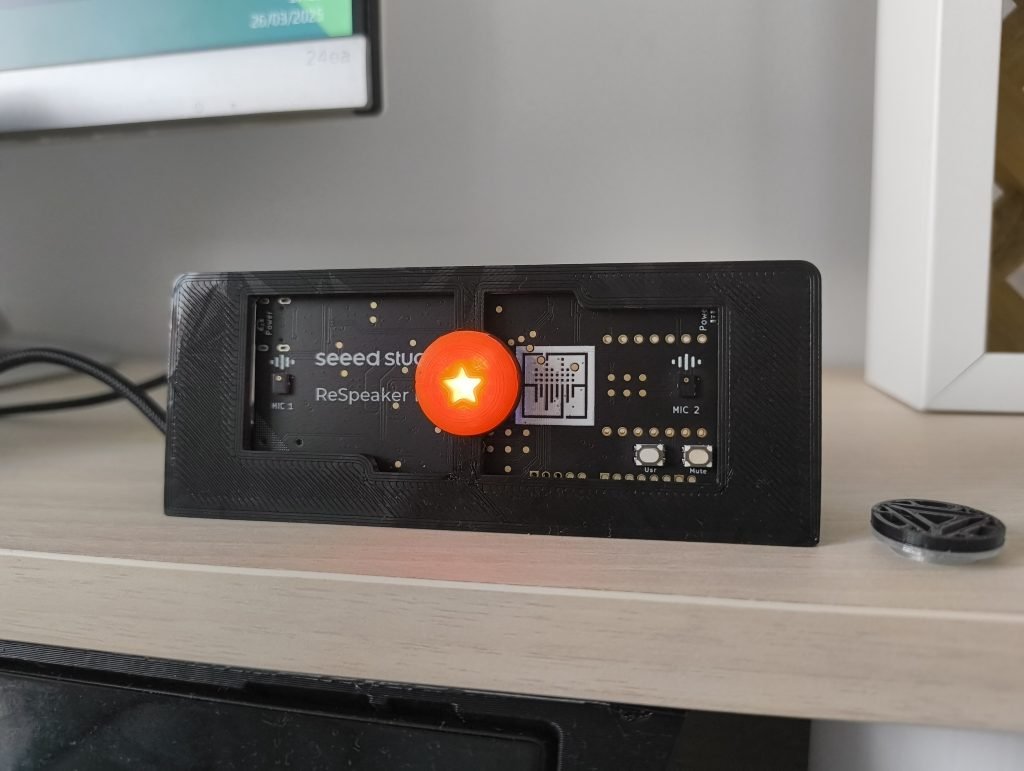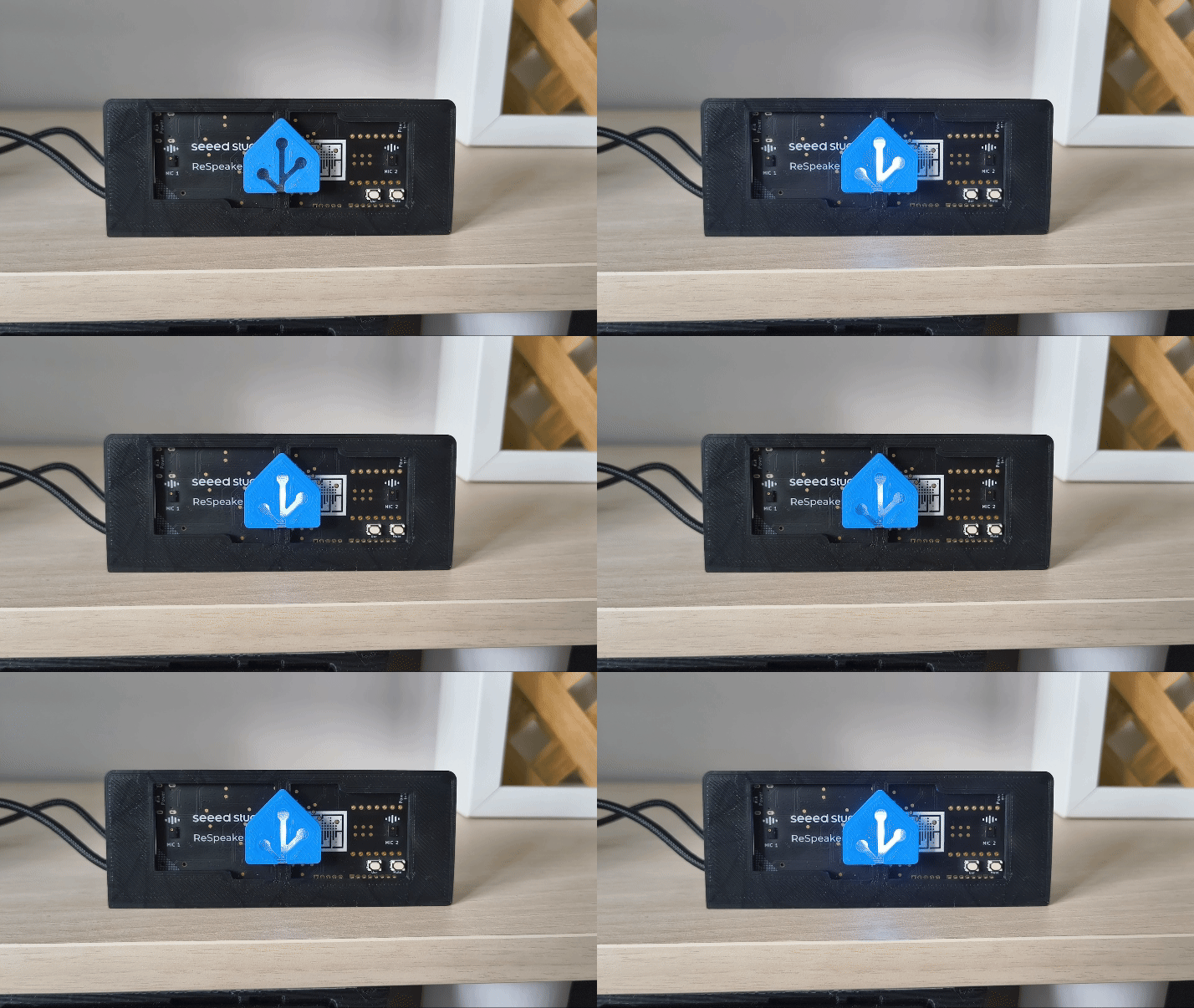



Si, como yo, utilizas esta placa con tus asistentes, en esta entrada te enseño a personalizar tu ReSpeaker Lite y darle un poco de estilo.
Índice
Personalizar tu ReSpeaker Lite
Hoy no me voy a entretener hablándote de Seeed Studio y su ReSpeaker Lite, ya que anteriormente ya te he contado cómo utilizarla para activar Assist y te he mostrado cómo usarlo en proyectos, como la integración de Iron Man en Home Assistant.
En su lugar quiero compartir contigo cómo utilizo la placa para integrarla en mi decoración y darle un toque de personalidad.
Elección de los cables
Si me has oido hablar de esta placa anteriormente, sabes que una de las cosas que me encantó es que fue la primera placa con un puerto Jack 3.5mm que llegó a mis manos. Esto hace que sea tremendamente sencilla de conectar a cualquier altavoz que tengas por casa.
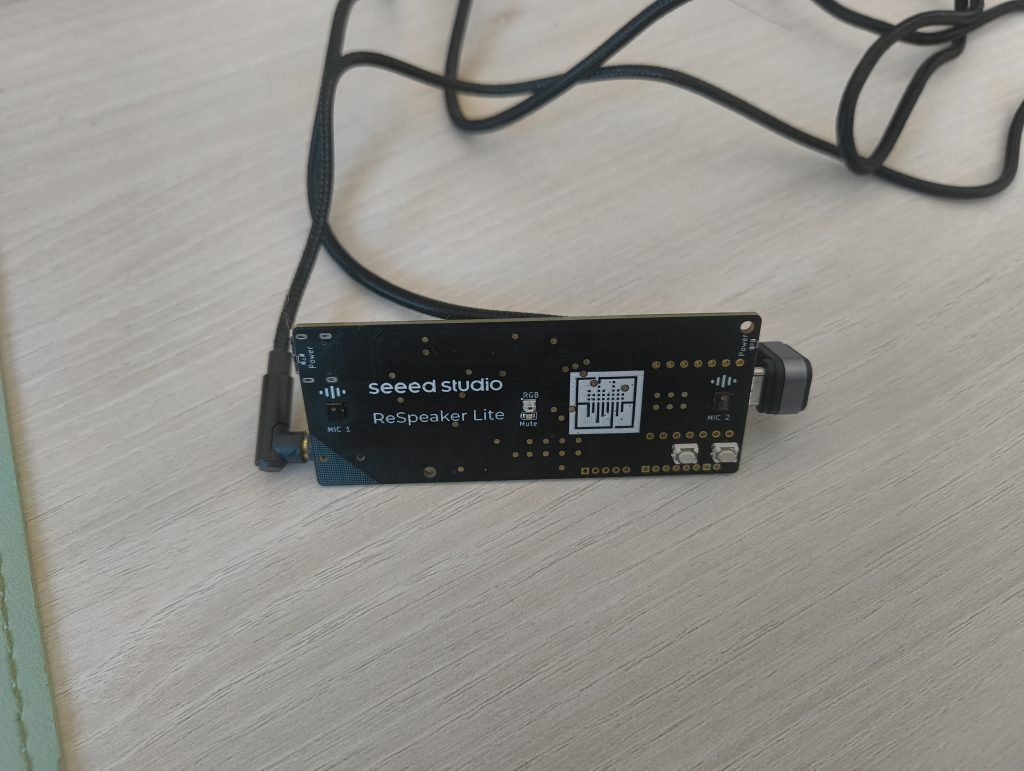
La pega es que los puertos de conexión están en los laterales de la placa, haciendo que la disposición de los cables pueda resultar un poco antiestética. No obstante, la solución es igual de sencilla!! Simplemente he usado cables con un codo de 90º, tanto para el puerto Jack como para el puerto USB-C. Como puedes observar, esto hace que los cables queden mucho mejor, de cara a poder crear un soporte compacto.

Diseño del soporte
Resuelto el tema de los cables, el siguiente paso para personalizar tu ReSpeaker Lite fue diseñar un soporte con las siguientes características:
- Lógicamente, debe adaptarse al tamaño de la placa y permitir que encaje perfectamente.
- Debe esconder los puertos de conexión de los cables, para reducir el ruido visual.
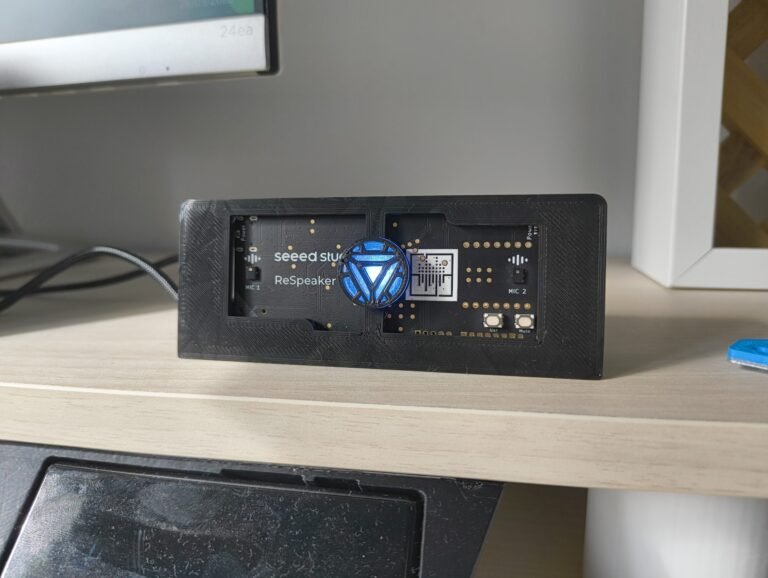
- No debe tapar los componentes que garantizan su correcto funcionamiento (micrófonos, LED y antena WiFi). Además, aunque esto es subjetivo, personalmente me gusta mucho el diseño de la placa en sí misma.
- Debe servir de soporte de la placa, y tener una ligera orientación para captar el sonido de forma nítida.
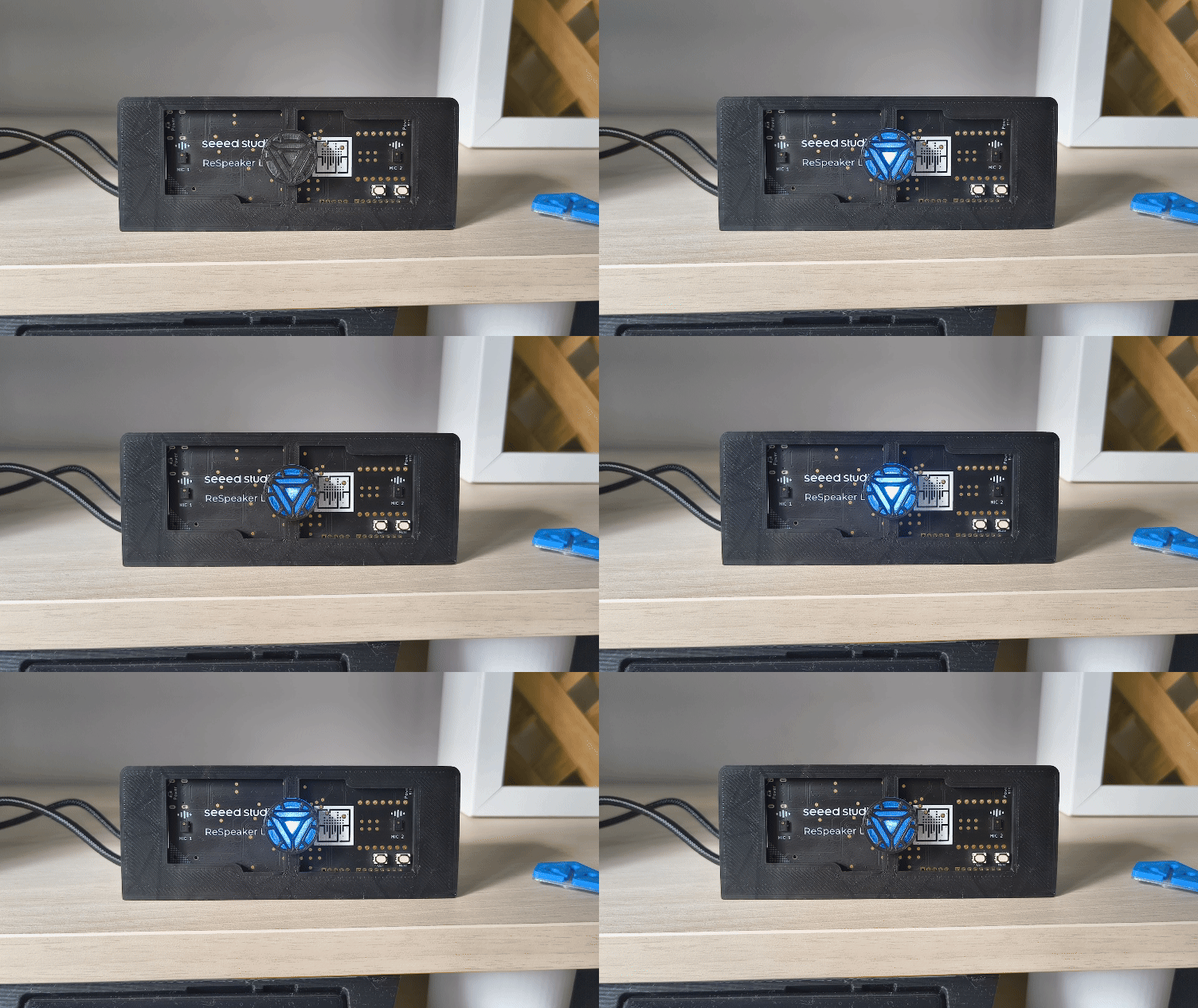
Con estos parámetros he creado el siguiente soporte, que puedes descargar desde nuestro perfil de Patreon.

Personalización del LED
Una de las preguntas que más me hacéis cuando te pones a personalizar tu ReSpeaker Lite es cómo controlar el LED a vuestro antojo. Aunque es algo bastante sencillo al ser una placa flasheada con ESPHome, puede resultar algo complicado para los «no iniciados».
A continuación te dejo una versión modificada del código, que he preparado de tal forma que sólo tienes que indicar el color que quieres mostrar (indicando el porcentaje de rojo, verde y azul) en las primeras líneas del código. Como siempre, no te olvides de reemplazar tus credenciales en los apartados ‘wifi’, ‘api’ y ‘ota’.
substitutions:
# Phases of the Voice Assistant
# The voice assistant is ready to be triggered by a wake word
voice_assist_idle_phase_id: '1'
# The voice assistant is waiting for a voice command (after being triggered by the wake word)
voice_assist_waiting_for_command_phase_id: '2'
# The voice assistant is listening for a voice command
voice_assist_listening_for_command_phase_id: '3'
# The voice assistant is currently processing the command
voice_assist_thinking_phase_id: '4'
# The voice assistant is replying to the command
voice_assist_replying_phase_id: '5'
# The voice assistant is not ready
voice_assist_not_ready_phase_id: '10'
# The voice assistant encountered an error
voice_assist_error_phase_id: '11'
# Change this to true in case you ahve a hidden SSID at home.
hidden_ssid: "false"
# Indica aquí el color del LED
red_percentage: 100%
green_percentage: 100%
blue_percentage: 100%
##############################
esphome:
name: respeaker
friendly_name: ReSpeaker
project:
name: formatbce.Respeaker Lite Satellite
version: 2025.2.2
min_version: 2025.2.0
on_boot:
priority: 375
then:
- sensor.template.publish:
id: next_timer
state: -1
# Run the script to refresh the LED status
- script.execute: control_leds
# If after 10 minutes, the device is still initializing (It did not yet connect to Home Assistant), turn off the init_in_progress variable and run the script to refresh the LED status
- delay: 10min
- if:
condition:
lambda: return id(init_in_progress);
then:
- lambda: id(init_in_progress) = false;
- script.execute: control_leds
on_shutdown:
then:
# Prevent loud noise on software restart
- lambda: id(respeaker).mute_speaker();
esp32:
board: esp32-s3-devkitc-1
variant: esp32s3
flash_size: 8MB
framework:
type: esp-idf
version: recommended
sdkconfig_options:
CONFIG_ESP32S3_DEFAULT_CPU_FREQ_240: "y"
CONFIG_ESP32S3_DATA_CACHE_64KB: "y"
CONFIG_ESP32S3_DATA_CACHE_LINE_64B: "y"
CONFIG_ESP32S3_INSTRUCTION_CACHE_32KB: "y"
CONFIG_BT_ALLOCATION_FROM_SPIRAM_FIRST: "y"
CONFIG_BT_BLE_DYNAMIC_ENV_MEMORY: "y"
CONFIG_MBEDTLS_EXTERNAL_MEM_ALLOC: "y"
CONFIG_MBEDTLS_SSL_PROTO_TLS1_3: "y" # TLS1.3 support isn't enabled by default in IDF 5.1.5
wifi:
id: wifi_id
fast_connect: ${hidden_ssid}
on_connect:
- lambda: id(improv_ble_in_progress) = false;
- script.execute: control_leds
on_disconnect:
- script.execute: control_leds
ssid: !secret wifi_ssid
password: !secret wifi_password
# Enable fallback hotspot (captive portal) in case wifi connection fails
ap:
ssid: "Respeaker Fallback Hotspot"
password: "I8Yaasd09agVs"
logger:
level: debug
initial_level: debug
logs:
sensor: WARN # avoids logging debug sensor updates
# hardware_uart: uart0 #Uncomment to see serial logs via USB connection. Comment out after debufgging - this line introduces noise on speaker...
select:
- platform: logger
id: logger_select
name: Logger Level
disabled_by_default: true
api:
encryption:
key: "WNgxOashsa98njk324jknsdsdjdj3MLJd83tjJQQ="
id: api_id
actions:
- action: start_va
then:
- voice_assistant.start
- action: stop_va
then:
- voice_assistant.stop
on_client_connected:
- script.execute: control_leds
on_client_disconnected:
- script.execute: control_leds
# Uncomment this, if you have problems with text-to-speech because of Home Assistant HTTPS internal URL
# http_request:
# verify_ssl: false
ota:
- platform: esphome
id: ota_esphome
password: "fasasd0993243fds04e4efdsfgdsd"
i2c:
- id: internal_i2c
sda: GPIO5
scl: GPIO6
frequency: 400kHz
psram:
mode: octal
speed: 80MHz
globals:
- id: init_in_progress
type: bool
restore_value: no
initial_value: 'true'
# Global variable storing the state of ImprovBLE. Used to draw different LED animations
- id: improv_ble_in_progress
type: bool
restore_value: no
initial_value: 'false'
# Global variable tracking the phase of the voice assistant (defined above). Initialized to not_ready
- id: voice_assistant_phase
type: int
restore_value: no
initial_value: ${voice_assist_not_ready_phase_id}
# Global variable storing the first active timer
- id: first_active_timer
type: voice_assistant::Timer
restore_value: false
# Global variable storing if a timer is active
- id: is_timer_active
type: bool
restore_value: false
# Global variable storing if a factory reset was requested. If it is set to true, the device will factory reset once the center button is released
- id: factory_reset_requested
type: bool
restore_value: no
initial_value: 'false'
switch:
# Hardware speaker mute
- platform: template
id: speaker_mute_switch
name: Speaker mute
icon: mdi:volume-mute
internal: true
optimistic: true
turn_on_action:
- lambda: id(respeaker).mute_speaker();
turn_off_action:
- lambda: id(respeaker).unmute_speaker();
# stateless momentary mic mute switch
- platform: gpio
internal: true
pin:
number: GPIO4 # D3
inverted: true
id: mute_toggle
on_turn_on:
- delay: 300ms
- switch.turn_off: mute_toggle
# stateful user facing mic mute switch
- platform: template
id: mic_mute_switch
name: Mic mute
icon: mdi:microphone-off
lambda: |-
if (id(mute_state).state) {
return true;
} else {
return false;
}
on_turn_on:
- if:
condition:
and:
- lambda: return !id(init_in_progress);
- switch.is_on: mute_sound
then:
- script.execute:
id: play_sound
priority: false
sound_file: !lambda return id(mute_switch_on_sound);
on_turn_off:
- if:
condition:
and:
- lambda: return !id(init_in_progress);
- switch.is_on: mute_sound
then:
- script.execute:
id: play_sound
priority: false
sound_file: !lambda return id(mute_switch_off_sound);
turn_on_action:
- switch.turn_on: mute_toggle
turn_off_action:
- switch.turn_on: mute_toggle
# Button click Sounds Switch.
- platform: template
id: button_sound
name: Button click sounds
icon: "mdi:bullhorn"
entity_category: config
optimistic: true
restore_mode: RESTORE_DEFAULT_ON
# Mute Sound Switch.
- platform: template
id: mute_sound
name: Mute/unmute sound
icon: "mdi:bullhorn"
entity_category: config
optimistic: true
restore_mode: RESTORE_DEFAULT_ON
# Wake Word Sound Switch.
- platform: template
id: wake_sound
name: Wake sound
icon: "mdi:bullhorn"
entity_category: config
optimistic: true
restore_mode: RESTORE_DEFAULT_ON
# Internal switch to track when a timer is ringing on the device.
- platform: template
id: timer_ringing
optimistic: true
internal: true
restore_mode: ALWAYS_OFF
on_turn_off:
# Disable stop wake word
- lambda: id(stop).disable();
- script.execute: disable_repeat
# Stop any current annoucement (ie: stop the timer ring mid playback)
- if:
condition:
media_player.is_announcing:
then:
media_player.stop:
announcement: true
# Set back ducking ratio to zero
- mixer_speaker.apply_ducking:
id: media_mixing_input
decibel_reduction: 0
duration: 1.0s
# Refresh the LED ring
- script.execute: control_leds
on_turn_on:
# Duck audio
- mixer_speaker.apply_ducking:
id: media_mixing_input
decibel_reduction: 20
duration: 0.0s
# Enable stop wake word
- lambda: id(stop).enable();
# Ring timer
- script.execute: ring_timer
# Refresh LED
- script.execute: control_leds
# If 15 minutes have passed and the timer is still ringing, stop it.
- delay: 15min
- switch.turn_off: timer_ringing
binary_sensor:
# User Button. Used for many things (See on_multi_click)
- platform: gpio
id: user_button
pin:
number: GPIO3 # D2
inverted: true
name: "User button"
on_press:
- script.execute: control_leds
on_release:
- script.execute: control_leds
# If a factory reset is requested, factory reset on release
- if:
condition:
lambda: return id(factory_reset_requested);
then:
- button.press: factory_reset_button
on_multi_click:
# Simple Click:
# - Abort "things" in order
# - Timer
# - Announcements
# - Voice Assistant Pipeline run
# - Music
# - Starts the voice assistant if it is not yet running and if the device is not muted.
- timing:
- ON for at most 1s
- OFF for at least 0.25s
then:
- if:
condition:
lambda: return !id(init_in_progress);
then:
- if:
condition:
switch.is_on: timer_ringing
then:
- switch.turn_off: timer_ringing
else:
- if:
condition:
media_player.is_announcing:
then:
media_player.stop:
announcement: true
else:
- if:
condition:
voice_assistant.is_running:
then:
- voice_assistant.stop:
else:
- if:
condition:
media_player.is_playing:
then:
- media_player.pause:
else:
- if:
condition:
and:
- switch.is_off: mic_mute_switch
- not:
voice_assistant.is_running
then:
- if:
condition:
switch.is_on: button_sound
then:
- script.execute:
id: play_sound
priority: true
sound_file: !lambda return id(center_button_press_sound);
- delay: 300ms
- voice_assistant.start:
# Double Click
# . Exposed as an event entity. To be used in automations inside Home Assistant
- timing:
- ON for at most 1s
- OFF for at most 0.25s
- ON for at most 1s
- OFF for at least 0.25s
then:
- if:
condition:
lambda: return !id(init_in_progress);
then:
- if:
condition:
switch.is_on: button_sound
then:
- script.execute:
id: play_sound
priority: false
sound_file: !lambda return id(center_button_double_press_sound);
- event.trigger:
id: button_press_event
event_type: "double_press"
# Triple Click
# . Exposed as an event entity. To be used in automations inside Home Assistant
- timing:
- ON for at most 1s
- OFF for at most 0.25s
- ON for at most 1s
- OFF for at most 0.25s
- ON for at most 1s
- OFF for at least 0.25s
then:
- if:
condition:
lambda: return !id(init_in_progress);
then:
- if:
condition:
switch.is_on: button_sound
then:
- script.execute:
id: play_sound
priority: false
sound_file: !lambda return id(center_button_triple_press_sound);
- event.trigger:
id: button_press_event
event_type: "triple_press"
# Long Press
# . Exposed as an event entity. To be used in automations inside Home Assistant
- timing:
- ON for at least 1s
then:
- if:
condition:
lambda: return !id(init_in_progress);
then:
- if:
condition:
switch.is_on: button_sound
then:
- script.execute:
id: play_sound
priority: false
sound_file: !lambda return id(center_button_long_press_sound);
- light.turn_off: led_respeaker_onboard
- event.trigger:
id: button_press_event
event_type: "long_press"
# Factory Reset Warning
# . Audible and Visible warning.
- timing:
- ON for at least 10s
then:
- light.turn_on:
brightness: 100%
id: led_respeaker_onboard
effect: "Factory Reset Coming Up"
- script.execute:
id: play_sound
priority: true
sound_file: !lambda return id(factory_reset_initiated_sound);
- wait_until:
binary_sensor.is_off: user_button
- if:
condition:
lambda: return !id(factory_reset_requested);
then:
- light.turn_off: led_respeaker_onboard
- script.execute:
id: play_sound
priority: true
sound_file: !lambda return id(factory_reset_cancelled_sound);
# Factory Reset Confirmed.
# . Audible warning to prompt user to release the button
# . Set factory_reset_requested to true
- timing:
- ON for at least 22s
then:
- script.execute:
id: play_sound
priority: true
sound_file: !lambda return id(factory_reset_confirmed_sound);
- light.turn_on:
brightness: 100%
red: 100%
green: 0%
blue: 0%
id: led_respeaker_onboard
effect: "none"
- lambda: id(factory_reset_requested) = true;
light:
- platform: esp32_rmt_led_strip
id: led_respeaker_onboard
name: LED Respeaker onboard
disabled_by_default: true
internal: false
rgb_order: GRB
pin: GPIO1
num_leds: 1
rmt_symbols: 192
chipset: ws2812
entity_category: config
default_transition_length: 0s
effects:
- pulse:
name: "Fast Pulse"
transition_length: 100ms
update_interval: 100ms
min_brightness: 50%
max_brightness: 100%
- pulse:
name: "Slow Pulse"
transition_length: 500ms
update_interval: 500ms
min_brightness: 50%
max_brightness: 100%
sensor:
- platform: template
id: next_timer
name: "Next timer"
update_interval: never
disabled_by_default: true
device_class: duration
unit_of_measurement: s
icon: "mdi:timer"
text_sensor:
- platform: template
id: next_timer_name
name: "Next timer name"
icon: "mdi:timer"
disabled_by_default: true
- platform: template
id: tts_uri
name: "TTS URI"
disabled_by_default: true
event:
# Event entity exposed to the user to automate on complex center button presses.
# The simple press is not exposed as it is used to control the device itself.
- platform: template
id: button_press_event
name: "Button press"
icon: mdi:button-pointer
device_class: button
event_types:
- double_press
- triple_press
- long_press
script:
# Master script controlling the LEDs, based on different conditions : initialization in progress, wifi and api connected and voice assistant phase.
# For the sake of simplicity and re-usability, the script calls child scripts defined below.
# This script will be called every time one of these conditions is changing.
- id: control_leds
then:
- lambda: |
id(check_if_timers_active).execute();
if (id(is_timer_active)){
id(fetch_first_active_timer).execute();
}
if (id(improv_ble_in_progress)) {
id(control_leds_improv_ble_state).execute();
} else if (id(init_in_progress)) {
id(control_leds_init_state).execute();
} else if (!id(wifi_id).is_connected() || !id(api_id).is_connected()){
id(control_leds_no_ha_connection_state).execute();
} else if (id(timer_ringing).state) {
id(control_leds_timer_ringing).execute();
} else if (id(voice_assistant_phase) == ${voice_assist_waiting_for_command_phase_id}) {
id(control_leds_voice_assistant_waiting_for_command_phase).execute();
} else if (id(voice_assistant_phase) == ${voice_assist_listening_for_command_phase_id}) {
id(control_leds_voice_assistant_listening_for_command_phase).execute();
} else if (id(voice_assistant_phase) == ${voice_assist_thinking_phase_id}) {
id(control_leds_voice_assistant_thinking_phase).execute();
} else if (id(voice_assistant_phase) == ${voice_assist_replying_phase_id}) {
id(control_leds_voice_assistant_replying_phase).execute();
} else if (id(voice_assistant_phase) == ${voice_assist_error_phase_id}) {
id(control_leds_voice_assistant_error_phase).execute();
} else if (id(voice_assistant_phase) == ${voice_assist_not_ready_phase_id}) {
id(control_leds_voice_assistant_not_ready_phase).execute();
} else if (id(is_timer_active)) {
id(control_leds_timer_ticking).execute();
} else if (id(voice_assistant_phase) == ${voice_assist_idle_phase_id}) {
id(control_leds_voice_assistant_idle_phase).execute();
}
# Script executed during Improv BLE
# Warm White slow pulse
- id: control_leds_improv_ble_state
then:
- light.turn_on:
brightness: 50%
red: 100%
green: 89%
blue: 71%
id: led_respeaker_onboard
effect: "Slow Pulse"
# Script executed during initialization
# Fast Blue pulse if Wifi is connected, Else slow blue pulse
- id: control_leds_init_state
then:
- if:
condition:
wifi.connected:
then:
- light.turn_on:
brightness: 50%
red: 0%
green: 100%
blue: 0%
id: led_respeaker_onboard
effect: "Fast pulse"
else:
- light.turn_on:
brightness: 50%
red: 9.4%
green: 73.3%
blue: 94.9%
id: led_respeaker_onboard
effect: "Slow Pulse"
# Script executed when the device has no connection to Home Assistant
# Red slow pulse (This will be visible during HA updates for example)
- id: control_leds_no_ha_connection_state
then:
- light.turn_on:
brightness: 50%
red: 1
green: 0
blue: 0
id: led_respeaker_onboard
effect: "Slow Pulse"
# Script executed when the voice assistant is idle (waiting for a wake word)
# Nothing
- id: control_leds_voice_assistant_idle_phase
then:
- light.turn_off:
id: led_respeaker_onboard
# Script executed when the voice assistant is waiting for a command (After the wake word)
# Slow purple pulse
- id: control_leds_voice_assistant_waiting_for_command_phase
then:
- light.turn_on:
brightness: 50%
red: ${red_percentage}
green: ${green_percentage}
blue: ${blue_percentage}
id: led_respeaker_onboard
effect: "Slow Pulse"
# Script executed when the voice assistant is listening to a command
# Slow purple pulse
- id: control_leds_voice_assistant_listening_for_command_phase
then:
- light.turn_on:
brightness: 50%
red: ${red_percentage}
green: ${green_percentage}
blue: ${blue_percentage}
id: led_respeaker_onboard
effect: "Slow Pulse"
# Script executed when the voice assistant is thinking to a command
# Fast purple pulse
- id: control_leds_voice_assistant_thinking_phase
then:
- light.turn_on:
brightness: 50%
red: ${red_percentage}
green: ${green_percentage}
blue: ${blue_percentage}
id: led_respeaker_onboard
effect: "Fast Pulse"
# Script executed when the voice assistant is replying to a command
# Slow cyan pulse
- id: control_leds_voice_assistant_replying_phase
then:
- light.turn_on:
brightness: 50%
red: ${red_percentage}
green: ${green_percentage}
blue: ${blue_percentage}
id: led_respeaker_onboard
effect: "Slow Pulse"
# Script executed when the voice assistant is in error
# Fast Red Pulse
- id: control_leds_voice_assistant_error_phase
then:
- light.turn_on:
brightness: 50%
red: 1
green: 0
blue: 0
id: led_respeaker_onboard
effect: "Fast Pulse"
# Script executed when the voice assistant is not ready
- id: control_leds_voice_assistant_not_ready_phase
then:
- light.turn_on:
brightness: 50%
red: 1
green: 0
blue: 0
id: led_respeaker_onboard
effect: "Slow Pulse"
# Script executed when the center button is touched
# The LED turns on blue
- id: control_leds_center_button_touched
then:
- light.turn_on:
brightness: 80%
red: 0
green: 1
blue: 0
id: led_respeaker_onboard
# Script executed when the timer is ringing, to control the LEDs
# The LED blinks green.
- id: control_leds_timer_ringing
then:
- light.turn_on:
brightness: 50%
red: 0
green: 1
blue: 0
id: led_respeaker_onboard
effect: "Fast Pulse"
# Script executed when the timer is ticking, to control the LEDs
# Slow dim while pulse.
- id: control_leds_timer_ticking
then:
- light.turn_on:
brightness: 50%
red: 0.3
green: 0.3
blue: 0.3
id: led_respeaker_onboard
effect: "Slow Pulse"
# Script executed when the timer is ringing, to playback sounds.
- id: ring_timer
then:
- script.execute: enable_repeat_one
- script.execute:
id: play_sound
priority: true
sound_file: !lambda return id(timer_finished_sound);
# Script executed when the timer is ringing, to repeat the timer finished sound.
- id: enable_repeat_one
then:
# Turn on the repeat mode and pause for 500 ms between playlist items/repeats
- lambda: |-
id(external_media_player)
->make_call()
.set_command(media_player::MediaPlayerCommand::MEDIA_PLAYER_COMMAND_REPEAT_ONE)
.set_announcement(true)
.perform();
id(external_media_player)->set_playlist_delay_ms(speaker::AudioPipelineType::ANNOUNCEMENT, 500);
# Script execute when the timer is done ringing, to disable repeat mode.
- id: disable_repeat
then:
# Turn off the repeat mode and pause for 0 ms between playlist items/repeats
- lambda: |-
id(external_media_player)
->make_call()
.set_command(media_player::MediaPlayerCommand::MEDIA_PLAYER_COMMAND_REPEAT_OFF)
.set_announcement(true)
.perform();
id(external_media_player)->set_playlist_delay_ms(speaker::AudioPipelineType::ANNOUNCEMENT, 0);
# Script executed when we want to play sounds on the device.
- id: play_sound
parameters:
priority: bool
sound_file: "audio::AudioFile*"
then:
- lambda: |-
if (priority) {
id(external_media_player)
->make_call()
.set_command(media_player::MediaPlayerCommand::MEDIA_PLAYER_COMMAND_STOP)
.set_announcement(true)
.perform();
}
if ( (id(external_media_player).state != media_player::MediaPlayerState::MEDIA_PLAYER_STATE_ANNOUNCING ) || priority) {
id(external_media_player)
->play_file(sound_file, true, false);
}
# Script used to fetch the first active timer (Stored in global first_active_timer)
- id: fetch_first_active_timer
then:
- lambda: |
const auto timers = id(va).get_timers();
auto output_timer = timers.begin()->second;
for (auto &iterable_timer : timers) {
if (iterable_timer.second.is_active && iterable_timer.second.seconds_left <= output_timer.seconds_left) {
output_timer = iterable_timer.second;
}
}
id(first_active_timer) = output_timer;
# Script used to check if a timer is active (Stored in global is_timer_active)
- id: check_if_timers_active
then:
- lambda: |
const auto timers = id(va).get_timers();
bool output = false;
if (timers.size() > 0) {
for (auto &iterable_timer : timers) {
if(iterable_timer.second.is_active) {
output = true;
}
}
}
id(is_timer_active) = output;
# Script used activate the stop word if the TTS step is long.
# Why is this wrapped on a script?
# Becasue we want to stop the sequence if the TTS step is faster than that.
# This allows us to prevent having the deactivation of the stop word before its own activation.
- id: activate_stop_word_if_tts_step_is_long
then:
- delay: 1s
# Enable stop wake word
- lambda: id(stop).enable();
i2s_audio:
- id: i2s_output
i2s_lrclk_pin:
number: GPIO7
allow_other_uses: true
i2s_bclk_pin:
number: GPIO8
allow_other_uses: true
i2s_mclk_pin:
number: GPIO9
allow_other_uses: true
- id: i2s_input
i2s_lrclk_pin:
number: GPIO7
allow_other_uses: true
i2s_bclk_pin:
number: GPIO8
allow_other_uses: true
i2s_mclk_pin:
number: GPIO9
allow_other_uses: true
microphone:
- platform: nabu_microphone
i2s_din_pin: GPIO44
adc_type: external
pdm: false
sample_rate: 48000
bits_per_sample: 32bit
i2s_mode: secondary
i2s_audio_id: i2s_input
channel_0:
id: nabu_mic_va
amplify_shift: 0
channel_1:
id: nabu_mic_mww
amplify_shift: 2
speaker:
# Hardware speaker output
- platform: i2s_audio
id: i2s_audio_speaker
sample_rate: 48000
i2s_mode: secondary
i2s_dout_pin: GPIO43
bits_per_sample: 32bit
i2s_audio_id: i2s_output
dac_type: external
channel: stereo
timeout: never
buffer_duration: 100ms
audio_dac: aic3204_dac
# Virtual speakers to combine the announcement and media streams together into one output
- platform: mixer
id: mixing_speaker
output_speaker: i2s_audio_speaker
num_channels: 2
source_speakers:
- id: announcement_mixing_input
timeout: never
- id: media_mixing_input
timeout: never
# Vritual speakers to resample each pipelines' audio, if necessary, as the mixer speaker requires the same sample rate
- platform: resampler
id: announcement_resampling_speaker
output_speaker: announcement_mixing_input
sample_rate: 48000
bits_per_sample: 16
- platform: resampler
id: media_resampling_speaker
output_speaker: media_mixing_input
sample_rate: 48000
bits_per_sample: 16
media_player:
- platform: speaker
id: external_media_player
name: Media Player
internal: False
volume_increment: 0.05
volume_min: 0.4
volume_max: 0.85
announcement_pipeline:
speaker: announcement_resampling_speaker
format: FLAC # FLAC is the least processor intensive codec
num_channels: 1 # Stereo audio is unnecessary for announcements
sample_rate: 48000
media_pipeline:
speaker: media_resampling_speaker
format: FLAC # FLAC is the least processor intensive codec
num_channels: 2
sample_rate: 48000
on_announcement:
- mixer_speaker.apply_ducking:
id: media_mixing_input
decibel_reduction: 20
duration: 0.0s
on_state:
if:
condition:
and:
- switch.is_off: timer_ringing
- not:
voice_assistant.is_running:
- not:
media_player.is_announcing:
then:
- mixer_speaker.apply_ducking:
id: media_mixing_input
decibel_reduction: 0
duration: 1.0s
files:
- id: center_button_press_sound
file: https://github.com/esphome/home-assistant-voice-pe/raw/dev/sounds/center_button_press.flac
- id: center_button_double_press_sound
file: https://github.com/esphome/home-assistant-voice-pe/raw/dev/sounds/center_button_double_press.flac
- id: center_button_triple_press_sound
file: https://github.com/esphome/home-assistant-voice-pe/raw/dev/sounds/center_button_triple_press.flac
- id: center_button_long_press_sound
file: https://github.com/esphome/home-assistant-voice-pe/raw/dev/sounds/center_button_long_press.flac
- id: factory_reset_initiated_sound
file: https://github.com/esphome/home-assistant-voice-pe/raw/dev/sounds/factory_reset_initiated.mp3
- id: factory_reset_cancelled_sound
file: https://github.com/esphome/home-assistant-voice-pe/raw/dev/sounds/factory_reset_cancelled.mp3
- id: factory_reset_confirmed_sound
file: https://github.com/esphome/home-assistant-voice-pe/raw/dev/sounds/factory_reset_confirmed.mp3
- id: mute_switch_on_sound
file: https://github.com/esphome/home-assistant-voice-pe/raw/dev/sounds/mute_switch_on.flac
- id: mute_switch_off_sound
file: https://github.com/esphome/home-assistant-voice-pe/raw/dev/sounds/mute_switch_off.flac
- id: timer_finished_sound
file: https://github.com/esphome/home-assistant-voice-pe/raw/dev/sounds/timer_finished.flac
- id: wake_word_triggered_sound
file: https://github.com/esphome/home-assistant-voice-pe/raw/dev/sounds/wake_word_triggered.flac
respeaker_lite:
id: respeaker
reset_pin: GPIO2
mute_state:
internal: true
id: mute_state
firmware_version:
icon: mdi:application-cog
name: XMOS firmware version
internal: false
id: firmware_version
firmware:
url: https://github.com/formatBCE/Respeaker-Lite-ESPHome-integration/raw/refs/heads/main/respeaker_lite_i2s_dfu_firmware_48k_v1.1.0.bin
version: "1.1.0"
md5: 9297155d1bf3eb21a9d4db52a89ea0c6
on_begin:
- light.turn_on:
brightness: 50%
red: 50%
green: 50%
blue: 50%
id: led_respeaker_onboard
effect: "Slow Pulse"
on_end:
- light.turn_on:
brightness: 50%
red: 0%
green: 100%
blue: 0%
id: led_respeaker_onboard
effect: "Fast Pulse"
- delay: 3s
- light.turn_off:
id: led_respeaker_onboard
on_error:
- light.turn_on:
brightness: 50%
red: 100%
green: 0%
blue: 0%
id: led_respeaker_onboard
effect: "Fast Pulse"
- delay: 3s
- light.turn_off:
id: led_respeaker_onboard
external_components:
- source:
type: git
url: https://github.com/esphome/home-assistant-voice-pe
ref: dev
components:
- micro_wake_word
- microphone
- voice_assistant
refresh: 0s
- source:
type: git
url: https://github.com/formatBCE/home-assistant-voice-pe
ref: 48kHz_mic_support
components:
- nabu_microphone
refresh: 0s
- source:
type: git
url: https://github.com/formatBCE/Respeaker-Lite-ESPHome-integration
ref: main
components:
- respeaker_lite
refresh: 0s
audio_dac:
- platform: aic3204
id: aic3204_dac
i2c_id: internal_i2c
micro_wake_word:
id: mww
models:
- model: https://github.com/kahrendt/microWakeWord/releases/download/okay_nabu_20241226.3/okay_nabu.json
# probability_cutoff: 0.8
id: okay_nabu
- model: hey_jarvis
id: hey_jarvis
- model: hey_mycroft
id: hey_mycroft
- model: https://github.com/kahrendt/microWakeWord/releases/download/stop/stop.json
id: stop
internal: true
vad:
microphone: nabu_mic_mww
on_wake_word_detected:
# If the wake word is detected when the device is muted (Possible with the software mute switch): Do nothing
- if:
condition:
switch.is_off: mic_mute_switch
then:
# If a timer is ringing: Stop it, do not start the voice assistant (We can stop timer from voice!)
- if:
condition:
switch.is_on: timer_ringing
then:
- switch.turn_off: timer_ringing
# Start voice assistant, stop current announcement.
else:
- if:
condition:
media_player.is_announcing:
then:
media_player.stop:
announcement: true
else:
- if:
condition:
switch.is_on: wake_sound
then:
- script.execute:
id: play_sound
priority: true
sound_file: !lambda return id(wake_word_triggered_sound);
- delay: 300ms
- voice_assistant.start:
wake_word: !lambda return wake_word;
voice_assistant:
id: va
microphone: nabu_mic_va
media_player: external_media_player
micro_wake_word: mww
use_wake_word: false
noise_suppression_level: 0
auto_gain: 0 dbfs
volume_multiplier: 1
on_client_connected:
- if:
condition:
- lambda: return id(init_in_progress);
- switch.is_on: mic_mute_switch
then:
- switch.turn_off: mic_mute_switch
- lambda: id(init_in_progress) = false;
- micro_wake_word.start:
- lambda: id(voice_assistant_phase) = ${voice_assist_idle_phase_id};
- script.execute: control_leds
on_client_disconnected:
- voice_assistant.stop:
- lambda: id(voice_assistant_phase) = ${voice_assist_not_ready_phase_id};
- script.execute: control_leds
on_error:
- if:
condition:
and:
- lambda: return !id(init_in_progress);
- lambda: return code != "duplicate_wake_up_detected";
- lambda: return code != "stt-no-text-recognized";
then:
- lambda: id(voice_assistant_phase) = ${voice_assist_error_phase_id};
- script.execute: control_leds
# When the voice assistant starts: Play a wake up sound, duck audio.
on_start:
- mixer_speaker.apply_ducking:
id: media_mixing_input
decibel_reduction: 20 # Number of dB quieter; higher implies more quiet, 0 implies full volume
duration: 0.0s # The duration of the transition (default is no transition)
on_listening:
- lambda: id(voice_assistant_phase) = ${voice_assist_waiting_for_command_phase_id};
- script.execute: control_leds
on_stt_vad_start:
- lambda: id(voice_assistant_phase) = ${voice_assist_listening_for_command_phase_id};
- script.execute: control_leds
on_stt_vad_end:
- lambda: id(voice_assistant_phase) = ${voice_assist_thinking_phase_id};
- script.execute: control_leds
on_tts_start:
- lambda: id(voice_assistant_phase) = ${voice_assist_replying_phase_id};
- script.execute: control_leds
# Start a script that would potentially enable the stop word if the response is longer than a second
- script.execute: activate_stop_word_if_tts_step_is_long
on_tts_end:
- text_sensor.template.publish:
id: tts_uri
state: !lambda 'return x;'
# When the voice assistant ends ...
on_end:
- wait_until:
not:
voice_assistant.is_running:
# Stop ducking audio.
- mixer_speaker.apply_ducking:
id: media_mixing_input
decibel_reduction: 0
duration: 1.0s
# Stop the script that would potentially enable the stop word if the response is longer than a second
- script.stop: activate_stop_word_if_tts_step_is_long
# Disable the stop word (If the tiemr is not ringing)
- if:
condition:
switch.is_off: timer_ringing
then:
- lambda: id(stop).disable();
# If the end happened because of an error, let the error phase on for a second
- if:
condition:
lambda: return id(voice_assistant_phase) == ${voice_assist_error_phase_id};
then:
- delay: 1s
# Reset the voice assistant phase id and reset the LED animations.
- lambda: id(voice_assistant_phase) = ${voice_assist_idle_phase_id};
- script.execute: control_leds
on_timer_finished:
- switch.turn_on: timer_ringing
- lambda: |
id(next_timer).publish_state(-1);
id(next_timer_name).publish_state("-");
on_timer_started:
- script.execute: control_leds
- lambda: |
id(next_timer).publish_state(id(first_active_timer).seconds_left);
id(next_timer_name).publish_state(id(first_active_timer).name);
on_timer_cancelled:
- script.execute: control_leds
- lambda: |
id(next_timer).publish_state(id(first_active_timer).seconds_left);
id(next_timer_name).publish_state(id(first_active_timer).name);
on_timer_updated:
- script.execute: control_leds
- lambda: |
id(next_timer).publish_state(id(first_active_timer).seconds_left);
id(next_timer_name).publish_state(id(first_active_timer).name);
on_timer_tick:
- script.execute: control_leds
- lambda: |
int seconds_left = id(first_active_timer).seconds_left;
if (std::abs(seconds_left) % 5 == 0) {
id(next_timer).publish_state(seconds_left);
}
button:
- platform: factory_reset
id: factory_reset_button
name: "Factory Reset"
entity_category: diagnostic
internal: true
- platform: restart
id: restart_button
name: "Restart"
entity_category: config
disabled_by_default: true
icon: "mdi:restart"
debug:
update_interval: 5s
Personalización del difusor
Si observas atentamente el soporte que he diseñado, hay un círculo en la parte central. Este no es un capricho estético, sino que lo he colocado estratégicamente alrededor del LED para que puedas añadir un difusor personalizado y de esta forma teminar de personalizar tu ReSpeaker Lite.