



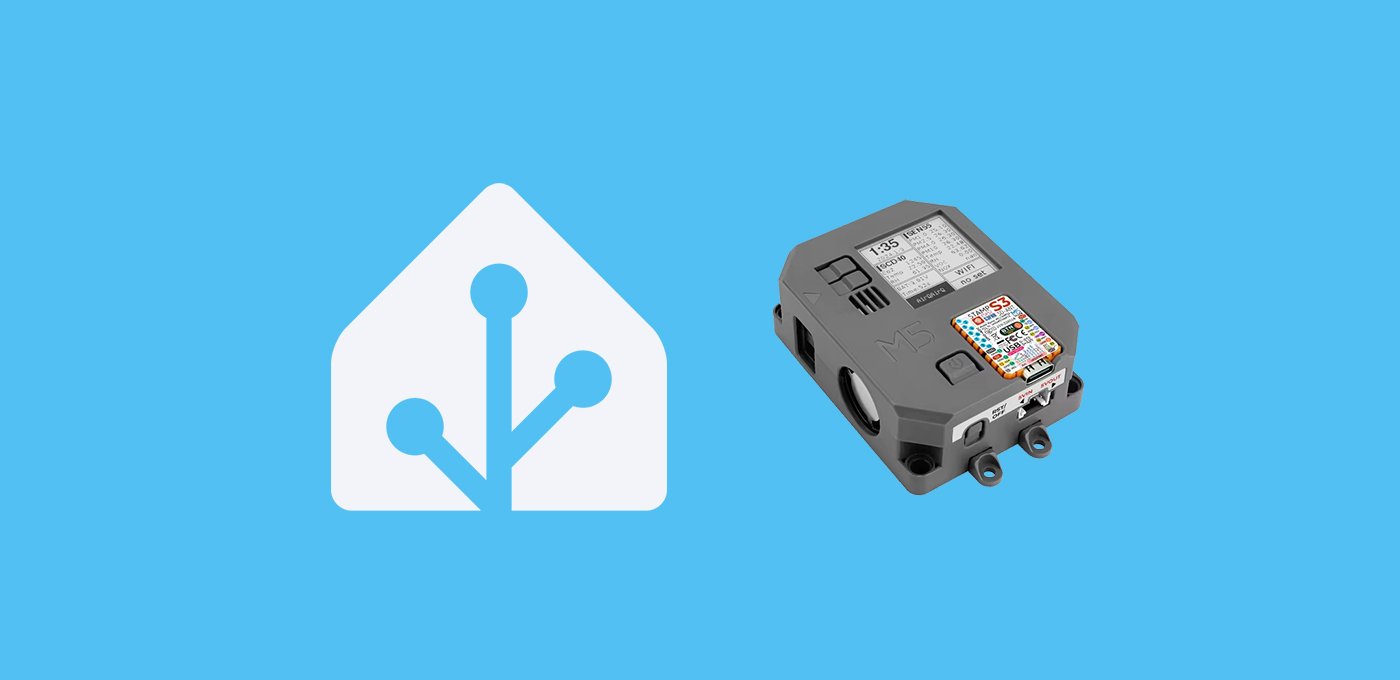
En esta entrada vamos a integrar el M5Stack Core AirQ en Home Assistant para tener la información de calidad del aire.
Índice
Sensores de calidad del aire
Aunque es algo que no le inquieta a todo el mundo, cada vez es más frecuente que aquellos que vivimos en grandes ciudades o cerca de zonas industriales nos preocupemos por la calidad del aire en nuestro hogar. Esto no es ninguna tontería y existen muchos estudios, ya que la exposición prolongada a contaminantes puede causar asma, bronquitis y otras enfermedades respiratorias, y a largo plazo, reducir la esperanza de vida y aumentar la incidencia de enfermedades crónicas como el cáncer de pulmón.
En este sentido, la domótica puede ayudarnos a luchar contra sus efectos monitorizando los niveles de calidad del aire, bien para recibir notificaciones cuando se disparen, o para activar dispositivos como sistema de ventilación o purificación del aire. Si lo que te preocupa es, en general, el nivel de contaminación ambiental puedes utilizar integraciones como la de World Air Quality Index.
No obstante, tanto si no te fías de los datos (por ejemplo, porque los medidores se han colocado convenientemente en zonas verdes), como si lo que quieres medir son los datos específicos en tu hogar, tendrás que recurrir a sensores de calidad del aire. Y aquí es donde siempre surge el debate, a la hora de encontrar un sensor completo, integrable y con un precio contenido.
M5Stack Core AirQ
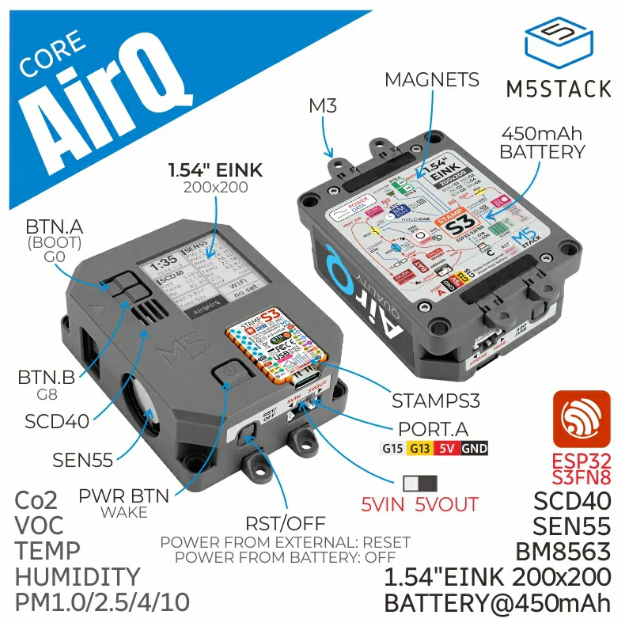
M5Stack ya es una marca conocida para nosotros, por dispositivos como el M5Stack CoreS3SE o el histórico Atom Echo. En este caso vamos a integrar el M5Stack Core AirQ en Home Assistant. Se trata de un dispositivo basado en una placa ESP32S3FN8, con capacidad de medir CO2, VOC, partículas PM1.0, PM2.5, PM4, PM10, temperatura y humedad (aunque según algunas opiniones que he leido, estos dos últimos no son precisos). Además incorpora una pantalla de tinta electrónica y una batería integrada.
Por cierto, en esta entrada vamos a integrar el M5Stack Core AirQ en Home Assistant, pero también podrías usarlo directamente con tu dispositivo móvil para monitorizar sus valores. En el siguiente video se explica el proceso de configuración.
Requisitos previos
Para integrar el M5Stack Core AirQ en Home Assistant necesitas:
- Un M5Stack Core AirQ.
- Haber instalado ESPHome en Home Assistant.
- Un cable USB-C para alimentar la placa de DATOS (con un cable de carga no vas a poder instalar el software).


Configuración en ESPHome
Sigue estos pasos para integrar el M5Stack Core AirQ en Home Assistant:
- En Home Assistant, ve a tu complemento de ESPHome, pulsa en “New device” y “Continue”.
- Dale un nombre a tu dispositivo (por ejemplo, “AirQ”) y pulsa en “Next”.
- Como tipo de dispositivo selecciona “ESP32-S3”. Observarás de fondo que se ha creado un nuevo bloque para tu dispositivo.
- Pulsa en “Skip” y haz clic en “Edit”, sobre el bloque de tu dispositivo. Copia el código que aparece y consérvalo, ya que vas a necesitar alguna parte del mismo.
- Copia el siguiente código (que encontré en reddit y edité ligeramente) y úsalo para reemplazar el código anterior en ESPHome.
substitutions:
  devicename: lounge-airq
  friendlyname: Lounge AirQ
  location: Lounge
  sensor_interval: 10s
esphome:
  name: ${devicename}
  friendly_name: ${friendlyname}
  area: ${location}
  platformio_options:
    board_build.mcu: esp32s3
    board_build.name: "M5Stack StampS3"
    board_build.upload.flash_size: 8MB
    board_build.upload.maximum_size: 8388608
    board_build.vendor: M5Stack
  on_boot:
  - priority: 800
    then:
      - output.turn_on: enable
  - priority: 800
    then:
      - pcf8563.read_time
esp32:
  board: esp32-s3-devkitc-1 #m5stack-stamps3
  variant: esp32s3
  framework:
    type: arduino
# Enable logging
logger:
# Enable Home Assistant API
api:
  encryption:
    key: REDACTED
ota:
  - platform: esphome
    password: REDACTED
wifi:
  ssid: !secret wifi_ssid
  password: !secret wifi_password
  # Enable fallback hotspot (captive portal) in case wifi connection fails
  ap:
    ssid: "Lounge-Airq Fallback Hotspot"
    password: REDACTED
captive_portal:
output:
  - platform: gpio
    pin: GPIO10
    id: enable
web_server:
   port: 80
   include_internal: true
i2c:
  sda: GPIO11
  scl: GPIO12
  scan: true
  frequency: 100kHz
  id: bus_a
spi:
  clk_pin: GPIO05
  mosi_pin: GPIO06
time:
  - platform: pcf8563
    address: 0x51
    update_interval: 10min
  - platform: homeassistant
    id: esptime
light:
  - platform: esp32_rmt_led_strip
    rgb_order: GRB
    pin: GPIO21
    num_leds: 1
    rmt_channel: 0
    chipset: SK6812
    name: "LED"
    restore_mode: ALWAYS_OFF
    id: id_led
text_sensor:
  - platform: wifi_info
    ip_address:
      name: IP
    ssid:
      name: SSID
    bssid:
      name: BSSID
    mac_address:
      name: MAC
    dns_address:
      name: DNS
  - platform: template
    name: "VOC IAQ Classification"
    id: iaq_voc
    icon: "mdi:checkbox-marked-circle-outline"
    lambda: |-
      if (int(id(voc).state) < 100.0) {
        return {"Great"};
      }
      else if (int(id(voc).state) <= 200.0) {
        return {"Good"};
      }
      else if (int(id(voc).state) <= 300.0) {
        return {"Light"};
      }
      else if (int(id(voc).state) <= 400.0) {
        return {"Moderate"};
      }
      else if (int(id(voc).state) <= 500.0) {
        return {"Heavy"};
      }
      else {
        return {"unknown"};
      }
  - platform: template
    name: "NOX IAQ Classification"
    id: iaq_nox
    icon: "mdi:checkbox-marked-circle-outline"
    lambda: |-
      if (int(id(nox).state) < 100.0) {
        return {"Great"};
      }
      else if (int(id(nox).state) <= 200.0) {
        return {"Good"};
      }
      else if (int(id(nox).state) <= 300.0) {
        return {"Light"};
      }
      else if (int(id(nox).state) <= 400.0) {
        return {"Moderate"};
      }
      else if (int(id(nox).state) <= 500.0) {
        return {"Heavy"};
      }
      else {
        return {"unknown"};
      }
sensor:
  - platform: scd4x
    co2:
      name: CO2
      id: CO2
      filters:
        - lambda: |-
            float MIN_VALUE = 300.0;
            float MAX_VALUE = 2500.0;
            if (MIN_VALUE <= x && x <= MAX_VALUE) return x;
            else return {};
    temperature:
      name: CO2 Temperature
      id: CO2_temperature
      filters:
        - lambda: |-
            float MIN_VALUE = -40.0;
            float MAX_VALUE = 100.0;
            if (MIN_VALUE <= x && x <= MAX_VALUE) return x;
            else return {};
    humidity:
      name: CO2 Humidity
      id: CO2_humidity
      filters:
        - lambda: |-
            float MIN_VALUE = 0.0;
            float MAX_VALUE = 100.0;
            if (MIN_VALUE <= x && x <= MAX_VALUE) return x;
            else return {};
    altitude_compensation: 0m
    address: 0x62
    update_interval: $sensor_interval
  - platform: wifi_signal # Reports the WiFi signal strength/RSSI in dB
    name: "Wifi Signal dB"
    id: wifi_signal_db
    update_interval: 60s
    entity_category: "diagnostic"
  - platform: sen5x
    id: sen55
    pm_1_0:
      name: "PM 1"
      id: PM1_0
      accuracy_decimals: 2
    pm_2_5:
      name: "PM 2.5"
      id: PM2_5
      accuracy_decimals: 2
    pm_4_0:
      name: "PM 4"
      id: PM4_0
      accuracy_decimals: 2
    pm_10_0:
      name: "PM 10"
      id: PM10_0
      accuracy_decimals: 2
    temperature:
      name: "SEN55 Temperature"
      id: sen55_temperature
      accuracy_decimals: 2
    humidity:
      name: "SEN55 Humidity"
      id: sen55_humidity
      accuracy_decimals: 2
    voc:
      name: VOC
      id: voc
      accuracy_decimals: 2
      algorithm_tuning:
        index_offset: 100
        learning_time_offset_hours: 12
        learning_time_gain_hours: 12
        gating_max_duration_minutes: 180
        std_initial: 50
        gain_factor: 230
    nox:
      name: NOX
      id: nox
      accuracy_decimals: 2
      algorithm_tuning:
        index_offset: 100
        learning_time_offset_hours: 12
        learning_time_gain_hours: 12
        gating_max_duration_minutes: 180
        std_initial: 50
        gain_factor: 230
    temperature_compensation:
      offset: 0
      normalized_offset_slope: 0
      time_constant: 0
    acceleration_mode: low
    store_baseline: true
    address: 0x69
    update_interval: $sensor_interval
  - platform: template
    name: Temperature
    id: temperature
    lambda: |-
      return (( id(sen55_temperature).state + id(CO2_temperature).state ) / 2 ) - id(temperature_offset).state;
    unit_of_measurement: "°C"
    icon: "mdi:thermometer"
    device_class: "temperature"
    state_class: "measurement"
    update_interval: $sensor_interval
    accuracy_decimals: 2
  - platform: template
    name: Humidity
    id: humidity
    lambda: |-
      return (( id(sen55_humidity).state + id(CO2_humidity).state ) / 2) - id(humidity_offset).state;
    unit_of_measurement: "%"
    icon: "mdi:water-percent"
    device_class: "humidity"
    state_class: "measurement"
    update_interval: $sensor_interval
    accuracy_decimals: 2
binary_sensor:
  - platform: gpio
    name: Button A
    pin:
      number: GPIO0
      ignore_strapping_warning: true
      mode:
        input: true
      inverted: true
    on_press:
      then:
        - component.update: disp

  - platform: gpio
    pin:
      number: GPIO08
      mode:
        input: true
        pullup: true
      inverted: true
    name: Button B

  - platform: gpio
    pin:
      number: GPIO46
      ignore_strapping_warning: true
    name: Button Hold
  - platform: gpio
    pin:
      number: GPIO42
    name: Button Power
button:
  - platform: restart
    name: Restart

  - platform: template
    name: "CO2 Force Manual Calibration"
    entity_category: "config"
    on_press:
      then:
        - scd4x.perform_forced_calibration:
            value: !lambda 'return id(co2_cal).state;'
  - platform: template
    name: "SEN55 Force Manual Clean"
    entity_category: "config"
    on_press:
      then:
        - sen5x.start_fan_autoclean: sen55
number:
  - platform: template
    name: "CO2 Calibration Value"
    optimistic: true
    min_value: 400
    max_value: 1000
    step: 5
    id: co2_cal
    icon: "mdi:molecule-co2"
    entity_category: "config"
  - platform: template
    name: Humidity Offset
    id: humidity_offset
    restore_value: true
    initial_value: 0.0
    min_value: -70.0
    max_value: 70.0
    entity_category: "CONFIG"
    unit_of_measurement: "%"
    optimistic: true
    update_interval: never
    step: 0.1
    mode: box
  - platform: template
    name: Temperature Offset
    id: temperature_offset
    restore_value: true
    initial_value: 0.0
    min_value: -70.0
    max_value: 70.0
    entity_category: "CONFIG"
    unit_of_measurement: "°C"
    optimistic: true
    update_interval: never
    step: 0.1
    mode: box
display:
  - platform: waveshare_epaper
    model: 1.54inv2
    id: disp
    cs_pin: GPIO04
    dc_pin: GPIO03
    reset_pin: GPIO02
    busy_pin:
      number: GPIO01
      inverted: false
    full_update_every: 6
    reset_duration: 2ms
    update_interval: 10s
    lambda: |-
      auto now = id(esptime).now().strftime("%H:%M %d/%m/%y").c_str();
      it.printf(it.get_width()/2, 0, id(f12), TextAlign::TOP_CENTER, "${location} @ %s", now);
      it.print(0, 23, id(f24), TextAlign::TOP_LEFT, "PM 1: ");
      it.print(0, 48, id(f24), TextAlign::TOP_LEFT, "PM 2.5: ");
      it.print(0, 73, id(f24), TextAlign::TOP_LEFT, "PM 4: ");
      it.print(0, 98, id(f24), TextAlign::TOP_LEFT, "PM 10: ");
      it.print(0, 123, id(f24), TextAlign::TOP_LEFT, "CO2: ");
      it.print(0, 148, id(f24), TextAlign::TOP_LEFT, "VOC: ");
      it.print(0, 173, id(f24), TextAlign::TOP_LEFT, "NOX: ");
      it.printf(it.get_width(), 23, id(f24), TextAlign::TOP_RIGHT, "%.0f", id(PM1_0).state);
      it.printf(it.get_width(), 48, id(f24), TextAlign::TOP_RIGHT, "%.0f", id(PM2_5).state);
      it.printf(it.get_width(), 73, id(f24), TextAlign::TOP_RIGHT, "%.0f", id(PM4_0).state);
      it.printf(it.get_width(), 98, id(f24), TextAlign::TOP_RIGHT, "%.0f", id(PM10_0).state);
      it.printf(it.get_width(), 123, id(f24), TextAlign::TOP_RIGHT, "%.0fppm", id(CO2).state);
      it.printf(it.get_width(), 148, id(f24), TextAlign::TOP_RIGHT, "%.0f", id(voc).state);
      it.printf(it.get_width(), 173, id(f24), TextAlign::TOP_RIGHT, "%.0f", id(nox).state);
font:
  - file:
      type: gfonts
      family: Noto Sans Display
      weight: 500
    glyphs: ['&', '@', '!', ',', '.', '"', '%', '(', ')', '+', '-', '_', ':', '°', '0',
        '1', '2', '3', '4', '5', '6', '7', '8', '9', 'A', 'B', 'C', 'D', 'E',
        'F', 'G', 'H', 'I', 'J', 'K', 'L', 'M', 'N', 'O', 'P', 'Q', 'R', 'S',
        'T', 'U', 'V', 'W', 'X', 'Y', 'Z', ' ', 'a', 'b', 'c', 'd', 'e', 'f',
        'g', 'h', 'i', 'j', 'k', 'l', 'm', 'n', 'o', 'p', 'q', 'r', 's', 't',
        'u', 'v', 'w', 'x', 'y', 'z','å', 'ä', 'ö', '/', 'µ', '³', '’']
    id: f16
    size: 16
  - file:
      type: gfonts
      family: Noto Sans Display
      weight: 500
    glyphs: ['&', '@', '!', ',', '.', '"', '%', '(', ')', '+', '-', '_', ':', '°', '0',
        '1', '2', '3', '4', '5', '6', '7', '8', '9', 'A', 'B', 'C', 'D', 'E',
        'F', 'G', 'H', 'I', 'J', 'K', 'L', 'M', 'N', 'O', 'P', 'Q', 'R', 'S',
        'T', 'U', 'V', 'W', 'X', 'Y', 'Z', ' ', 'a', 'b', 'c', 'd', 'e', 'f',
        'g', 'h', 'i', 'j', 'k', 'l', 'm', 'n', 'o', 'p', 'q', 'r', 's', 't',
        'u', 'v', 'w', 'x', 'y', 'z','å', 'ä', 'ö', '/', 'µ', '³', '’']
    id: f18
    size: 18
  - file:
      type: gfonts
      family: Noto Sans Display
      weight: 500
    id: f12
    size: 12
    glyphs: ['&', '@', '!', ',', '.', '"', '%', '(', ')', '+', '-', '_', ':', '°', '0',
        '1', '2', '3', '4', '5', '6', '7', '8', '9', 'A', 'B', 'C', 'D', 'E',
        'F', 'G', 'H', 'I', 'J', 'K', 'L', 'M', 'N', 'O', 'P', 'Q', 'R', 'S',
        'T', 'U', 'V', 'W', 'X', 'Y', 'Z', ' ', 'a', 'b', 'c', 'd', 'e', 'f',
        'g', 'h', 'i', 'j', 'k', 'l', 'm', 'n', 'o', 'p', 'q', 'r', 's', 't',
        'u', 'v', 'w', 'x', 'y', 'z','å', 'ä', 'ö', '/', 'µ', '³', '’']
  - file:
      type: gfonts
      family: Noto Sans Display
      weight: 500
    id: f24
    size: 24
    glyphs: ['&', '@', '!', ',', '.', '"', '%', '(', ')', '+', '-', '_', ':', '°', '0',
        '1', '2', '3', '4', '5', '6', '7', '8', '9', 'A', 'B', 'C', 'D', 'E',
        'F', 'G', 'H', 'I', 'J', 'K', 'L', 'M', 'N', 'O', 'P', 'Q', 'R', 'S',
        'T', 'U', 'V', 'W', 'X', 'Y', 'Z', ' ', 'a', 'b', 'c', 'd', 'e', 'f',
        'g', 'h', 'i', 'j', 'k', 'l', 'm', 'n', 'o', 'p', 'q', 'r', 's', 't',
        'u', 'v', 'w', 'x', 'y', 'z','å', 'ä', 'ö', '/', 'µ', '³', '’']
  - file:
      type: gfonts
      family: Noto Sans Display
      weight: 500
    id: f36
    size: 36
    glyphs: ['&', '@', '!', ',', '.', '"', '%', '(', ')', '+', '-', '_', ':', '°', '0',
        '1', '2', '3', '4', '5', '6', '7', '8', '9', 'A', 'B', 'C', 'D', 'E',
        'F', 'G', 'H', 'I', 'J', 'K', 'L', 'M', 'N', 'O', 'P', 'Q', 'R', 'S',
        'T', 'U', 'V', 'W', 'X', 'Y', 'Z', ' ', 'a', 'b', 'c', 'd', 'e', 'f',
        'g', 'h', 'i', 'j', 'k', 'l', 'm', 'n', 'o', 'p', 'q', 'r', 's', 't',
        'u', 'v', 'w', 'x', 'y', 'z','å', 'ä', 'ö', '/', 'µ', '³', '’']
  - file:
      type: gfonts
      family: Noto Sans Display
      weight: 500
    id: f48
    size: 48
    glyphs: ['&', '@', '!', ',', '.', '"', '%', '(', ')', '+', '-', '_', ':', '°', '0',
        '1', '2', '3', '4', '5', '6', '7', '8', '9', 'A', 'B', 'C', 'D', 'E',
        'F', 'G', 'H', 'I', 'J', 'K', 'L', 'M', 'N', 'O', 'P', 'Q', 'R', 'S',
        'T', 'U', 'V', 'W', 'X', 'Y', 'Z', ' ', 'a', 'b', 'c', 'd', 'e', 'f',
        'g', 'h', 'i', 'j', 'k', 'l', 'm', 'n', 'o', 'p', 'q', 'r', 's', 't',
        'u', 'v', 'w', 'x', 'y', 'z','å', 'ä', 'ö', '/', 'µ', '³', '’']
  - file:
      type: gfonts
      family: Noto Sans Display
      weight: 500
    id: f32
    size: 32
    glyphs: ['&', '@', '!', ',', '.', '"', '%', '(', ')', '+', '-', '_', ':', '°', '0',
        '1', '2', '3', '4', '5', '6', '7', '8', '9', 'A', 'B', 'C', 'D', 'E',
        'F', 'G', 'H', 'I', 'J', 'K', 'L', 'M', 'N', 'O', 'P', 'Q', 'R', 'S',
        'T', 'U', 'V', 'W', 'X', 'Y', 'Z', ' ', 'a', 'b', 'c', 'd', 'e', 'f',
        'g', 'h', 'i', 'j', 'k', 'l', 'm', 'n', 'o', 'p', 'q', 'r', 's', 't',
        'u', 'v', 'w', 'x', 'y', 'z','å', 'ä', 'ö', '/', 'µ', '³', '’']
  - file:
      type: gfonts
      family: Noto Sans Display
      weight: 500
    id: f64
    size: 64
    glyphs: ['&', '@', '!', ',', '.', '"', '%', '(', ')', '+', '-', '_', ':', '°', '0',
        '1', '2', '3', '4', '5', '6', '7', '8', '9', 'A', 'B', 'C', 'D', 'E',
        'F', 'G', 'H', 'I', 'J', 'K', 'L', 'M', 'N', 'O', 'P', 'Q', 'R', 'S',
        'T', 'U', 'V', 'W', 'X', 'Y', 'Z', ' ', 'a', 'b', 'c', 'd', 'e', 'f',
        'g', 'h', 'i', 'j', 'k', 'l', 'm', 'n', 'o', 'p', 'q', 'r', 's', 't',
        'u', 'v', 'w', 'x', 'y', 'z','å', 'ä', 'ö', '/', 'µ', '³', '’']
  - file:
      type: gfonts
      family: Noto Sans Display
      weight: 800
    id: f64b
    size: 64
    glyphs: ['&', '@', '!', ',', '.', '"', '%', '(', ')', '+', '-', '_', ':', '°', '0',
        '1', '2', '3', '4', '5', '6', '7', '8', '9', 'A', 'B', 'C', 'D', 'E',
        'F', 'G', 'H', 'I', 'J', 'K', 'L', 'M', 'N', 'O', 'P', 'Q', 'R', 'S',
        'T', 'U', 'V', 'W', 'X', 'Y', 'Z', ' ', 'a', 'b', 'c', 'd', 'e', 'f',
        'g', 'h', 'i', 'j', 'k', 'l', 'm', 'n', 'o', 'p', 'q', 'r', 's', 't',
        'u', 'v', 'w', 'x', 'y', 'z','å', 'ä', 'ö', '/', 'µ', '³', '’']
  - file:
      type: gfonts
      family: Noto Sans Display
      weight: 800
    id: f55b
    size: 55
    glyphs: ['&', '@', '!', ',', '.', '"', '%', '(', ')', '+', '-', '_', ':', '°', '0',
        '1', '2', '3', '4', '5', '6', '7', '8', '9', 'A', 'B', 'C', 'D', 'E',
        'F', 'G', 'H', 'I', 'J', 'K', 'L', 'M', 'N', 'O', 'P', 'Q', 'R', 'S',
        'T', 'U', 'V', 'W', 'X', 'Y', 'Z', ' ', 'a', 'b', 'c', 'd', 'e', 'f',
        'g', 'h', 'i', 'j', 'k', 'l', 'm', 'n', 'o', 'p', 'q', 'r', 's', 't',
        'u', 'v', 'w', 'x', 'y', 'z','å', 'ä', 'ö', '/', 'µ', '³', '’']
  - file:
      type: gfonts
      family: Material Symbols Sharp
      weight: 400
    id: font_weather_icons_xsmall
    size: 20
    glyphs:
      - "\U0000F159" # clear-night
      - "\U0000F15B" # cloudy
      - "\U0000F172" # partlycloudy
      - "\U0000E818" # fog
      - "\U0000F67F" # hail
      - "\U0000EBDB" # lightning, lightning-rainy
      - "\U0000F61F" # pouring
      - "\U0000F61E" # rainy
      - "\U0000F61C" # snowy
      - "\U0000F61D" # snowy-rainy
      - "\U0000E81A" # sunny
      - "\U0000EFD8" # windy, windy-variant
      - "\U0000F7F3" # exceptional
  - file:
      type: gfonts
      family: Material Symbols Sharp
      weight: 400
    id: font_weather_icons_small
    size: 32
    glyphs:
      - "\U0000F159" # clear-night
      - "\U0000F15B" # cloudy
      - "\U0000F172" # partlycloudy
      - "\U0000E818" # fog
      - "\U0000F67F" # hail
      - "\U0000EBDB" # lightning, lightning-rainy
      - "\U0000F61F" # pouring
      - "\U0000F61E" # rainy
      - "\U0000F61C" # snowy
      - "\U0000F61D" # snowy-rainy
      - "\U0000E81A" # sunny
      - "\U0000EFD8" # windy, windy-variant
      - "\U0000F7F3" # exceptional
  - file:
      type: gfonts
      family: Open Sans
      weight: 700
    id: font_clock
    glyphs: "0123456789:"
    size: 70
  - file:
      type: gfonts
      family: Open Sans
      weight: 700
    id: font_clock_big
    glyphs: "0123456789:"
    size: 100
  - file: "gfonts://Roboto"
    id: font_temp
    size: 28
  - file:
      type: gfonts
      family: Open Sans
      weight: 500
    id: font_small
    size: 30
    glyphs: "!\"%()+=,-_.:°0123456789ABCDEFGHIJKLMNOPQRSTUVWXYZ abcdefghijklmnopqrstuvwxyz→»"
  - file:
      type: gfonts
      family: Open Sans
      weight: 500
    id: font_medium
    size: 45
    glyphs: "!\"%()+=,-_.:°0123456789ABCDEFGHIJKLMNOPQRSTUVWXYZ abcdefghijklmnopqrstuvwxyz→»"
  - file:
      type: gfonts
      family: Open Sans
      weight: 300
    id: font_xsmall
    size: 16
    glyphs: "!\"%()+=,-_.:°0123456789ABCDEFGHIJKLMNOPQRSTUVWXYZ abcdefghijklmnopqrstuvwxyz→»"
- Parte importante. En este código no se han incluido las credenciales para que el dispositivo se conecte a tu WiFi y tu instancia de Home Assistant y tienes que incluirlas manualmente. En concreto me refiero a las siguientes líneas del código que has copiado en el paso 4.
# Enable Home Assistant API
api:
  encryption:
    key: "bg6hash6sjdjsdjk02hh0qnQeYVwm123vdfKE8BP5"
ota:
  - platform: esphome
    password: "asddasda27aab65a48484502b332f"
wifi:
  ssid: !secret wifi_ssid
  password: !secret wifi_password
  # Enable fallback hotspot (captive portal) in case wifi connection fails
  ap:
    ssid: "Assist Fallback Hotspot"
    password: "ZsasdasdHGP2234"
- Lo que tienes que hacer es, encontrar las líneas correspondientes en el código (está al principio) y añadir la información correspondiente.
- Ahora sí, pulsa en “Save” e “Install”. Selecciona “Manual download” y espera a que se compile el código.
- Cuando termine, selecciona la opción “Modern format” para descargar el fichero ‘.bin’ correspondiente.
- Conecta el M5Stack AirQ con el cable USB-C de datos por el puerto que trae en la parte inferior a tu ordenador.
- Ahora ve a la página de ESPHome y pulsa en “Connect”. En la ventana emergente selecciona tu placa y pulsa en “Conectar”.
- Ahora pulsa en “Install” y selecciona el fichero ‘.bin’ obtenido en el paso 9. De nuevo, pulsa en “Install”.
- Vuelve a Home Assistant y ve a Ajustes > Dispositivos y servicios. Lo normal es que tu dispositivo haya sido descubierto y aparezca en la parte superior, esperando únicamente a que pulses el botón de “Configurar”. De lo contrario pulsa en el botón de “Añadir integración”, busca “ESPHome” e introduce la IP de tu placa en el campo ‘Host’.
Información del dispositivo
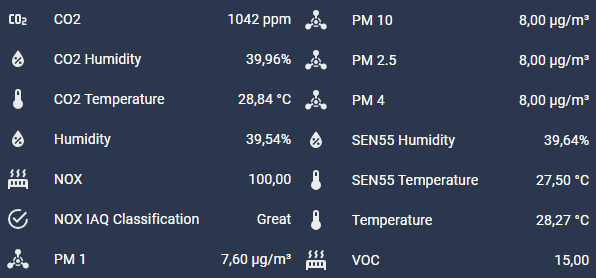
Si vas Ajustes > Dispositivos y servicios > ESPHome y seleccionas el dispositivo M5Stack AirQ comprobarás que tienes un montón de entidades con información sobre la calidad del aire.
Además, tambien se han expuesto como entidades los botones que tiene el dispositivo en la parte superior, a la izquierda de la pantalla. Por tanto, puedes crear una automatización para que suceda algo cuando los pulsas. Por ejemplo, que se active tu sistema de ventilación.
Para ello simplemente ve a Ajustes > Automatizaciones y escenas > Crear automatización y, en el apartado «Cuando», añade un disparador de tipo «Estado». En la entidad busca la que corresponda a tu dispositivo (por ejemplo, ‘binary_sensor.airq_button_a’) y en el campo «A» selecciona «Encendido». Después sólo tienes que añadir las acciones deseadas.