


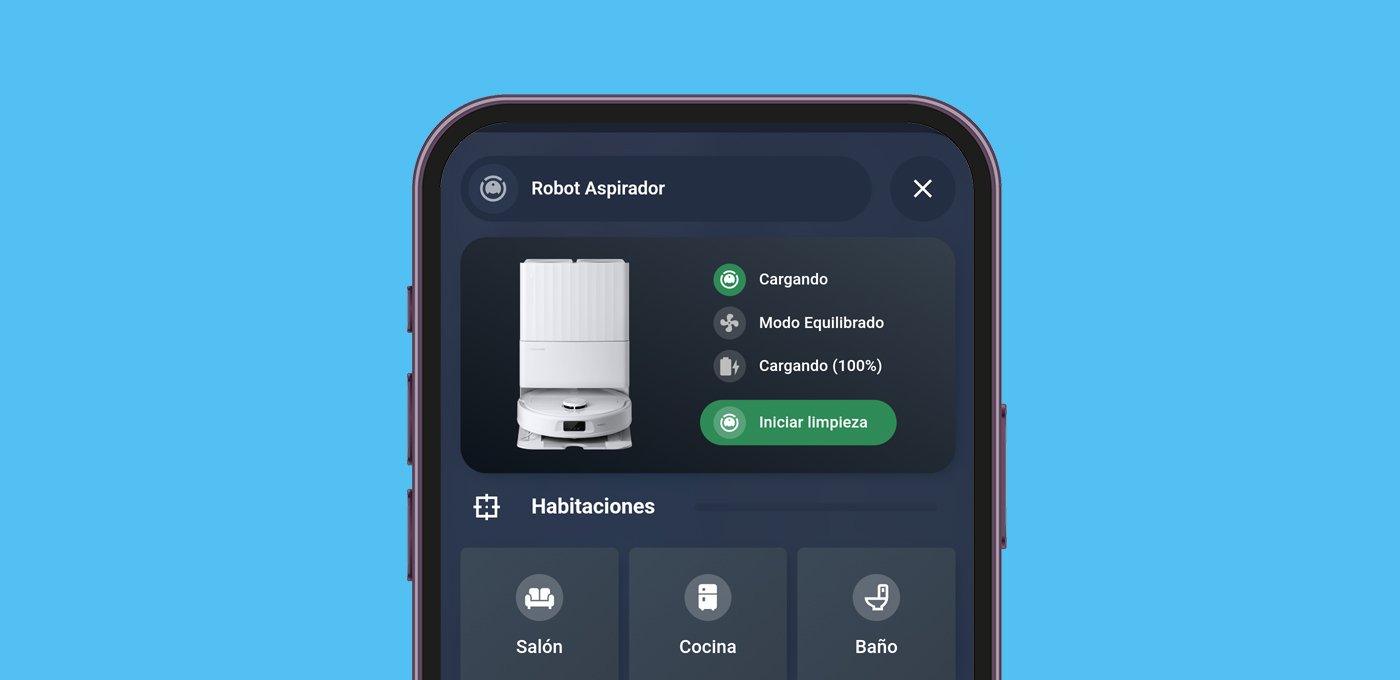
En esta entrada te enseño y comparto la tarjeta para robot aspirador que he creado, útil y totalmente personalizada.
¿Hacía falta?
Pues la verdad es que no 😅. A día de hoy existen un montón de tarjetas que puedes instalar desde HACS y utilizar de forma muy sencilla, por ejemplo:
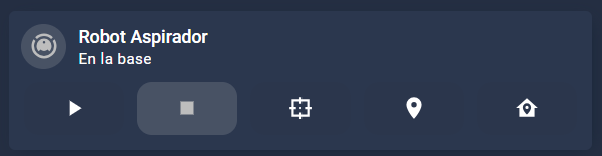
- Mushroom Vacuum Card. Una de las tarjetas de la colección Mushroom Cards que tanto nos gustan. Se trata de una tarjeta compacta en la que puedes añadir y quitar controles en función de tus preferencias.
- Lovelace Vacuum Map card. Esta es una tarjeta súper completa y con un montón de controles, incluido el mapa.
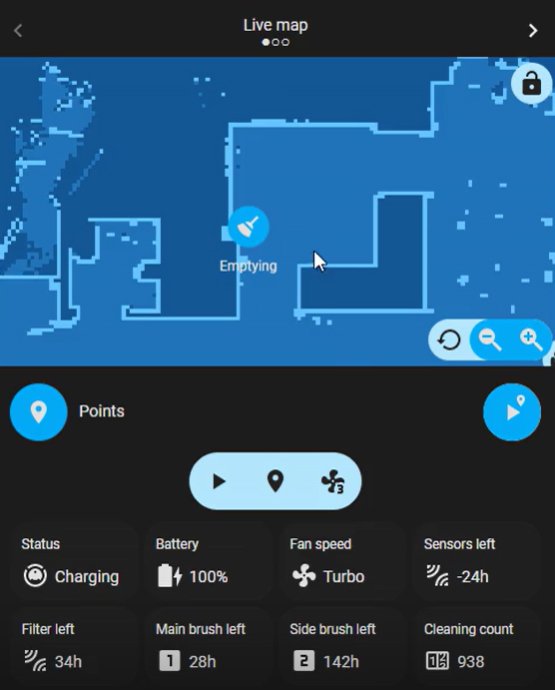
- Vacuum Card. Otra tarjeta que me parece una versión intermedia entre las anteriores, elegante pero con más información y opciones.
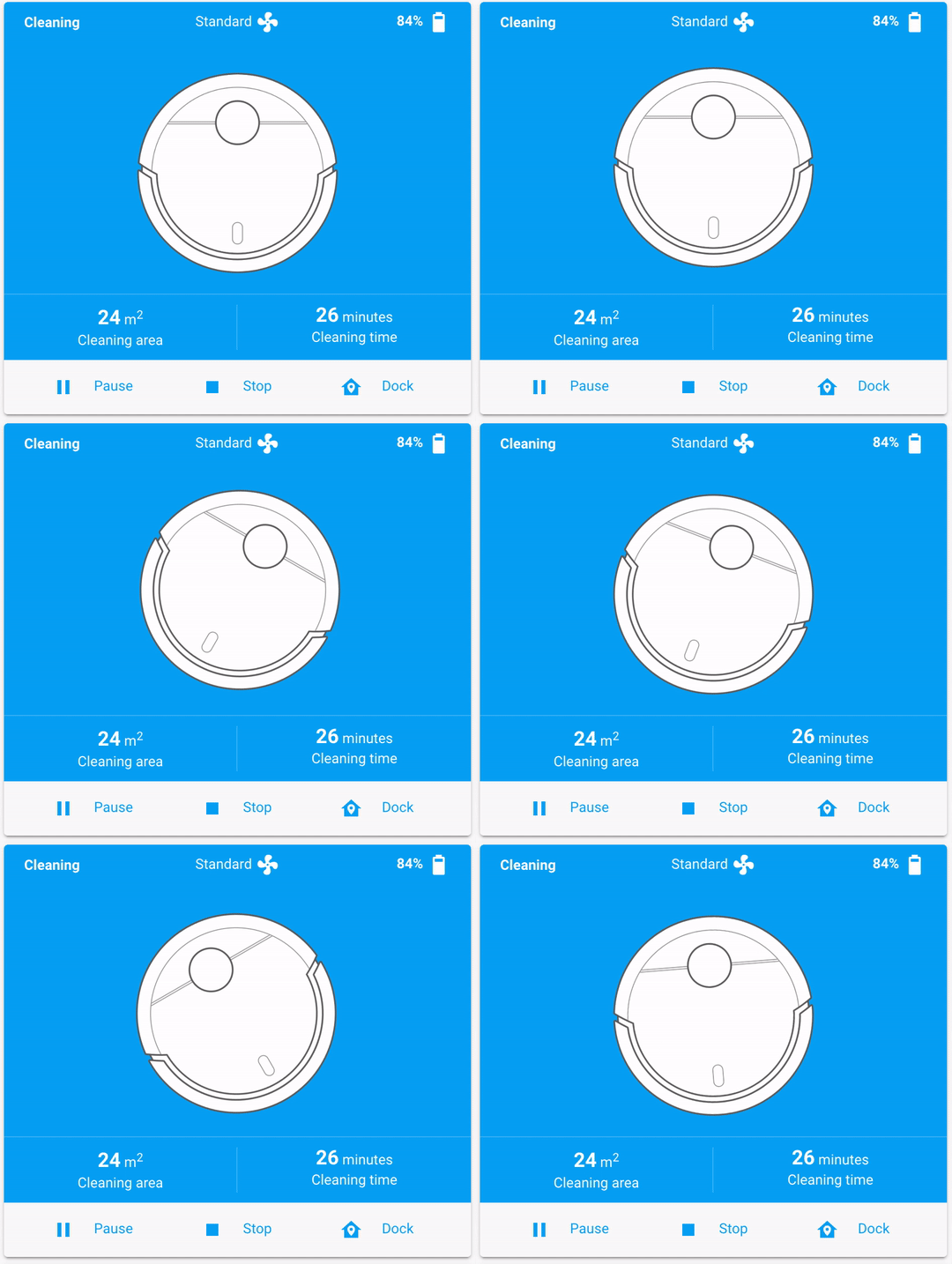
Además no dejan de crearse tarjetas nuevas, por lo que te invito a que entres en HACS y busques «vacuum».
Nuestra tarjeta para robot aspirador
Ya sabes que aunque haya muchas opciones disponibles, me gusta crear mis propias tarjetas. De esta manera puedo adaptarlas a mi panel de control y personalizar las funciones que quiero mostrar.
Al final te dejaré el codigo completo, por si quieres «copiar y pegar», pero igualmente te voy a explicar cómo la he construido por si la quieres personalizar.


Dependencias
Para usar mi tarjeta para robot aspirador previamente necesitas instalar a través de HACS las tarjetas de Bubble Card, Stack in Card, Card Mod, Mushroom Cards y Bar Card.
La imagen
Hace poco cambié mi robot aspirador por uno nuevo de la marca Roborock, y me gustó que en la aplicación saliesen algunas animaciones del robot en función de su estado. Por este motivo, en lugar de utilizar una tarjeta genérica, voy a incluir la imagen de mi propio robot. Obviamente tú puedes usar la de tu robot o la que tú quieras. Para ello te sugiero dos maneras:
- Si la aplicación de tu robot te muestra una imagen que te gusta, haz una captura y guárdala en tu ordenador. Recórtala para que sólo aparezca el robot en imagen y entra en Pixelcut para eliminar el fondo.
- Si no te gusta o quieres elegir otra imagen, puedes buscar en Google el modelo de tu robot. En la parte superior pulsa sobre «Imágenes» y luego haz clic a la derecha del todo donde indica «Herramientas». Selecciona como tamaño «Grande» y en color indica «Transparente». De esta forma podrás elegir y guardar imágenes con buena resolución y fondo transparente. Normalmente también encontrarás imágenes de muy buena calidad en la propia página del fabricante.
Una vez tengas tu imagen, renómbrala como quieras (por ejemplo, ‘robot.png’) y guárdala en la siguiente ruta de Home Assistant. Si no existe puedes crear las carpetas correspondientes o utilizar otra (siempre que luego lo adaptes en la tarjeta). Para ello te recomiendo que utilices el complemento «Samba Share».
Por cierto, también puedes utilizar distintas imágenes para distintos estados. Por ejemplo, yo he usado una para cuando está en la base (‘dock.png‘) y otra para cuando está limpiando (‘robot.png‘). Además he añadido un efecto que simula el movimiento del robot cuando está limpiando. Si quieres usar este efecto, te sugiero que utilices una imagen del robot visto desde arriba (o quedará «raro»).
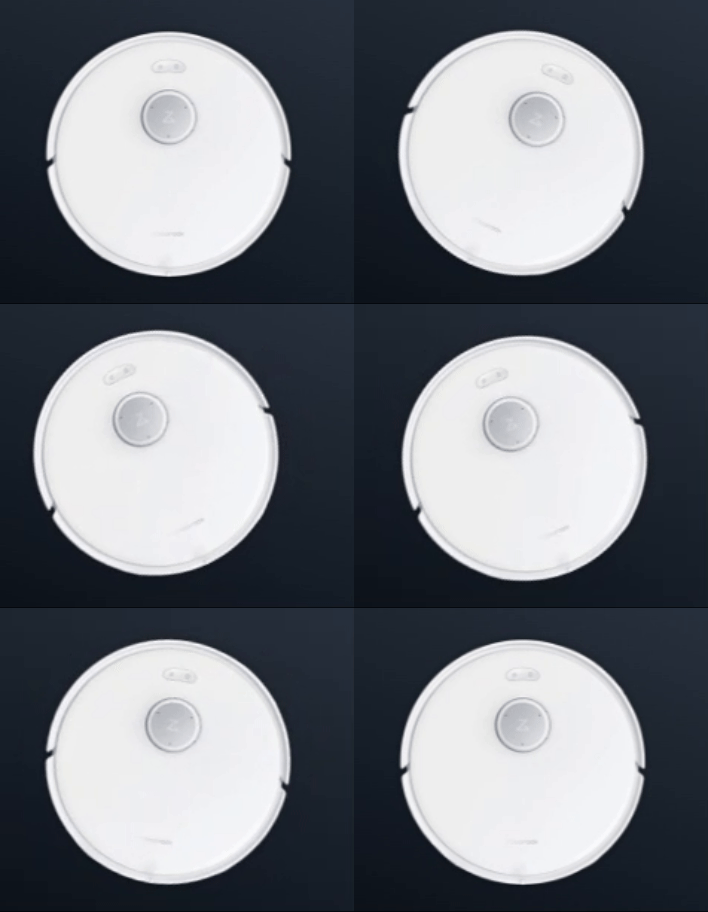
Esta es la parte del código que corresponde a la imagen. Como observarás, necesitas una entidad que te proporcione el estado del robot, y a partir de ahí asignar la imagen y el efecto que quieras en función de cada estado.
          - type: custom:mushroom-template-card
            card_mod:
              style: >
                ha-card {
                {% if states('vacuum.roborock_qr_598') == "cleaning" or
                states('vacuum.roborock_qr_598') == "paused" or
                states('vacuum.roborock_qr_598') == "idle" or
                states('vacuum.roborock_qr_598') == "returning" %}
                background: url('/local/vacuum/robot.png');

                {% if states('vacuum.roborock_qr_598') == "cleaning" or
                states('vacuum.roborock_qr_598') == "returning"%}
                transform-origin: center center;
                animation: robotVacuumMove 6s infinite alternate ease-in-out;
                {% endif %}
                {% else %}
                background: url('/local/vacuum/dock.png');
                {% endif %}

                background-position: center;
                background-size: contain;
                background-repeat: no-repeat;
                height: 180px!important;
                }

                @keyframes robotVacuumMove {
                  0% { transform: rotate(-25deg) translate(0, 0);}
                  10% {transform: rotate(-25deg) translate(-10px, -10px);}
                  20% {transform: rotate(-25deg) translate(0, 0);}
                  30% {transform: rotate(25deg) translate(0, 0);}
                  40% {transform: rotate(25deg) translate(10px, -10px);}
                  50% {transform: rotate(25deg) translate(0, 0);}
                  60% {transform: rotate(0deg) translate(0, 0);}
                  70% {transform: rotate(0deg) translate(0, -10px);}
                  80% {transform: rotate(0deg) translate(0, 0);}
                  100% {transform: rotate(0deg) translate(0, 0);}
                }
Información básica y controles
A la derecha de la imagen he situado la información que me resulta más interesante y los controles que más utilizo:
- Estado del robot. Va cambiando en función del mismo y si pulsas sobre él muestra el último mapa guardado.
- Modo de de funcionamiento. Indica la velocidad del ventilador (y por tanto el ruido que genera). Si pulsas sobre el mismo accedes a todos los controles, desde donde puedes cambiar el modo también.
- Nivel de batería y estado de carga.
- Controles. Este es un apartado dinámico, ya que cuando el robot está en la base aparece un botón para iniciar la limpieza. En cualquier otro estado muestra unos botones de «play», «pause» y «volver a la base».
De nuevo, ten en cuenta que puedes cambiar este comportamiento, tanto si tu robot no te proporciona las entidades correspondientes, como si prefieres que funcione de otra manera.
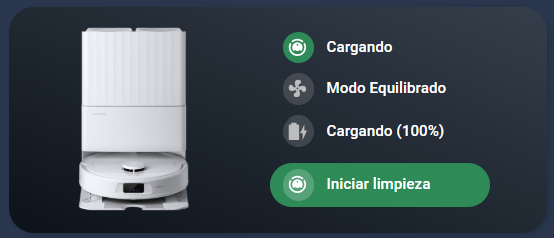
Esta es la parte del código que corresponde a la información básica y los controles.
      - square: false
        type: grid
        columns: 2
        cards:
          - type: custom:mushroom-legacy-template-card
            card_mod:
              style: >
                ha-card {

                {% if states('vacuum.roborock_qr_598') == "cleaning" or
                states('vacuum.roborock_qr_598') == "paused" or
                states('vacuum.roborock_qr_598') == "idle" or
                states('vacuum.roborock_qr_598') == "returning" %}

                background: url('/local/vacuum/robot.png');

                {% if states('vacuum.roborock_qr_598') == "cleaning" or
                states('vacuum.roborock_qr_598') == "returning"%}

                transform-origin: center center;

                animation: robotVacuumMove 6s infinite alternate ease-in-out;

                {% endif %}

                {% else %}

                background: url('/local/vacuum/dock.png');

                {% endif %}

                background-position: center;

                background-size: contain;

                background-repeat: no-repeat;

                height: 180px!important;

                }


                @keyframes robotVacuumMove {
                  0% { transform: rotate(-25deg) translate(0, 0);}
                  10% {transform: rotate(-25deg) translate(-10px, -10px);}
                  20% {transform: rotate(-25deg) translate(0, 0);}
                  30% {transform: rotate(25deg) translate(0, 0);}
                  40% {transform: rotate(25deg) translate(10px, -10px);}
                  50% {transform: rotate(25deg) translate(0, 0);}
                  60% {transform: rotate(0deg) translate(0, 0);}
                  70% {transform: rotate(0deg) translate(0, -10px);}
                  80% {transform: rotate(0deg) translate(0, 0);}
                  100% {transform: rotate(0deg) translate(0, 0);}
                }
          - square: false
            type: grid
            columns: 1
            cards:
              - type: custom:mushroom-legacy-template-card
                primary: "{{ state_translated('sensor.roborock_qr_598_estado') }}"
                secondary: null
                icon: mdi:robot-vacuum
                icon_color: white
                entity: image.roborock_qr_598_casa
                tap_action:
                  action: more-info
                card_mod:
                  style: |
                    ha-card {
                    background: transparent !important;
                    --icon-size: 25px;
                    --card-primary-font-size: 12px;
                    box-shadow: none;
                    margin-top: 10px;
                    margin-bottom: -30px;
                    }
                    mushroom-shape-icon {
                    --shape-color: seagreen !important;
                    }
              - type: custom:mushroom-legacy-template-card
                primary: >
                  Modo {% set ventilador =
                  state_attr('vacuum.roborock_qr_598','fan_speed') %}

                  {% if ventilador == "quiet" %} Tranquilo

                  {% elif ventilador == "off" %} Apagado

                  {% elif ventilador == "balanced" %} Equilibrado

                  {% elif ventilador == "turbo" %} Turbo

                  {% elif ventilador == "max" %} Max

                  {% elif ventilador == "custom" %} Personalizado

                  {% elif ventilador == "max_plus" %} Max. Plus

                  {% endif%}
                secondary: null
                icon: mdi:fan
                entity: vacuum.roborock_qr_598
                tap_action:
                  action: more-info
                card_mod:
                  style: |
                    ha-card {
                    background: transparent !important;
                    --icon-size: 25px;
                    --card-primary-font-size: 12px;
                    box-shadow: none;
                    margin-bottom: -30px;
                    };
              - type: custom:mushroom-legacy-template-card
                primary: >
                  {% if states('binary_sensor.roborock_qr_598_cargando') ==
                  "off" %} Batería al {{
                  states('sensor.roborock_qr_598_bateria') }}% {% else %}
                  Cargando ({{ states('sensor.roborock_qr_598_bateria') }}%) {%
                  endif %}
                secondary: null
                icon: mdi:battery
                card_mod:
                  style: |
                    ha-card {
                    background: transparent !important;
                    --icon-size: 25px;
                    --card-primary-font-size: 12px;
                    box-shadow: none;
                    margin-bottom: -25px;
                    };
              - type: custom:mushroom-legacy-template-card
                primary: Iniciar limpieza
                icon: mdi:robot-vacuum
                icon_color: white
                secondary: ""
                tap_action:
                  action: perform-action
                  perform_action: vacuum.start
                  target:
                    entity_id: vacuum.roborock_qr_598
                card_mod:
                  style: |
                    ha-card {
                    background: seagreen;
                    border-radius: 20px!important;
                    margin-top: 0px;
                    margin-right: 25px;
                    --icon-size: 25px;
                    --card-primary-font-size: 12px;
                    height: 35px!important;
                    };
                visibility:
                  - condition: state
                    entity: vacuum.roborock_qr_598
                    state: docked
              - square: false
                type: grid
                visibility:
                  - condition: state
                    entity: vacuum.roborock_qr_598
                    state_not: docked
                cards:
                  - type: custom:mushroom-legacy-template-card
                    icon: mdi:play
                    icon_color: white
                    primary: ""
                    secondary: ""
                    tap_action:
                      action: perform-action
                      perform_action: vacuum.start
                      target:
                        entity_id: vacuum.roborock_qr_598
                    card_mod:
                      style: >
                        ha-card {

                        background: transparent !important;

                        --icon-size: 35px;

                        box-shadow: none; padding: 0px;

                        }

                        {% if states('vacuum.roborock_qr_598') == "paused" or
                        states('vacuum.roborock_qr_598') == "idle" %}

                        mushroom-shape-icon {

                        --shape-color: seagreen !important;

                        }

                        {% endif %}
                  - type: custom:mushroom-legacy-template-card
                    icon: mdi:pause
                    icon_color: white
                    primary: ""
                    secondary: ""
                    tap_action:
                      action: perform-action
                      perform_action: vacuum.pause
                      target:
                        entity_id:
                          - vacuum.roborock_qr_598
                    card_mod:
                      style: |
                        ha-card {
                        background: transparent !important;
                        --icon-size: 35px;
                        box-shadow: none;
                        padding: 0px;
                        }
                        {% if states('vacuum.roborock_qr_598') == "cleaning" %}

                        mushroom-shape-icon {

                        --shape-color: seagreen !important;

                        }

                        {% endif %}
                  - type: custom:mushroom-legacy-template-card
                    icon: mdi:home-import-outline
                    icon_color: white
                    primary: ""
                    secondary: ""
                    tap_action:
                      action: perform-action
                      perform_action: vacuum.return_to_base
                      target:
                        entity_id:
                          - vacuum.roborock_qr_598
                    card_mod:
                      style: |
                        ha-card {
                        background: transparent !important;
                        --icon-size: 35px;
                        box-shadow: none;
                        padding: 0px;
                        };
                columns: 3
Limpieza por habitaciones
Esta es una parte muy sencilla, pero que me parece tremendamente útil. Lógicamente, esta depende de que tu integración tenga la capacidad de enviar el robot a una habitación concreta y, en su caso, la forma de ejecutarlo.
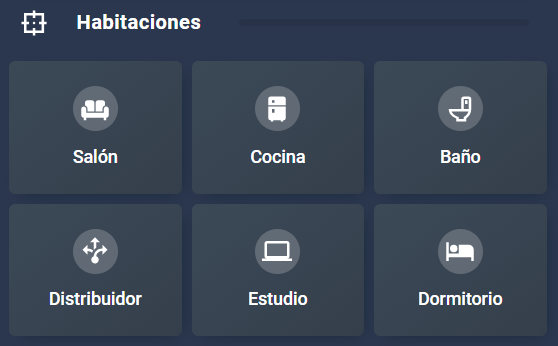
Esta es la parte del código que corresponde a la limpieza por habitaciones.
  - square: false
    type: grid
    cards:
      - type: custom:mushroom-legacy-template-card
        primary: Salón
        icon: mdi:sofa
        icon_color: white
        secondary: ""
        layout: vertical
        tap_action:
          action: perform-action
          perform_action: vacuum.send_command
          target:
            entity_id: vacuum.roborock_qr_598
          data:
            command: app_segment_clean
            params:
              - segments:
                  - 1
                repeat: 1
        fill_container: true
        card_mod:
          style: |
            ha-card {
              margin-top: 10px;
              margin-bottom: 10px;
              background: linear-gradient(to right bottom, rgba(59,73,87,1), rgba(53,63,75,1)) !important;
            }
      - type: custom:mushroom-legacy-template-card
        primary: Cocina
        icon: mdi:fridge
        icon_color: white
        secondary: ""
        layout: vertical
        tap_action:
          action: perform-action
          perform_action: vacuum.send_command
          target:
            entity_id: vacuum.roborock_qr_598
          data:
            command: app_segment_clean
            params:
              - segments:
                  - 2
                repeat: 1
        fill_container: true
        card_mod:
          style: |
            ha-card {
              margin-top: 10px;
              margin-bottom: 10px;
              background: linear-gradient(to right bottom, rgba(59,73,87,1), rgba(53,63,75,1)) !important;
            }
      - type: custom:mushroom-legacy-template-card
        primary: Baño
        icon: mdi:toilet
        icon_color: white
        secondary: ""
        layout: vertical
        tap_action:
          action: perform-action
          perform_action: vacuum.send_command
          target:
            entity_id: vacuum.roborock_qr_598
          data:
            command: app_segment_clean
            params:
              - segments:
                  - 3
                repeat: 1
        fill_container: true
        card_mod:
          style: |
            ha-card {
              margin-top: 10px;
              margin-bottom: 10px;
              background: linear-gradient(to right bottom, rgba(59,73,87,1), rgba(53,63,75,1)) !important;
            }
      - type: custom:mushroom-legacy-template-card
        primary: Distribuidor
        icon: mdi:arrow-decision
        icon_color: white
        secondary: ""
        layout: vertical
        tap_action:
          action: perform-action
          perform_action: vacuum.send_command
          target:
            entity_id: vacuum.roborock_qr_598
          data:
            command: app_segment_clean
            params:
              - segments:
                  - 4
                repeat: 1
        fill_container: true
        card_mod:
          style: |
            ha-card {
              margin-top: 10px;
              margin-bottom: 10px;
              background: linear-gradient(to right bottom, rgba(59,73,87,1), rgba(53,63,75,1)) !important;
            }
      - type: custom:mushroom-legacy-template-card
        primary: Estudio
        icon: mdi:laptop
        icon_color: white
        secondary: ""
        layout: vertical
        tap_action:
          action: perform-action
          perform_action: vacuum.send_command
          target:
            entity_id: vacuum.roborock_qr_598
          data:
            command: app_segment_clean
            params:
              - segments:
                  - 5
                repeat: 1
        fill_container: true
        card_mod:
          style: |
            ha-card {
              margin-top: 10px;
              margin-bottom: 10px;
              background: linear-gradient(to right bottom, rgba(59,73,87,1), rgba(53,63,75,1)) !important;
            }
      - type: custom:mushroom-legacy-template-card
        primary: Dormitorio
        icon: mdi:bed
        icon_color: white
        secondary: ""
        layout: vertical
        tap_action:
          action: perform-action
          perform_action: vacuum.send_command
          target:
            entity_id: vacuum.roborock_qr_598
          data:
            command: app_segment_clean
            params:
              - segments:
                  - 6
                repeat: 1
        fill_container: true
        card_mod:
          style: |
            ha-card {
              margin-top: 10px;
              margin-bottom: 10px;
              background: linear-gradient(to right bottom, rgba(59,73,87,1), rgba(53,63,75,1)) !important;
            }
    columns: 3
Información de mantenimiento
Algo que es común a cualquier robot es que nos proporcione una serie de sensores sobre el estado de algunas piezas que necesitan recambio o limpieza. En mi caso, he creado unos sensores ‘template’ para transformar el valor que me proporcionaba en valor absoluto a un porcentaje, y poder mostrarlo en estas tarjetas.
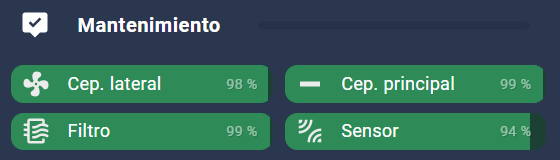
Esta es la parte del código que corresponde a la información de mantenimiento.
  - square: false
    type: grid
    columns: 2
    cards:
      - type: custom:bar-card
        height: 30
        positions:
          name: inside
        card_mod:
          style: |-
            ha-card {
              --primary-text-color: white;
              background: transparent;
              box-shadow: none;
              margin-top: -10px;
              margin-left: -15px;
              margin-right: -15px;
              border: 0px;
            }
            bar-card-name {
              margin-left: 5px;
            }
            bar-card-currentbar {
              border-radius: 10px !important;
            }
            bar-card-backgroundbar {
              border-radius: 10px !important;
              opacity: 0.7
            }
            bar-card-value {
              margin-right: 12px;
              font-size: 11px;
              text-shadow: 1px 1px #0005;
              opacity: .5
            }
        entities:
          - entity: sensor.vacuum_mantenimiento_cepillo_lateral
            icon: mdi:fan
            name: Cep. lateral
            positions:
              icon: inside
            max: 100
            severity:
              - color: seagreen
                from: 51
                to: 100
              - color: darkkhaki
                from: 11
                to: 50
              - color: crimson
                from: 0
                to: 10
          - entity: sensor.vacuum_mantenimiento_filtro
            icon: mdi:air-filter
            name: Filtro
            positions:
              icon: inside
            max: 100
            severity:
              - color: seagreen
                from: 51
                to: 100
              - color: darkkhaki
                from: 11
                to: 50
              - color: crimson
                from: 0
                to: 10
      - type: custom:bar-card
        height: 30
        positions:
          name: inside
        card_mod:
          style: |-
            ha-card {
              --primary-text-color: white;
              background: transparent;
              box-shadow: none;
              margin-top: -10px;
              margin-left: -15px;
              margin-right: -15px;
              border: 0px;
            }
            bar-card-name {
              margin-left: 5px;
            }
            bar-card-currentbar {
              border-radius: 10px !important;
            }
            bar-card-backgroundbar {
              border-radius: 10px !important;
              opacity: 0.7
            }
            bar-card-value {
              margin-right: 12px;
              font-size: 11px;
              text-shadow: 1px 1px #0005;
              opacity: .5
            }
        entities:
          - entity: sensor.vacuum_mantenimiento_cepillo_principal
            icon: mdi:minus-thick
            name: Cep. principal
            positions:
              icon: inside
            max: 100
            severity:
              - color: seagreen
                from: 51
                to: 100
              - color: darkkhaki
                from: 11
                to: 50
              - color: crimson
                from: 0
                to: 10
          - entity: sensor.vacuum_mantenimiento_sensor
            icon: mdi:leak
            name: Sensor
            positions:
              icon: inside
            max: 100
            severity:
              - color: seagreen
                from: 51
                to: 100
              - color: darkkhaki
                from: 11
                to: 50
              - color: crimson
                from: 0
                to: 10
Código completo
Como te he prometido, aquí tienes el código completo de la tarjeta. No olvides que tienes que repasar el código y reemplazar tus entidades. De igual forma, te recomiendo que adaptes las imágenes y colores a la estética de tu interfaz.
type: vertical-stack
cards:
- type: custom:bubble-card
card_type: pop-up
hash: "#aspirador"
name: Robot Aspirador
icon: mdi:robot-vacuum
- type: custom:stack-in-card
keep:
background: true
card_mod:
style: |
ha-card {
background: linear-gradient(to right top, rgba(12,18,25,1), rgba(53,63,75,1)) !important;
border-radius: 20px;
padding-right: 20px;
}
cards:
- square: false
type: grid
columns: 2
cards:
- type: custom:mushroom-legacy-template-card
card_mod:
style: >
ha-card {
{% if states('vacuum.roborock_qr_598') == "cleaning" or
states('vacuum.roborock_qr_598') == "paused" or
states('vacuum.roborock_qr_598') == "idle" or
states('vacuum.roborock_qr_598') == "returning" %}
background: url('/local/vacuum/robot.png');
{% if states('vacuum.roborock_qr_598') == "cleaning" or
states('vacuum.roborock_qr_598') == "returning"%}
transform-origin: center center;
animation: robotVacuumMove 6s infinite alternate ease-in-out;
{% endif %}
{% else %}
background: url('/local/vacuum/dock.png');
{% endif %}
background-position: center;
background-size: contain;
background-repeat: no-repeat;
height: 180px!important;
}
@keyframes robotVacuumMove {
0% { transform: rotate(-25deg) translate(0, 0);}
10% {transform: rotate(-25deg) translate(-10px, -10px);}
20% {transform: rotate(-25deg) translate(0, 0);}
30% {transform: rotate(25deg) translate(0, 0);}
40% {transform: rotate(25deg) translate(10px, -10px);}
50% {transform: rotate(25deg) translate(0, 0);}
60% {transform: rotate(0deg) translate(0, 0);}
70% {transform: rotate(0deg) translate(0, -10px);}
80% {transform: rotate(0deg) translate(0, 0);}
100% {transform: rotate(0deg) translate(0, 0);}
}
- square: false
type: grid
columns: 1
cards:
- type: custom:mushroom-legacy-template-card
primary: "{{ state_translated('sensor.roborock_qr_598_estado') }}"
secondary: null
icon: mdi:robot-vacuum
icon_color: white
entity: image.roborock_qr_598_casa
tap_action:
action: more-info
card_mod:
style: |
ha-card {
background: transparent !important;
--icon-size: 25px;
--card-primary-font-size: 12px;
box-shadow: none;
margin-top: 10px;
margin-bottom: -30px;
}
mushroom-shape-icon {
--shape-color: seagreen !important;
}
- type: custom:mushroom-legacy-template-card
primary: >
Modo {% set ventilador =
state_attr('vacuum.roborock_qr_598','fan_speed') %}
{% if ventilador == "quiet" %} Tranquilo
{% elif ventilador == "off" %} Apagado
{% elif ventilador == "balanced" %} Equilibrado
{% elif ventilador == "turbo" %} Turbo
{% elif ventilador == "max" %} Max
{% elif ventilador == "custom" %} Personalizado
{% elif ventilador == "max_plus" %} Max. Plus
{% endif%}
secondary: null
icon: mdi:fan
entity: vacuum.roborock_qr_598
tap_action:
action: more-info
card_mod:
style: |
ha-card {
background: transparent !important;
--icon-size: 25px;
--card-primary-font-size: 12px;
box-shadow: none;
margin-bottom: -30px;
};
- type: custom:mushroom-legacy-template-card
primary: >
{% if states('binary_sensor.roborock_qr_598_cargando') ==
"off" %} Batería al {{
states('sensor.roborock_qr_598_bateria') }}% {% else %}
Cargando ({{ states('sensor.roborock_qr_598_bateria') }}%) {%
endif %}
secondary: null
icon: mdi:battery
card_mod:
style: |
ha-card {
background: transparent !important;
--icon-size: 25px;
--card-primary-font-size: 12px;
box-shadow: none;
margin-bottom: -25px;
};
- type: custom:mushroom-legacy-template-card
primary: Iniciar limpieza
icon: mdi:robot-vacuum
icon_color: white
secondary: ""
tap_action:
action: perform-action
perform_action: vacuum.start
target:
entity_id: vacuum.roborock_qr_598
card_mod:
style: |
ha-card {
background: seagreen;
border-radius: 20px!important;
margin-top: 0px;
margin-right: 25px;
--icon-size: 25px;
--card-primary-font-size: 12px;
height: 35px!important;
};
visibility:
- condition: state
entity: vacuum.roborock_qr_598
state: docked
- square: false
type: grid
visibility:
- condition: state
entity: vacuum.roborock_qr_598
state_not: docked
cards:
- type: custom:mushroom-legacy-template-card
icon: mdi:play
icon_color: white
primary: ""
secondary: ""
tap_action:
action: perform-action
perform_action: vacuum.start
target:
entity_id: vacuum.roborock_qr_598
card_mod:
style: >
ha-card {
background: transparent !important;
--icon-size: 35px;
box-shadow: none; padding: 0px;
}
{% if states('vacuum.roborock_qr_598') == "paused" or
states('vacuum.roborock_qr_598') == "idle" %}
mushroom-shape-icon {
--shape-color: seagreen !important;
}
{% endif %}
- type: custom:mushroom-legacy-template-card
icon: mdi:pause
icon_color: white
primary: ""
secondary: ""
tap_action:
action: perform-action
perform_action: vacuum.pause
target:
entity_id:
- vacuum.roborock_qr_598
card_mod:
style: |
ha-card {
background: transparent !important;
--icon-size: 35px;
box-shadow: none;
padding: 0px;
}
{% if states('vacuum.roborock_qr_598') == "cleaning" %}
mushroom-shape-icon {
--shape-color: seagreen !important;
}
{% endif %}
- type: custom:mushroom-legacy-template-card
icon: mdi:home-import-outline
icon_color: white
primary: ""
secondary: ""
tap_action:
action: perform-action
perform_action: vacuum.return_to_base
target:
entity_id:
- vacuum.roborock_qr_598
card_mod:
style: |
ha-card {
background: transparent !important;
--icon-size: 35px;
box-shadow: none;
padding: 0px;
};
columns: 3
- type: custom:bubble-card
card_type: separator
name: Habitaciones
icon: mdi:target-variant
card_mod:
style: |
ha-card {
margin-bottom: -5px;
}
- square: false
type: grid
cards:
- type: custom:mushroom-legacy-template-card
primary: Salón
icon: mdi:sofa
icon_color: white
secondary: ""
layout: vertical
tap_action:
action: perform-action
perform_action: vacuum.send_command
target:
entity_id: vacuum.roborock_qr_598
data:
command: app_segment_clean
params:
- segments:
- 1
repeat: 1
fill_container: true
card_mod:
style: |
ha-card {
margin-top: 10px;
margin-bottom: 10px;
background: linear-gradient(to right bottom, rgba(59,73,87,1), rgba(53,63,75,1)) !important;
}
- type: custom:mushroom-legacy-template-card
primary: Cocina
icon: mdi:fridge
icon_color: white
secondary: ""
layout: vertical
tap_action:
action: perform-action
perform_action: vacuum.send_command
target:
entity_id: vacuum.roborock_qr_598
data:
command: app_segment_clean
params:
- segments:
- 2
repeat: 1
fill_container: true
card_mod:
style: |
ha-card {
margin-top: 10px;
margin-bottom: 10px;
background: linear-gradient(to right bottom, rgba(59,73,87,1), rgba(53,63,75,1)) !important;
}
- type: custom:mushroom-legacy-template-card
primary: Baño
icon: mdi:toilet
icon_color: white
secondary: ""
layout: vertical
tap_action:
action: perform-action
perform_action: vacuum.send_command
target:
entity_id: vacuum.roborock_qr_598
data:
command: app_segment_clean
params:
- segments:
- 3
repeat: 1
fill_container: true
card_mod:
style: |
ha-card {
margin-top: 10px;
margin-bottom: 10px;
background: linear-gradient(to right bottom, rgba(59,73,87,1), rgba(53,63,75,1)) !important;
}
- type: custom:mushroom-legacy-template-card
primary: Distribuidor
icon: mdi:arrow-decision
icon_color: white
secondary: ""
layout: vertical
tap_action:
action: perform-action
perform_action: vacuum.send_command
target:
entity_id: vacuum.roborock_qr_598
data:
command: app_segment_clean
params:
- segments:
- 4
repeat: 1
fill_container: true
card_mod:
style: |
ha-card {
margin-top: 10px;
margin-bottom: 10px;
background: linear-gradient(to right bottom, rgba(59,73,87,1), rgba(53,63,75,1)) !important;
}
- type: custom:mushroom-legacy-template-card
primary: Estudio
icon: mdi:laptop
icon_color: white
secondary: ""
layout: vertical
tap_action:
action: perform-action
perform_action: vacuum.send_command
target:
entity_id: vacuum.roborock_qr_598
data:
command: app_segment_clean
params:
- segments:
- 5
repeat: 1
fill_container: true
card_mod:
style: |
ha-card {
margin-top: 10px;
margin-bottom: 10px;
background: linear-gradient(to right bottom, rgba(59,73,87,1), rgba(53,63,75,1)) !important;
}
- type: custom:mushroom-legacy-template-card
primary: Dormitorio
icon: mdi:bed
icon_color: white
secondary: ""
layout: vertical
tap_action:
action: perform-action
perform_action: vacuum.send_command
target:
entity_id: vacuum.roborock_qr_598
data:
command: app_segment_clean
params:
- segments:
- 6
repeat: 1
fill_container: true
card_mod:
style: |
ha-card {
margin-top: 10px;
margin-bottom: 10px;
background: linear-gradient(to right bottom, rgba(59,73,87,1), rgba(53,63,75,1)) !important;
}
columns: 3
- type: custom:bubble-card
card_type: separator
name: Mantenimiento
icon: mdi:tooltip-check
card_mod:
style: |
ha-card {
margin-top: 15px;
}
- square: false
type: grid
columns: 2
cards:
- type: custom:bar-card
height: 30
positions:
name: inside
card_mod:
style: |-
ha-card {
--primary-text-color: white;
background: transparent;
box-shadow: none;
margin-top: -10px;
margin-left: -15px;
margin-right: -15px;
border: 0px;
}
bar-card-name {
margin-left: 5px;
}
bar-card-currentbar {
border-radius: 10px !important;
}
bar-card-backgroundbar {
border-radius: 10px !important;
opacity: 0.7
}
bar-card-value {
margin-right: 12px;
font-size: 11px;
text-shadow: 1px 1px #0005;
opacity: .5
}
entities:
- entity: sensor.roborock_qr_598_cepillo_lateral_mantenimiento
icon: mdi:fan
name: Cep. lateral
positions:
icon: inside
max: 100
severity:
- color: seagreen
from: 51
to: 100
- color: darkkhaki
from: 11
to: 50
- color: crimson
from: 0
to: 10
- entity: sensor.vacuum_mantenimiento_filtro
icon: mdi:air-filter
name: Filtro
positions:
icon: inside
max: 100
severity:
- color: seagreen
from: 51
to: 100
- color: darkkhaki
from: 11
to: 50
- color: crimson
from: 0
to: 10
- type: custom:bar-card
height: 30
positions:
name: inside
card_mod:
style: |-
ha-card {
--primary-text-color: white;
background: transparent;
box-shadow: none;
margin-top: -10px;
margin-left: -15px;
margin-right: -15px;
border: 0px;
}
bar-card-name {
margin-left: 5px;
}
bar-card-currentbar {
border-radius: 10px !important;
}
bar-card-backgroundbar {
border-radius: 10px !important;
opacity: 0.7
}
bar-card-value {
margin-right: 12px;
font-size: 11px;
text-shadow: 1px 1px #0005;
opacity: .5
}
entities:
- entity: sensor.vacuum_mantenimiento_cepillo_principal
icon: mdi:minus-thick
name: Cep. principal
positions:
icon: inside
max: 100
severity:
- color: seagreen
from: 51
to: 100
- color: darkkhaki
from: 11
to: 50
- color: crimson
from: 0
to: 10
- entity: sensor.vacuum_mantenimiento_sensor
icon: mdi:leak
name: Sensor
positions:
icon: inside
max: 100
severity:
- color: seagreen
from: 51
to: 100
- color: darkkhaki
from: 11
to: 50
- color: crimson
from: 0
to: 10